E-Commerce & Conversion
Why 80% of Mobile E-Commerce Traffic Bounces: 7 Lethal Mobile UX Mistakes Torching Ad Spend
Anatomy of the Mobile Revenue Leak: Where 79.8% of Smartphone Shoppers Disappear
Open the Google Analytics 4 device report of almost any D2C brand or online retailer running paid campaigns on Meta Ads, TikTok, or Google Shopping, and you will see the same expensive anomaly: 78% to 86% of paid clicks arrive on smartphones, yet the mobile conversion rate (0.8%–1.4%) lags behind desktop (3.4%–4.2%) by a factor of three. According to 2025–2026 benchmarks from the Baymard Institute and Contentsquare, mobile cart abandonment sits at a staggering 79.8% compared to 67.1% on desktop. In practical terms, out of every $5,000 spent on ad clicks, over $3,200 is torched on mobile visitors who bounce after fighting tiny filter checkboxes, intrusive chat popups, and 12-field checkout forms.
When founders ask why mobile traffic refuses to convert, media buyers often blame 'low-intent social traffic.' Yet across 14 years of engineering commercial interfaces, I have consistently found that the bottleneck is not traffic quality—it is responsive ecommerce design flaws caused by approving designs on 27-inch office monitors. Below, we conduct a technical mobile checkout ux audit, dissect the 7 most destructive smartphone UX errors, and demonstrate through real portfolio builds how mobile ecommerce conversion rate optimization ($3,000–$8,000) lifts mobile CR to 2.6%–3.5% and pays for itself in under a month.
The Desktop-First Trap: Why Shrinking a 1440px Layout Destroys Mobile Sales
The root cause explaining why mobile shoppers abandon carts begins during design sign-off. Founders and marketing teams review mockups on wide MacBook or desktop screens where multi-column grids, left-hand filter sidebars, and mega-menus look spacious. Developers then apply basic CSS media queries (`flex-direction: column`) to stack those desktop blocks into an endless vertical scroll on a 375px screen.
1. Mechanical CSS Stacking vs. True Mobile-First Engineering
A squished desktop site is not a mobile shopping experience. When a 4-column desktop grid collapses into a single mobile column, page height quadruples. A sidebar filter that sat neatly on the left on desktop now pushes the actual product grid three viewports down on a smartphone: shoppers click a paid ad and are greeted by two meters of checkboxes instead of merchandise.
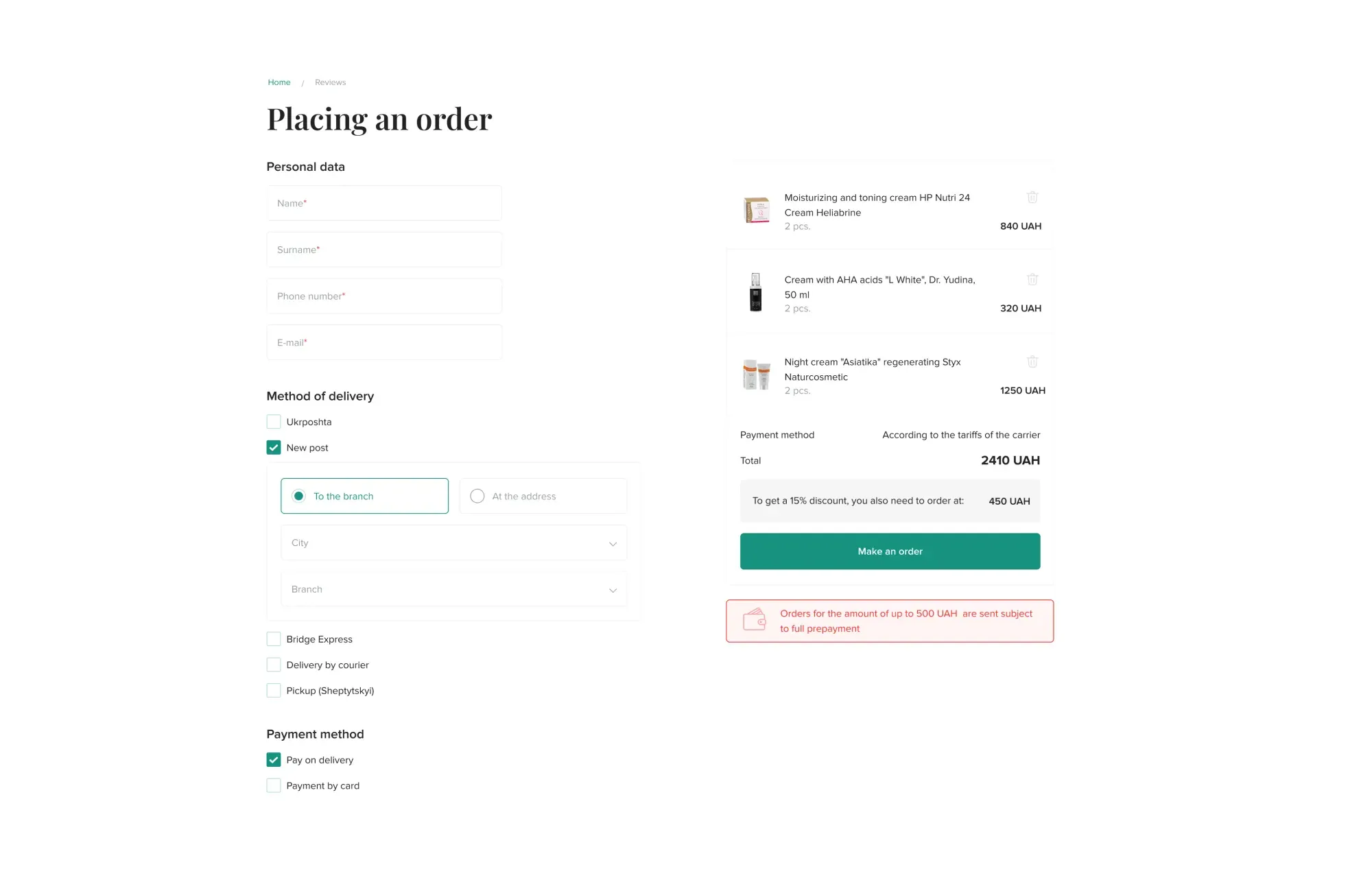
We eliminated this exact multi-page friction when architecting Elixir, a hybrid professional cosmetics e-commerce platform and educational portal for cosmetologists. Because aesthetic practitioners order supplies on their phones between client appointments, we replaced multi-step redirects with a consolidated single-screen checkout flow where order summary, shipping selection, and one-click payment live in one unified view:
2. Above-the-Fold Starvation: Mistakes #1 and #2
Inside mobile Safari or Chrome (where browser chrome leaves only 620–680px of vertical viewport height), every vertical pixel carries a direct financial cost. Mistake #1 is multi-tier header bloat: stacking top announcement bars, phone numbers, language toggles, and oversized hero sliders consumes 75% of the first screen, pushing product pricing and the primary CTA below the fold.
Mistake #2 is burying search inside a hamburger menu. Hiding the search bar behind a tiny icon without instant predictive autocomplete (showing live product thumbnails and prices) alienates high-intent shoppers who convert at 3.2x the rate of casual category browsers.
3. Comparison Table: Squished Template vs. Mobile-First E-Commerce Architecture
Below is the engineering and financial contrast between a standard responsive theme and a custom Mobile-First build, which we detail further in our High-Yield E-Commerce Design hub.
| Interface Parameter / Metric | Standard Theme (Desktop-First Squish) | Engineered Mobile-First Store (375px–430px) |
|---|---|---|
| PDP First Viewport (667px) | 160px header + breadcrumbs + full-height photo; price and CTA hidden below fold | 55% gallery height + product title, price, stock badge & sticky Add-to-Cart visible immediately |
| Navigation & Search | Hidden inside top-left hamburger menu, plain text search | Thumb-friendly bottom tab bar + exposed predictive search with live SKU previews |
| Mobile Catalog Filtering | Long checkbox wall above products, 3-second full page reload per click | Slide-up Bottom Sheet drawer with 50ms AJAX filtering and live 'Show N items' counter |
| Checkout Form Fields | 10–14 mandatory fields (Zip, Street, Middle Name, Account Password) | 3 essential inputs (Name, Phone with `inputmode="tel"`, predictive carrier pickup search) |
| Mobile Payment Flow | Manual 16-digit card typing, expiry date, CVV, and 3DS redirect | 1-tap Apple Pay / Google Pay / Stripe Link biometric checkout in 4 seconds |
| Average Mobile Conversion Rate | 0.8% – 1.2% (chronic ad spend bleed) | 2.6% – 3.8% (profitable unit economics from Week 1) |
Steven Hoober's Thumb Zone: Designing for One-Handed Smartphone Commerce
Steven Hoober's landmark field research observing 1,333 real-world mobile interactions established that 49% of users hold and operate their smartphone with one hand, while another 36% cradle the device and tap with their thumb. Overall, more than 75% of all smartphone interactions are driven by the thumb.
1. Reachability Maps on 6.1"–6.7" Screens & Mistakes #3 and #4
On modern large-screen devices (iPhone 15/16 Pro Max or Galaxy S24 Ultra), the thumb's natural arc covers only the bottom and center third of the display (Natural Green Zone). Reaching the top-left or top-right corners (Red Stretch Zone) forces users to shift their grip or use a second hand.
This exposes Mistake #3: placing critical commerce actions (cart drawer trigger, filter button, modal close 'X') in the top dead zone. Worse yet is Mistake #4: sub-44×44pt touch targets and cramped tap spacing. When a commuter tries to tap a 16×16px close icon on a promo popup, fat-fingers the background ad instead, and gets redirected, they close the store tab permanently.
2. Putting the Entire Medication Purchase Flow in the Thumb Zone: Good Day Pharmacy Case Study
In pharmaceutical e-commerce, customers often search for urgent medications while on the move. During our comprehensive UX/UI redesign for the national chain Good Day Pharmacy, we engineered 15 dedicated mobile screens (375px) strictly around one-handed thumb ergonomics. The four screens below show the mobile home screen with quick category icons, the category catalog with thumb-friendly `Sorting` and `Filter` triggers, the medication card featuring tactile pack-size pills (`5 pcs / 30 pcs / 100 pcs`) and an `Add to cart` CTA, and the `Availability in pharmacies` screen with 1-tap `Pick up here` reservation buttons:




Sticky CTA Bars & Zero-Shift Variant Selection on Product Pages
Even when a shopper lands on a product they want, friction on the Product Detail Page (PDP) and cart drawer kills up to 40% of high-intent sessions right before checkout. Implementing mobile product detail page best practices requires eliminating scroll fatigue and layout shifts.
How Lifting Mobile CR from 0.9% to 2.6% Generates +$8,670/mo in Net Profit on the Exact Same Ad Spend
- Mobile Conversion Rate: 0.9% (135 completed orders)
- Customer Acquisition Cost (CAC): $33.33 against $34.00 gross margin
- Mobile Cart Abandonment: 79.8% (drop-off on 12-field checkout)
- Gross Margin Generated: $4,590/mo ($34 × 135 orders)
- Net Profit After $4,500 Ad Spend: +$90/mo (working for Meta & Google)
- Mobile Conversion Rate: 2.6% (390 completed orders)
- Customer Acquisition Cost (CAC): $11.54 (65.4% reduction in acquisition cost)
- Mobile Checkout Speed: 15–20 seconds (Sticky CTA + Apple/Google Pay)
- Gross Margin Generated: $13,260/mo ($34 × 390 orders)
- Net Profit After $4,500 Ad Spend: +$8,760/mo (+$105,120 annually)
Lifting mobile conversion by just 1.7 percentage points (from 0.9% to 2.6%) by eliminating 7 mobile UX bottlenecks transforms a break-even ad account into +$8,760/mo in net profit—without spending an extra dollar on Meta or Google Ads.
1. Mistakes #5 and #6: Missing Sticky CTAs & Clunky Native Dropdowns
As a mobile shopper scrolls down to read specifications, sizing charts, or reviews, the primary 'Add to Cart' button disappears four screens above. Mistake #5 is omitting a Sticky Bottom CTA Bar, forcing users to scroll all the way back up to purchase. Pair this with Mistake #6: hiding size, weight, or color variations inside native `<select>` dropdowns instead of tactile visual swatches, or triggering a full-page reload (Cumulative Layout Shift > 0.25) every time a user taps a different ring size.
2. Mistake #7: Forced Account Creation vs. Frictionless Mobile Cart Drawers (Luxury Life Case Study)
Even after tapping 'Add to Cart', retailers lose buyers through Mistake #7: forcing a full-page redirect to a bloated cart screen gated by mandatory account registration. A high-converting mobile cart and order summary should immediately display selected items, a gift certificate or promo code input, free-shipping status, and 1-tap express payment selection.
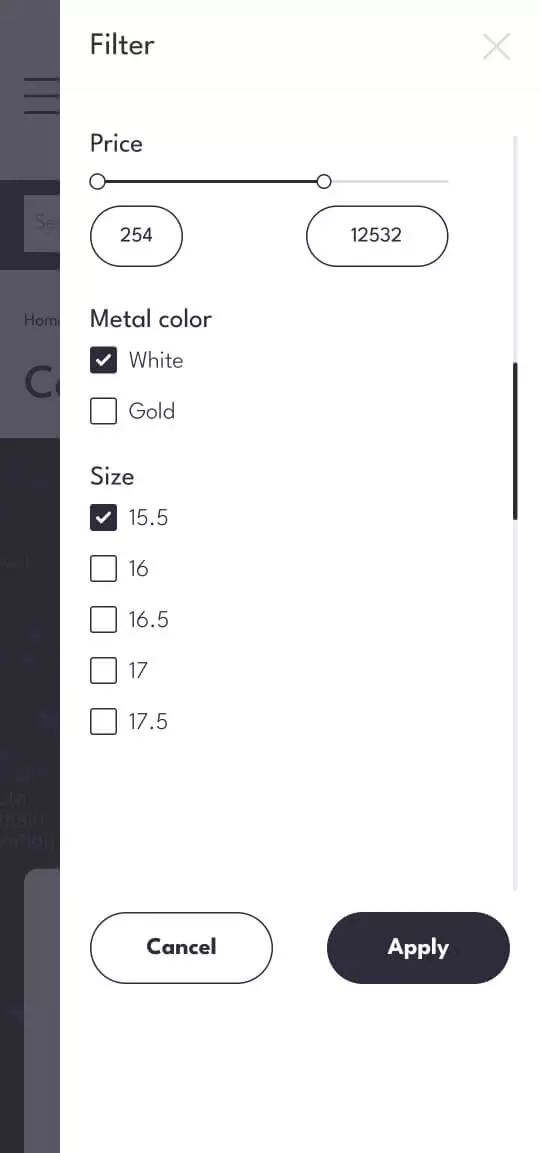
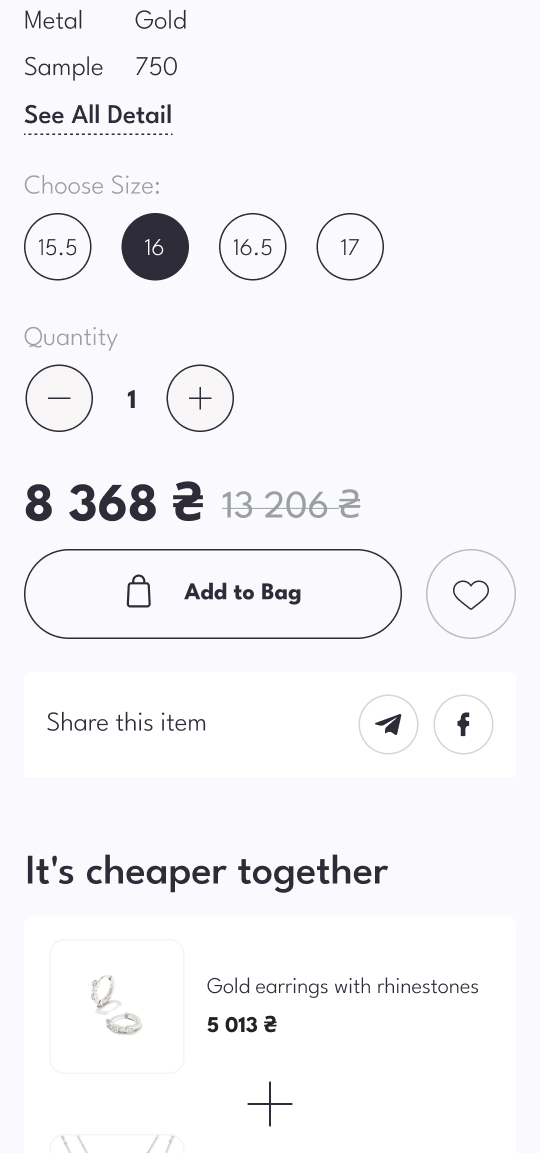
We engineered this exact 24-screen mobile architecture for Canadian jewelry retailer Luxury Life. Because fine silver and gold jewelry is predominantly discovered via mobile Instagram campaigns, we designed a slide-out filter drawer by metal color and ring size, tactile circular size pills (`15.5`, `16`, `16.5`, `17`) directly above the `Add to Bag` button, a clean mobile order summary with gift certificate redemption, and fast checkout via PayPal and credit cards:


4G Load Speed Engineering: Rendering a 50-Photo Catalog in 1.2 Seconds
Research by Google and Deloitte ('Milliseconds Make Millions') proves that a 0.1-second improvement in mobile site speed lifts retail conversions by 8.4%, whereas if Largest Contentful Paint (LCP) exceeds 2.8–3.0 seconds on a 4G connection, up to 53% of mobile visitors bounce before the first product photo even renders—burning your CPC immediately.
1. Frontend Catalog Optimization: AVIF/WebP, Priority Hints & Zero JS Bloat
Why do template stores on WooCommerce, OpenCart, or plugin-heavy Shopify themes score 22–35 on Mobile PageSpeed Insights? Three engineering bottlenecks are responsible:
Uncompressed Media Payloads: Serving raw 1.5MB JPEG/PNG files instead of responsive `srcset` WebP/AVIF assets weighing 35–55KB.
Main-Thread Blocking (TBT > 800ms): Loading legacy jQuery libraries, heavy carousel scripts, and a dozen third-party tracking pixels synchronously before rendering the viewport.
Missing Fetch Priority (`fetchpriority="high"`): Failing to prioritize the first 4 above-the-fold product cards while lazy-loading (`loading="lazy"`) the remaining 46 catalog items.
2. Structuring High-Density Technical Catalogs on Mobile: The Persha Voda Case Study
Speed and visual clarity become even more critical when selling complex technical equipment with dozens of specifications. During our full e-commerce redesign for water filtration retailer Persha Voda, the legacy site suffered from cluttered specification tables and slow multi-level reloads.
We rebuilt the mobile catalog and PDP architecture into a fast vertical flow: the home screen places an exposed search bar across 1,000+ SKUs right at the top, category pages pair sorting dropdowns with a dedicated filter drawer trigger, and the product card cleanly presents the reverse-osmosis gallery alongside 1-tap checkboxes for professional installation (`Монтаж обратного осмоса`), connection sizing options, and a 1-click purchase button:




Mobile QA Checklist: Stress-Testing Your Store Across 5 Real Device Viewports
Before scaling next month's ad budget, test your checkout funnel on physical smartphones rather than simply dragging your desktop browser window narrower.
1. The 5 Mandatory Mobile Viewport Benchmarks
Every commercial store we ship passes QA across five real-world device environments:
360×800 px (Mid-Range Android — Samsung Galaxy A-series, Xiaomi): Verify zero horizontal overflow and clean typography wrapping at 115% system font scaling.
375×667 px / 375×812 px (Compact iPhone SE / 13 mini): The ultimate vertical height stress test—ensure sticky headers and live-chat bubbles never obscure the 'Complete Order' button.
390×844 px / 393×852 px (Standard iPhone 14 / 15 / 16): Validate touch-swipe gallery physics and native Apple Pay sheet triggers.
430×932 px (Large Flagships — iPhone Pro Max / Galaxy Ultra): Audit one-handed Thumb Zone reachability for filter drawers and cart close buttons.
In-App WebViews (Instagram & TikTok In-App Browsers): Over 70% of paid social clicks open inside an in-app WebView that strips 55px of viewport height and frequently breaks poorly coded address autocomplete scripts.
2. The 60-Second One-Handed Checkout Diagnostic
Hold your phone in one hand and attempt to search for a product, select a size, add it to the cart, and reach payment confirmation in under 60 seconds. Check three technical details:
Does tapping the phone input automatically trigger the numeric keypad (`inputmode="tel"`)?
Does browser autofill populate name, phone, and shipping address in one tap?
Does the primary submit button remain visible above the virtual keyboard?
To run a complete 20-point diagnostic on your store in 2 minutes, use our interactive Ad Spend Readiness Scanner.
Key Takeaways
Ready to stop burning paid mobile traffic on a Desktop-First template?
Over 80% of paid e-commerce traffic arrives on smartphones, yet squished Desktop-First templates cause 79.8% of mobile carts to be abandoned.
Anchoring navigation, catalog filters, and a Sticky Add-to-Cart bar inside Steven Hoober's Thumb Zone cuts time-to-cart by 2.5x.
Replacing a 12-field multi-step checkout with a single-screen flow and 1-tap Apple Pay / Google Pay slashes Customer Acquisition Cost (CAC) by 60–65%.
A comprehensive Mobile-First UX redesign ($3,000–$8,000) reaches full break-even in 3–6 weeks purely by recovering wasted ad spend.