E-Commerce & Conversion
1-Page Checkout vs 4-Step Maze: Slashing Cart Abandonment by 35% in Modern E-Commerce
Why 7 out of 10 shoppers abandon your store one click before paying—and what that leak costs you every month
The most expensive paradox in modern e-commerce is watching founders spend thousands of dollars every month on Google Shopping and Meta Ads, invest in studio product photography, and fine-tune catalog filters to get a shopper to click "Add to Cart"—only to lose the sale in the final 30 seconds of the funnel. According to the Baymard Institute's meta-analysis of 50+ global e-commerce studies, the average shopping cart abandonment rate sits at 70.22%, surging to a brutal 80.0%–85.6% on mobile smartphones. That is why the fastest lever to reduce shopping cart abandonment ecommerce is not doubling your ad spend, but eliminating checkout friction.
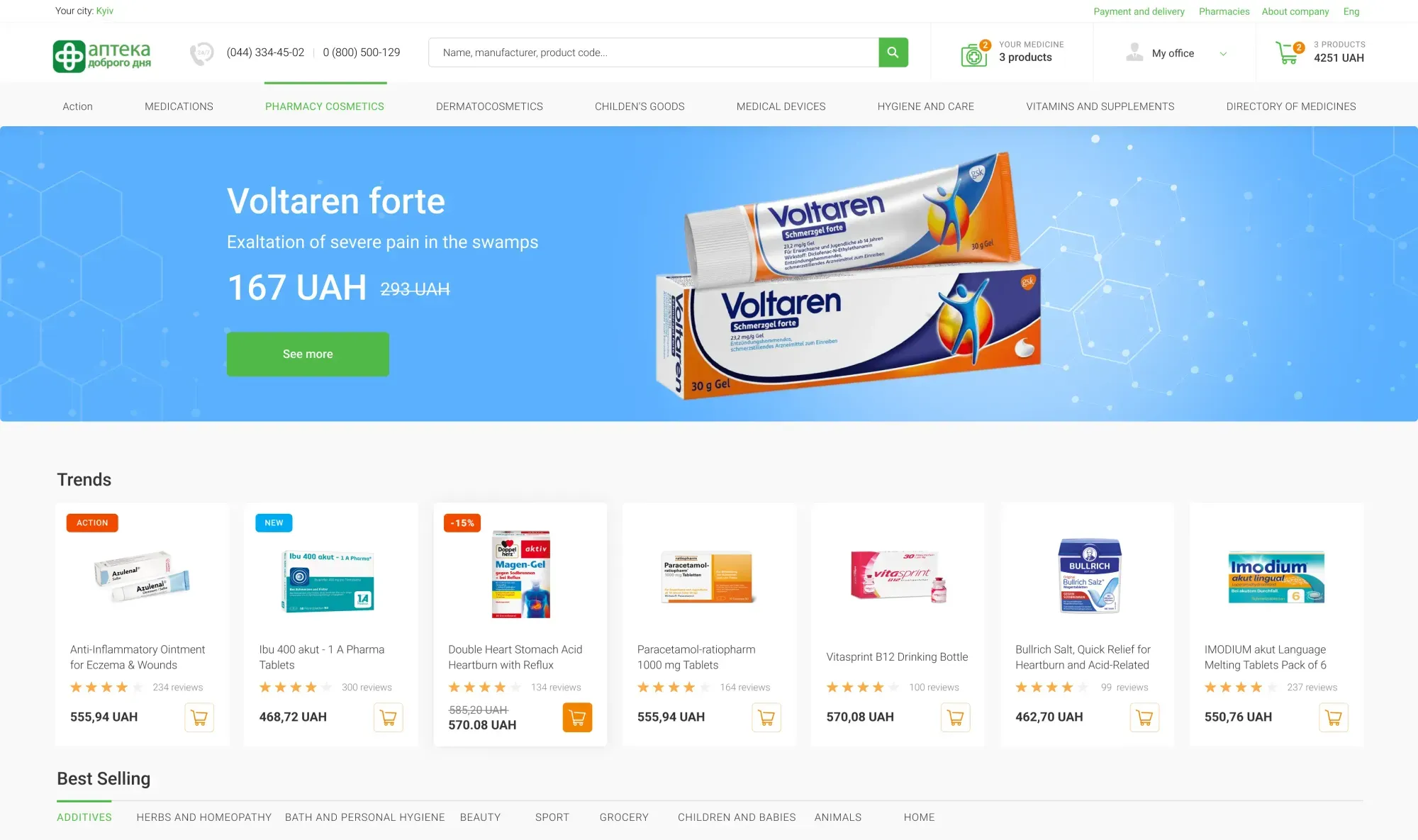
When a high-intent mobile buyer enters a default 4-step template checkout (WooCommerce, OpenCart, Magento, or unoptimized Shopify flows) forcing them to fill out 18–23 form elements, invent a password, type out shipping addresses manually, and wait through four full-page reloads, over a third of ready-to-buy customers bounce. In this engineering breakdown, we examine one page checkout ux design, walk through four real e-commerce platforms from our portfolio (Good Day Pharmacy, Teren Blade, CoolBaba, and Dobramama), and calculate the exact unit economics of ecommerce checkout redesign cost vs. recovered monthly revenue.
The Cost of Every Extra Field: Why 12+ Mandatory Inputs Steal a Quarter of Your Net Profit
Baymard Institute's large-scale checkout usability testing proves a critical engineering truth: conversion rate is governed not by the number of visual progress bars at the top of the screen, but by the total number of form elements a user must process and type into. While the average US and European checkout contains 23.48 form elements by default, an optimized fulfillment flow requires only 6 to 8 inputs. Mastering streamlined checkout flow best practices starts with ruthlessly cutting every non-essential field.
1. Anatomy of Mobile Form Fatigue: The 6 Legacy Fields Killing Your Conversion Rate
On a 375px smartphone viewport—where the on-screen touch keyboard covers 55% of the visible screen—every unnecessary input field drops checkout completion by 2% to 4%. When auditing stores inside our High-Yield E-Commerce Design vertical, we immediately eliminate six legacy template bottlenecks:
Split First Name, Middle Name & Last Name inputs: consolidating separate name boxes into a single "Full Name" input with native browser autofill (`autocomplete="name"`) saves 6 seconds of typing.
Address Line 2, County/State & Fax inputs: 94% of shoppers leave "Apartment/Suite (Address 2)" blank, yet its presence visually doubles the height of the shipping form. We tuck it behind a `+ Add apartment or suite` micro-toggle.
Redundant Billing Address forms: forcing users to review or re-type a billing address when it matches the shipping address in 96% of B2C orders creates massive visual clutter. Keep the `Billing address same as shipping` checkbox checked by default, hiding the extra 6 fields.
Mandatory Email & Confirm Email fields: forcing mobile buyers to type their email twice—or requiring email when SMS/WhatsApp order tracking is preferred—triggers typos and validation errors.
Giant 'Order Notes' textareas: an open multi-line comment box subconsciously signals extra work. Collapse it into a single clickable link (`+ Add delivery instructions or promo code`).
2. Engineering a Frictionless One-Page Checkout for Artisan Knife Brand Teren Blade
In high-ticket specialty e-commerce, buyers decide to purchase at peak emotional engagement right after inspecting macro blade photography and field test videos. Dumping them into a rigid 4-step bureaucratic form kills purchase momentum.
When designing the e-commerce platform for handcrafted knife brand Teren Blade, we engineered a high-contrast One-Page Checkout that consolidates the entire transaction onto a single screen with zero page reloads. The left column groups an instant guest-vs-returning buyer toggle, carrier branch and address lookup (Nova Poshta, Ukrposhta, Meest, or local pickup), and payment selection with a "Do not call me back" checkbox, while the right column pins a sticky order summary displaying blade thumbnails, an inline promo code field (showing an applied 590 UAH discount), and final totals:

3. Comparison Table: Legacy 4-Step Template Checkout vs. Engineered One-Page Checkout
Here is how a traditional multi-step template compares against a reactive single-screen checkout architecture.
| Checkout Metric | Legacy 4-Step Template (WooCommerce / OpenCart) | Engineered One-Page Checkout (Reactive UI) |
|---|---|---|
| Total Form Elements | 18–23 fields (Address 2, State, Fax, Password, Confirm Email) | 6–8 fields (Phone, Name, Autocomplete Address/Pickup, Payment) |
| Full-Page HTTP Reloads | 4 full page reloads between steps (high drop-off on 4G) | 0 page reloads (instant reactive state on a single URL) |
| Average Completion Time | 140–210 seconds (constant mobile keyboard switching) | 25–45 seconds (or 8 seconds via 1-tap Apple Pay / Google Pay) |
| Account Creation Policy | Mandatory "Login or Register" wall before Step 1 | 100% Guest Checkout by default + 1-tap post-purchase account save |
| Shipping Cost Visibility | Hidden until Step 3 (causes 39% of cart abandonments) | Calculated dynamically on screen the instant city/ZIP is entered |
| Abandoned Cart Recovery | Contact data lost if user drops off before Step 4 | Field-by-field autosave captures phone/email on blur in real time |
| Mobile Checkout CR | 22%–31% cart-to-paid conversion | 54%–68% cart-to-paid conversion (+35%..+48% revenue uplift) |
Guest Checkout Without Forced Registration: Buyer Psychology at the Final Step
The second largest self-inflicted wound in e-commerce is forcing first-time buyers to register an account before allowing them to pay. Baymard Institute research shows that mandatory account creation walls directly cause 18% to 19% of all cart abandonments. Optimizing your guest checkout conversion rate is the highest-leverage UX fix you can deploy.
1. The 'Forgot Password' Death Spiral & Delayed Account Creation
Consider what happens when a shopper clicks your Google Shopping ad on their phone, adds an item to their cart, and hits a login wall: "Sign In to Existing Account or Create New Account." If they bought from you eight months ago, they do not remember their password. They tap "Reset Password," leave your store to check their email inbox, wait 60 seconds, get distracted by a notification, and never return.
We eliminate login friction using two architectural patterns:
100% Open Guest Checkout by Default: every shopper lands directly on the open contact and shipping fields—no login modals blocking the viewport.
Passwordless OTP Recognition & Post-Purchase Account Creation: if our backend detects that the entered phone number or email belongs to a returning customer, it never demands a password; it offers an optional 4-digit SMS autofill for saved addresses, or waits until the Thank You (Order Confirmation) Page after payment is captured to ask: "Order #4082 confirmed! Save your delivery details in 1 tap to track this package and earn 5% loyalty credit.".
2. Streamlining Checkout for Busy Parents: The Dobramama Children's Store Case Study
Nowhere is attention span shorter than in children's retail, where over 85% of orders are placed by busy parents multitasking on smartphones or laptops. Any unnecessary registration barrier immediately kills the transaction.
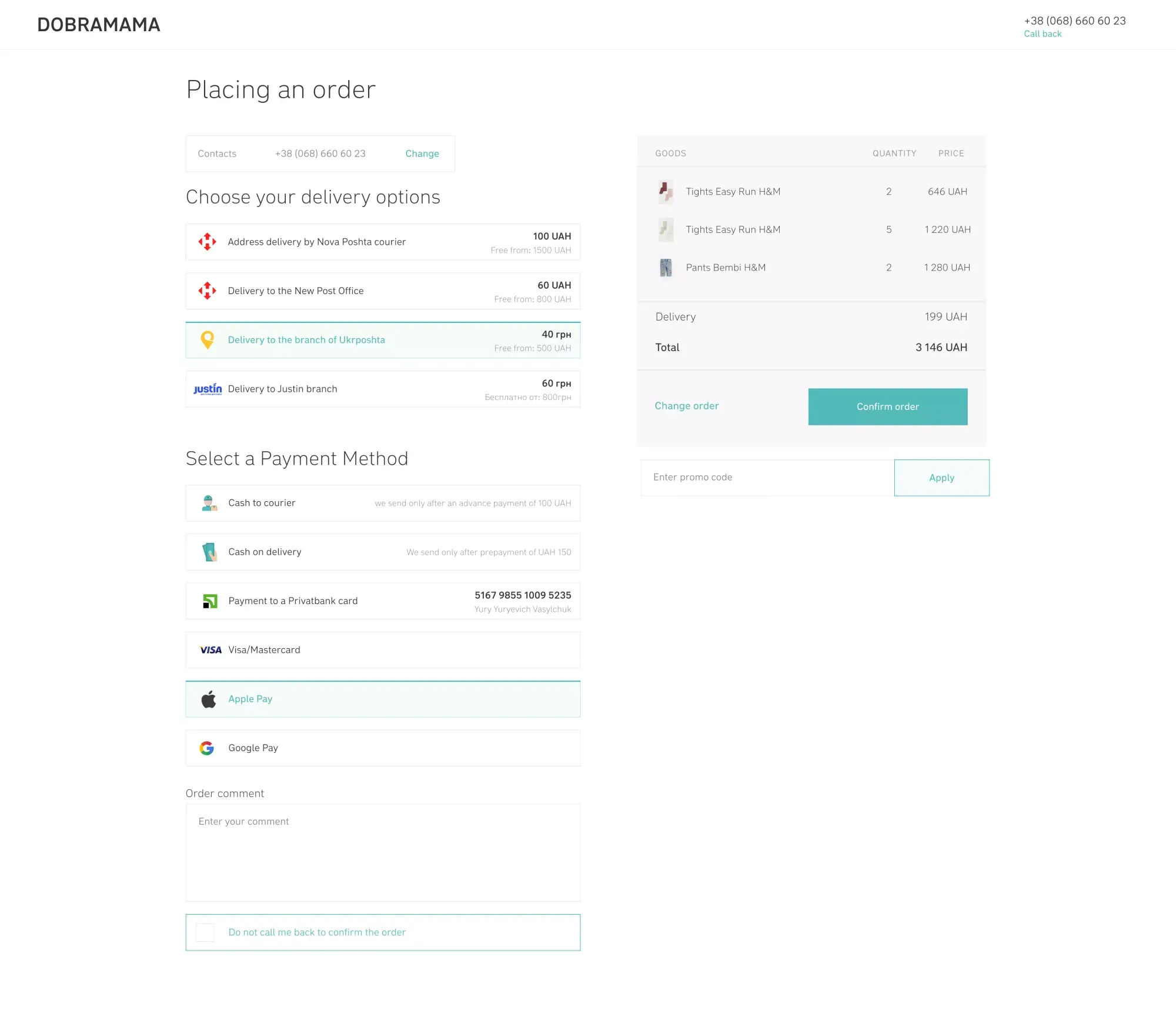
When designing the e-commerce platform for children's clothing and footwear store Dobramama, we engineered the checkout flow around zero-friction guest ordering. The left-hand column presents a compact verified contact block, carrier delivery selection with transparent free-shipping thresholds (`Free from: 800 UAH` for post office pickup), and fast payment options including Apple Pay and Google Pay alongside a "Do not call me back to confirm the order" checkbox. Meanwhile, the right-hand column anchors a high-clarity Sticky Order Summary displaying garment thumbnails, exact child size selections, SKU codes, colors, and final totals:
Real-Time Shipping & Pickup Autocomplete (Postal APIs, Parcel Lockers & ZIP Lookup) Without Page Reloads
Unexpected shipping costs (39%) and clunky address entry are top drivers of checkout drop-off. Standard e-commerce plugins often load massive unindexed dropdown lists of 25,000+ pickup lockers or trigger a 3-second full-page refresh every time a buyer changes their city or ZIP code.
1. Reactive Carrier API Integration: Sub-50ms Lookup, Geo-Chips & Free-Shipping Progress Bars
To let buyers select their delivery address or parcel locker in under 4 seconds, we engineer carrier integrations (USPS / UPS / FedEx / Google Places Autocomplete in the US; DHL / InPost / Nova Poshta API v2 in Europe) around four frontend principles:
1-Tap Top City Geo-Chips: directly below the city input field, we render clickable quick-select pills for major metropolitan hubs. Over 50% of shoppers select their city in a single tap without opening the keyboard.
Sub-50ms Cached Autocomplete: typing a ZIP code, street name, or parcel locker number (e.g., typing `142` immediately surfaces `Locker #142`) queries a Redis-cached carrier directory, returning results in under 50 milliseconds with zero page flicker.
Auto-Formatted Numeric Phone Masks (`inputmode="tel"`): tapping the phone input on mobile triggers the large numeric keypad and automatically formats pasted strings into standardized carrier E.164 syntax, ensuring 100% automated shipping label generation.
Dynamic Free-Shipping Threshold Bar: because surprise shipping fees cause 39% of abandonments, we display a live progress indicator inside the cart and checkout ("Add $18 more to unlock Free Express Shipping"), simultaneously eliminating price shock and lifting Average Order Value (AOV) by 14%–18%.
2. Omnichannel Delivery & Real-Time Map Pickup in the Good Day Pharmacy Case Study
Fulfillment UX becomes even more critical in omnichannel retail and pharmacy chains, where shoppers choose between instant in-store pickup at a nearby branch, 2-hour courier delivery, or national postal shipping.
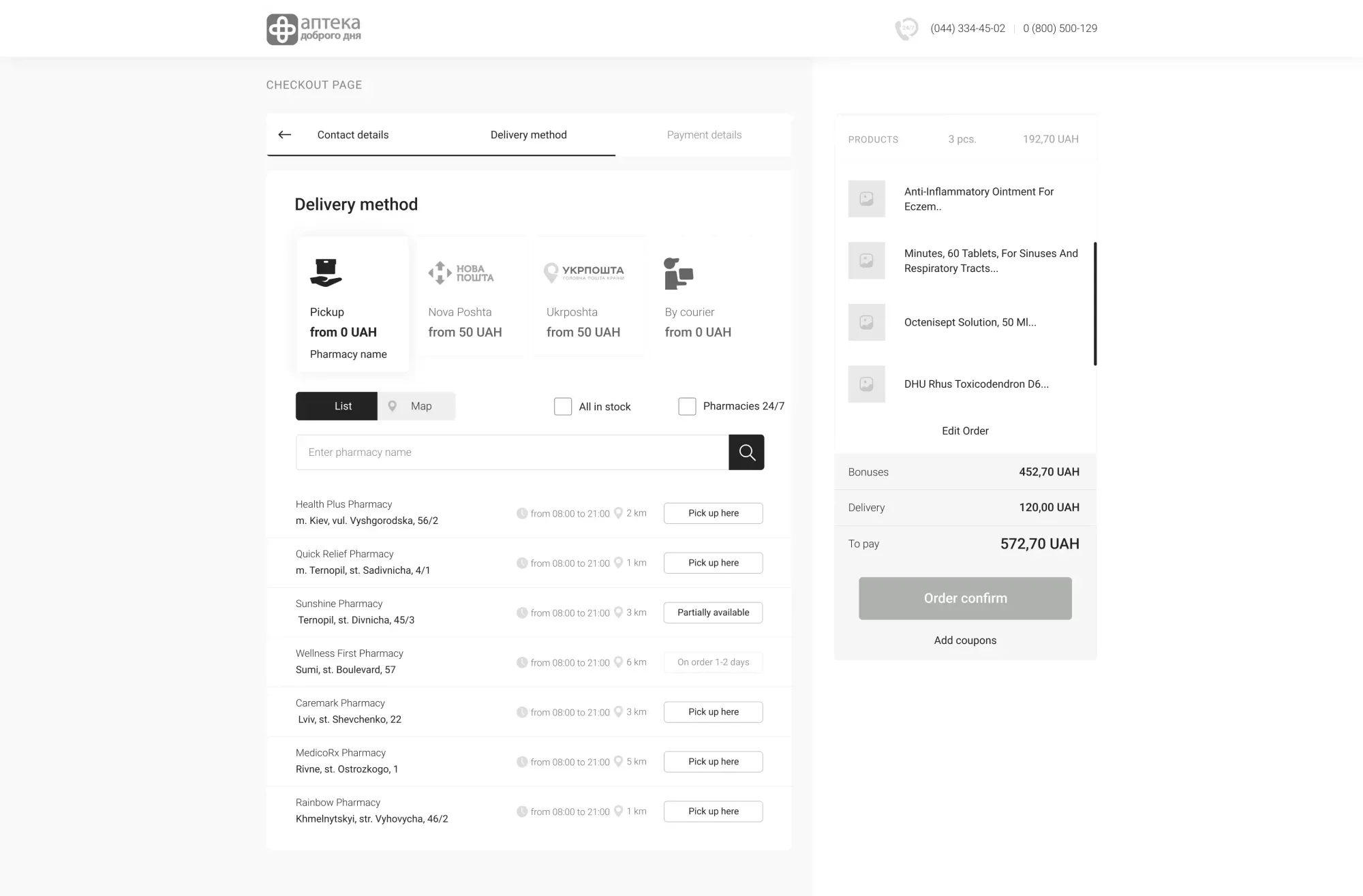
During our comprehensive UX/UI redesign for the national pharmacy chain Good Day Pharmacy, we overhauled the entire delivery selection and checkout architecture. Instead of forcing users through fragmented reloads, we designed instant tab switchers and an interactive city availability map: shoppers see real-time medication stock across nearby pharmacy locations, compare store-specific prices and opening hours, and book in-store pickup or courier delivery on a single responsive screen:
1-Tap Biometric Payments: Apple Pay & Google Pay as the Modern Mobile Conversion Standard
When 75% to 85% of your paid social and search traffic arrives on smartphones, asking a mobile shopper to pull a physical plastic credit card out of their wallet and manually type a 16-digit card number, expiration date, and 3-digit CVV on a tiny glass screen is conversion suicide. A single typo or delayed 3D-Secure SMS code results in an abandoned order.
1. The Math of Digital Wallets: +22.3% Conversion Uplift & 50% Fewer Bank Declines
Global payment benchmarks from Stripe and ACI Worldwide confirm that surfacing native Apple Pay and Google Pay express buttons increases mobile checkout conversion by 22.3% to 32% for three technical reasons:
Face ID / Touch ID Replaces Typing: transaction completion time drops from 55 seconds of manual card entry to 2.5 seconds via a single thumb tap and biometric glance.
Cryptographic Tokenization Halves False Declines: manually keyed credit cards suffer an 8%–11% false-positive fraud decline rate from issuing banks. Because Apple Pay and Google Pay use device-bound cryptographic tokens (DPAN) verified by biometrics, payment authorization rates exceed 98.5%.
Express Checkout in Slide-Out Cart Drawers: placing 1-tap wallet buttons directly inside the slide-out cart drawer and at the very top of the one-page checkout lets high-intent shoppers bypass manual billing forms entirely.
2. Thumb-Zone Mobile Ergonomics (375px) & Fast Ordering in the CoolBaba Case Study
In food delivery and multi-brand restaurant e-commerce, over 88% of orders happen on smartphones when the customer is hungry and impatient. Any mobile layout friction sends the buyer straight to a competitor.
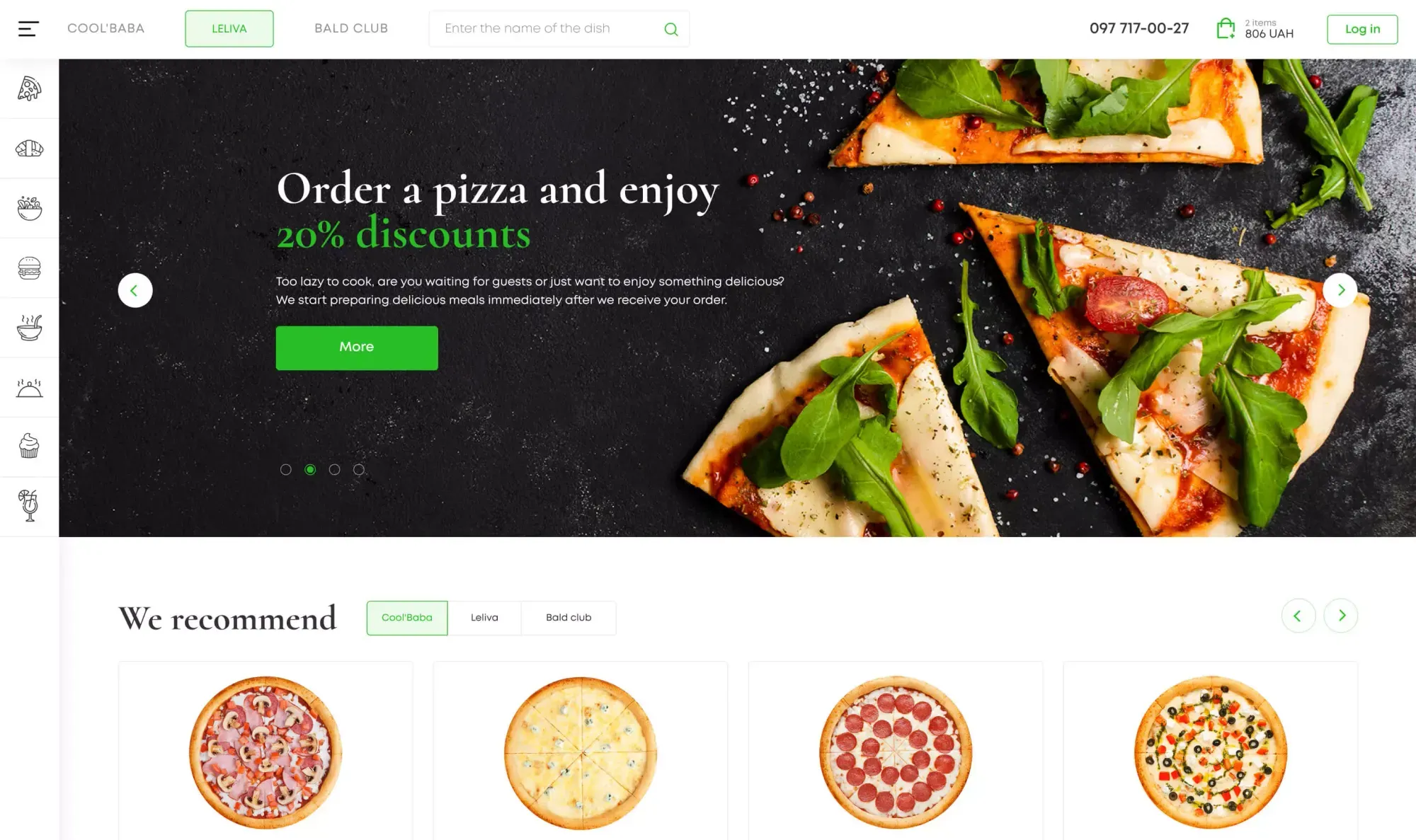
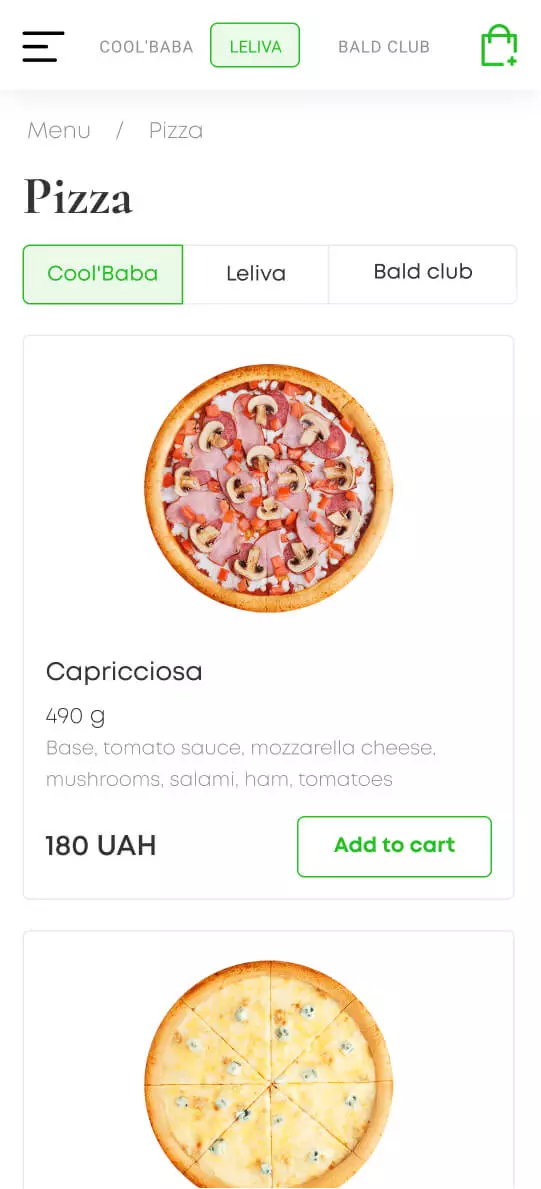
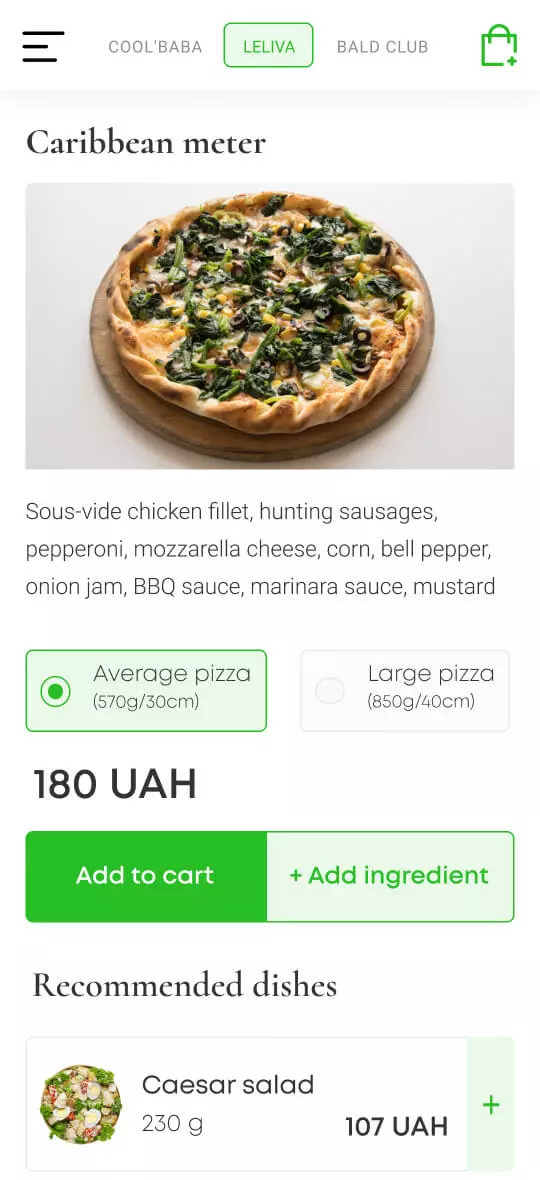
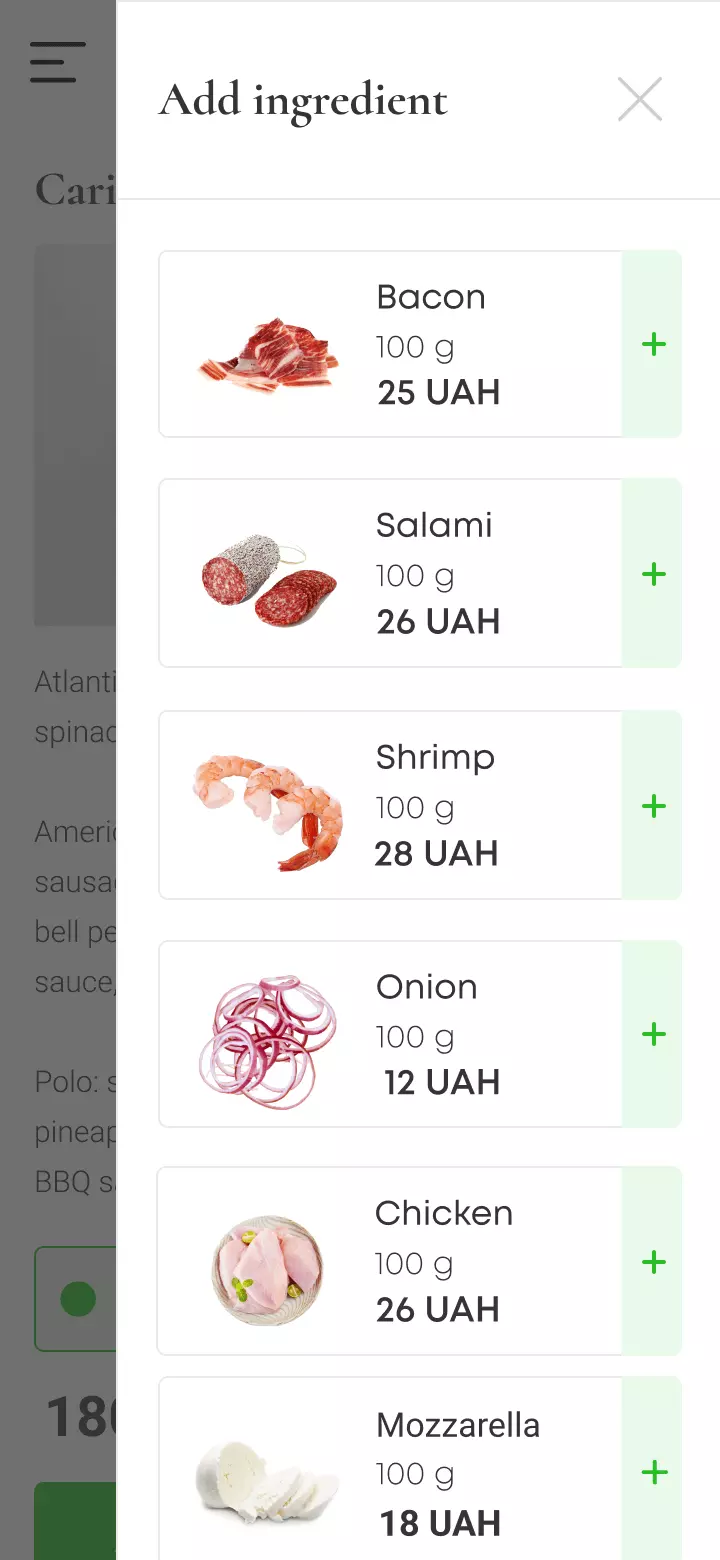
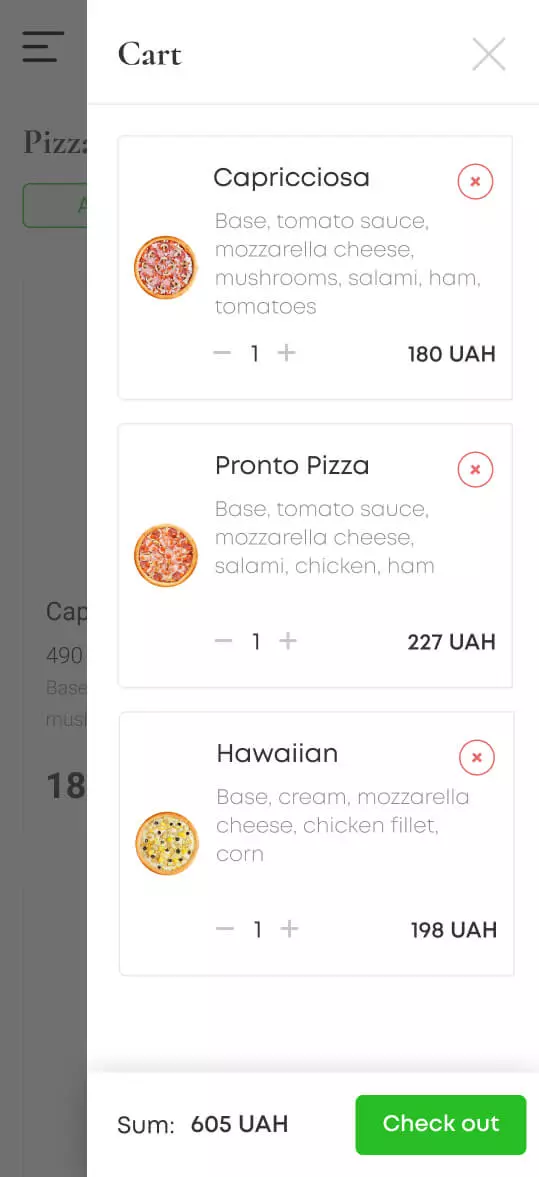
When designing the unified food delivery platform for the three-restaurant chain CoolBaba (uniting Cool'Baba, Leliva, and Bald Club), we engineered the mobile experience around strict one-handed Thumb Zone ergonomics (375px viewport width). The four mobile screens below demonstrate the complete ordering journey: selecting a pizza in the catalog with inline portion counters, customizing size (`570g/30cm` vs. `850g/40cm`) on the dish card with a split `Add to cart / + Add ingredient` action bar, adding toppings inside the slide-out `Add ingredient` drawer, and reviewing the slide-out `Cart` drawer with a pinned bottom bar (`Sum: 605 UAH` and green `Check out` CTA):
Instant Revenue Growth on Identical Ad Spend: Unit Economics of a Checkout Redesign
The financial beauty of fixing your checkout funnel is that every recovered order flows straight to your bottom line with $0 in additional Google or Meta ad spend. You are already paying to bring those 2,400 shoppers to the cart—here is the exact payback math when evaluating ecommerce checkout redesign cost against monthly recovered margin.
Legacy 4-Step Checkout vs. Engineered One-Page Checkout: Monthly Store P&L Comparison
- Cart Abandonment Rate: 76% (1,824 shoppers abandon the 4-step form every month)
- Completed Paid Orders: 576 orders/mo (24% checkout completion rate)
- Customer Acquisition Cost (CAC): $10.42 per paid order
- Monthly Revenue & Gross Margin (35%): $37,440 gross revenue → $13,104 gross margin
- Net Contribution (Margin minus $6,000 Ad Spend): +$7,104/mo (barely covering store overhead)
- Cart Abandonment Rate: 61% (360 orders/mo rescued via 1-screen UX & 1-tap wallets)
- Completed Paid Orders: 936 orders/mo (+62.5% more orders with $0 extra ad spend)
- Customer Acquisition Cost (CAC): $6.41 per paid order (38.5% drop in CAC)
- Monthly Revenue & Gross Margin (35%): $60,840 gross revenue → $21,294 gross margin
- Net Contribution (Margin minus $6,000 Ad Spend): +$15,294/mo (+$98,280 in additional net profit per year)
Generating those same +360 extra orders on a leaky 4-step checkout would require spending an extra +$3,750/month ($45,000/year) on Google and Meta Ads. A one-time $4,800 checkout engineering sprint unlocks that revenue permanently without paying ad networks another dime.
1. Field-by-Field Autosave: Recovering Interrupted Checkouts Automatically
Even with a 6-field checkout, some mobile shoppers get interrupted mid-purchase by incoming phone calls or dead batteries. In standard templates, if a buyer types their phone number and name but closes the tab before clicking the final "Pay Now" button, that lead is lost forever.
We implement asynchronous Field-by-Field Lead Capture:
The instant a shopper enters a valid phone number or email in the first input (`onBlur`), the frontend silently saves a draft order containing their cart items.
If payment is not completed within 25 minutes, the draft syncs to your CRM as an Abandoned Checkout Lead or triggers an automated SMS/Viber/email recovery link that restores their exact cart in 1 tap.
This single engineering mechanism recovers an additional 8% to 12% of abandoned carts effortlessly.
2. 5-Minute Smartphone Diagnostic Checklist for Your Store
Open your store right now on your smartphone (using a private/incognito tab over cellular 4G) and test five conversion points:
Count every input box and checkbox between "Add to Cart" and payment confirmation. If you count more than 8 elements, you are leaking 20%+ of your ad budget.
Tap the Phone input: does it immediately trigger the large numeric keypad (`inputmode="tel"`) with automatic mask formatting?
Test address/locker lookup: does typing a ZIP code or branch number filter results in under 50ms without reloading the page?
Check 1-tap wallets: can you complete the purchase via Apple Pay or Google Pay Face ID without typing a 16-digit card number?
Run an automated 20-point store scan: test your URL in our free Ad Spend Readiness Scanner to uncover every mobile and checkout bottleneck before scaling your ad campaigns.
Key Takeaways
Spending thousands on Google Shopping and Meta Ads while shoppers abandon their carts at checkout?
Mobile cart abandonment averages 80%–85.6%: the primary conversion killers are surprise shipping fees (39%), forced account creation walls (19%), and bloated 18–23 field forms (18%).
Replacing a 4-step template maze with a reactive One-Page Checkout (6–7 fields + open guest checkout) cuts completion time from 3 minutes down to 30 seconds.
Combining sub-50ms cached carrier autocomplete, 1-tap city geo-chips, and biometric Apple Pay / Google Pay lifts mobile checkout conversion by 22%–35% while cutting bank declines in half.
For a store spending $6,000/mo on ads, a $4,800 cart and checkout redesign achieves full payback in 17.6 days and adds +$98,280 in net annual profit on identical traffic.