iOS / Android Mobile Apps
Mobile App UI/UX Design Cost in 2026: Screen Count, HIG Architecture & Development Handoff
Why '$2,000 to $80,000' Agency Quotes Mislead Founders—And What Production-Ready App Design Actually Costs
When a startup founder or enterprise product owner requests quotes for a new mobile application, the numbers come back wildly disconnected: marketplace freelancers promise to 'draw 15 screens for $800,' while traditional dev shops quote $25,000–$60,000 just for Discovery and UI/UX. Yet very few vendors explain the core financial mechanic upfront: the true mobile app ui ux design cost is not determined by making screens look pretty—it is determined by whether iOS and Android engineers can compile your Figma files into production code without doubling your development budget in mid-sprint rework.
According to Barry Boehm's foundational software engineering economics (the 1–10–100 Cost-of-Change Rule validated by IEEE), fixing a UX flow flaw or missing state during interactive prototyping costs 10x less than rewriting Swift or Kotlin code during development, and 100x less than shipping an emergency hotfix after Day-1 user uninstalls. Drawing on 14 years of experience as a Senior Design Engineer (including native iOS development in Swift), this guide delivers a transparent app design pricing breakdown 2026, explains how much does ios app design cost alongside Android, and demonstrates through three portfolio products (Wrieat, JetAgro, CheckLive) how tokenized design architecture saves founders $12,000 to $28,000 in engineering payroll.
What Really Drives the Budget: Unique Screen Count, Edge-Case States & Micro-Interactions
The biggest mistake when estimating the cost to design mobile application for startup teams is counting only top-level navigation tabs ('our app only has 10 screens: Login, Home, Catalog, Profile, Settings'). To a Swift or Flutter engineer, a single 'Profile or Tracker screen' actually requires 5 to 7 distinct interface states to function in production.
1. The State Multiplier: Why '15 Screens in the Brief' Become 65 Production Frames
To prevent developers from guessing business logic mid-sprint (which inevitably blows up timelines), every core screen in a commercial mobile app must be architected across five mandatory states:
Empty State (First-Time User Experience): What does the user see on 'My Orders' or 'Calorie Log' before any data exists, and how does the interface prompt their first action?
Loading & Skeleton State: Smooth shimmer skeletons during weak cellular connectivity instead of a frozen white screen.
Active / Populated State: Real-world data density, including edge cases like two-line product titles and large currency figures.
Error & Offline State: Clear recovery flows when 4G drops, Apple Pay declines, or form validation fails.
Bottom Sheets & System Modals: Slide-up drawers for date pickers, camera permissions, and multi-parameter filters.
2. Full-Lifecycle State Engineering in Practice: The Wrieat Nutrition App Case Study
We applied this exact state-complete architecture when designing Wrieat, a mobile calorie counter and nutrition tracking app. Across the four screens shown below, we engineered every stage of the user lifecycle: streamlined `Create Personal Account` registration with Apple, Google, and Facebook SSO, the `Home` daily dashboard featuring a live calorie balance ring (`1174 Remaining = 2150 Goal - 976 Food`), macronutrient progress bars (`Proteins / Fats / Carbs`), and meal timeline cards (`Breakfast`, `Lunch`), the `Add Food` entry screen with an expandable `Additional Information` micronutrient drawer (`Saturated Fat`, `Trans Fat`, `Cholesterol`, `Sodium`), and a 13-step personalized metabolic onboarding quiz (`What is your sex?`):


3. 2026 Mobile App UI/UX Pricing Tiers by Product Complexity
Below is the realistic 2026 cost matrix based on unique screen count and state depth. You can review our full deliverable standards in the Native Mobile App UI/UX hub.
| Product Complexity Tier | Unique Screens / Core Flows | Total Figma Frames (All States) | Timeline | UI/UX & Prototype Investment (2026) |
|---|---|---|---|---|
| 1. Focused Startup MVP (utility, booking service, habit tracker, loyalty app) | 12 – 18 unique screens (single user role, onboarding, core loop, Apple/Google Pay) | 45 – 70 frames (including Empty, Loading & Error states) | 3 – 4 weeks | $3,500 – $5,500 |
| 2. Mid-Sized Commercial App (e-commerce, delivery, telehealth, EdTech platform) | 22 – 38 unique screens (catalog, checkout, in-app chat, geolocation, push center) | 90 – 140 frames + atomic Figma component library (UI Kit) | 5 – 7 weeks | $6,000 – $9,500 |
| 3. Multi-Role Marketplace / Logistics / FinTech (2+ roles: client + driver/provider) | 45 – 75+ unique screens (live maps, bidding, analytics, Dark Mode, offline sync) | 180 – 300+ frames + tokenized iOS HIG & Material 3 systems | 7 – 10 weeks | $10,000 – $16,000+ |
Why iOS and Android Demand Platform-Aware Architecture (Apple HIG vs. Material 3)
Whether you build natively in Swift/Kotlin or cross-platform in Flutter/React Native, shipping to both the App Store and Google Play requires respecting two distinct operating system philosophies: Apple Human Interface Guidelines (HIG) and Google Material Design 3. Blindly copying an Android layout onto an iPhone triggers App Store Review rejections and alienates high-LTV iOS users who immediately sense non-native friction.
1. Navigation Paradigms, Gestures & Component Tokenization
A senior mobile architect builds platform adaptability directly into the component library:
Navigation & Back Gestures: iOS users rely on a persistent bottom Tab Bar (up to 5 destinations) and a mandatory left-edge swipe-to-back gesture. Android Material 3 utilizes edge-to-edge predictive back gestures and prominent Floating Action Buttons (FAB).
Sheets & Native Pickers: iOS users expect native wheel pickers and fluid bottom sheets (`UISheetPresentationController`) with background blur and grabber handles. Material 3 relies on distinct modal date pickers and elevation tonal surfaces.
Typography & Tap Targets: iOS scales around SF Pro with `Dynamic Type` accessibility in points (`44×44pt` minimum hit target), whereas Android scales around Roboto in density-independent pixels (`48×48dp` minimum touch target).
2. Environmental Ergonomics & Dark Mode Engineering: The JetAgro Logistics Case Study
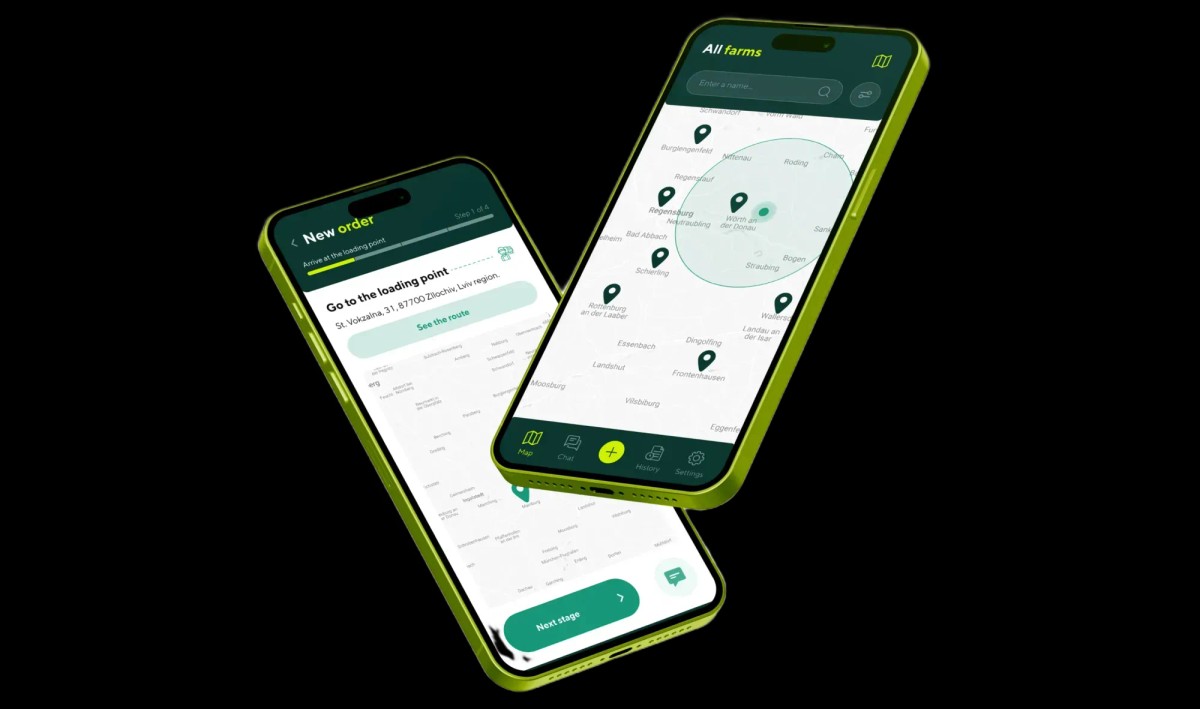
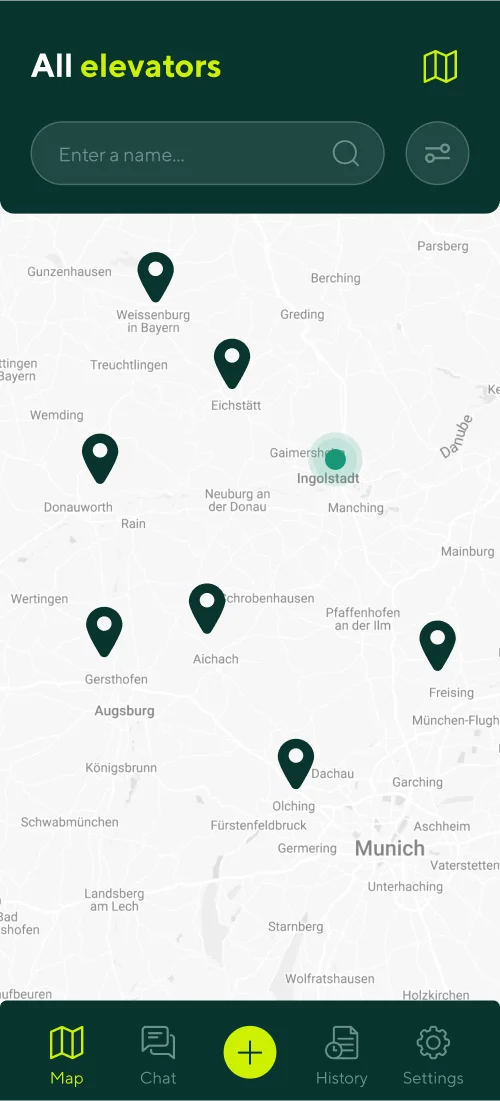
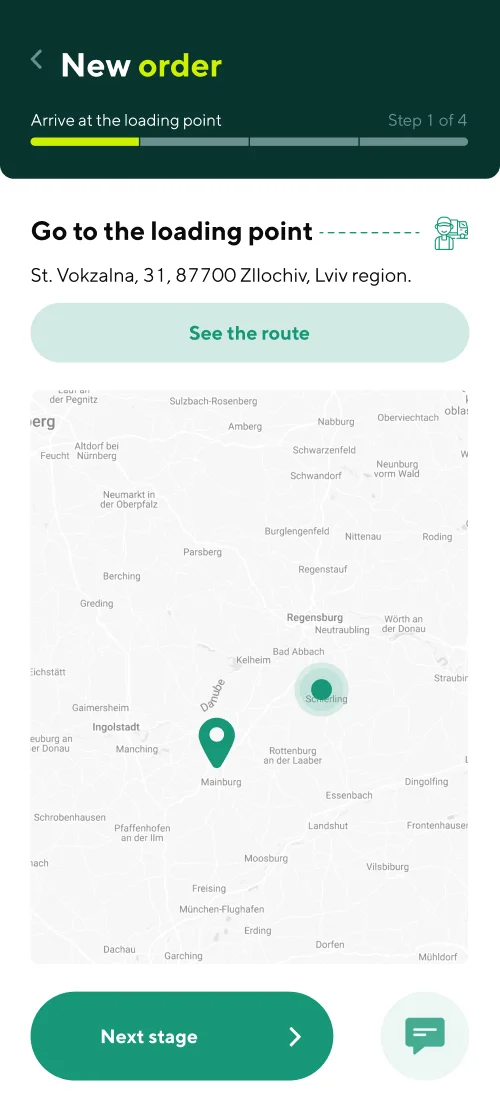
Beyond OS guidelines, physical usage conditions dictate interface architecture. A prime example is JetAgro, an Uber-style grain logistics mobile platform we designed to connect agricultural enterprises, grain elevators, and commercial truck drivers.
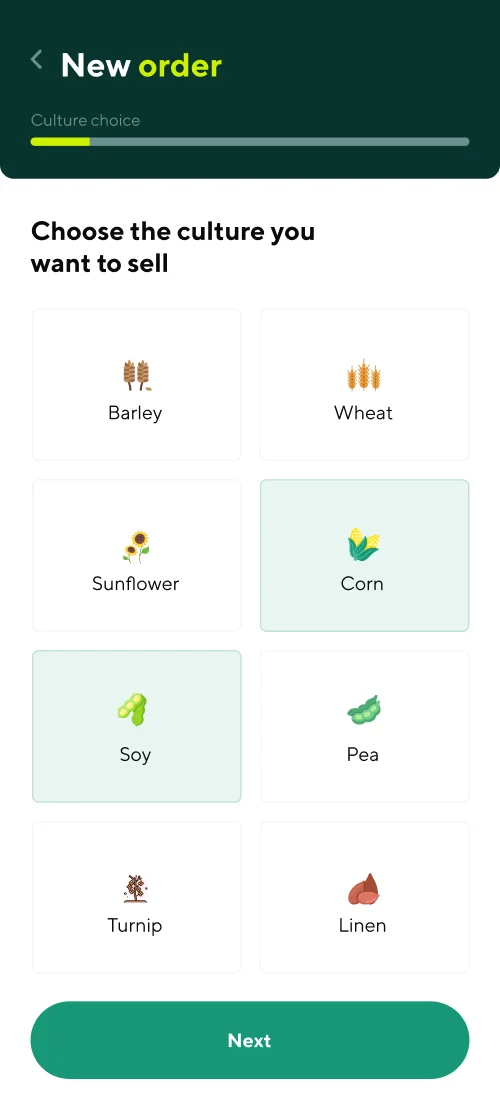
Within a single product, we architected two separate role-based interfaces starting from the initial `Choose who you are: Driver / Farmer` onboarding screen, featuring real-time `All elevators` GPS map discovery, a step-by-step `New order` grain transport wizard, contextual in-chat deal confirmation, and `Touch ID` biometric login. Because grain truck drivers and farm operators frequently work overnight harvest shifts inside dark vehicle cabs, we engineered a dedicated high-contrast Black Edition (Dark Mode): deep OLED black surfaces eliminate cab glare during night driving, save up to 35% battery life, and spotlight active `In transit` shipment progress and per-ton rates with high-visibility neon green tokens:

Interactive Clickable Prototypes: Validating Product-Market Fit With Investors Before Writing Code
The most expensive mistake a founder can make is hiring a $15,000/month engineering squad for six months only to discover after launch that users get lost in the onboarding funnel. That is why every professional mobile app prototype estimate centers on building a high-fidelity, clickable Figma prototype before a single line of backend code is written.
1. How Interactive Prototypes De-Risk Pre-Seed Fundraising & Usability Testing
Launched directly on an iPhone via Figma Mirror, a properly engineered interactive prototype is 95% indistinguishable from a live App Store build—complete with sticky tab bars, Smart Animate drawer transitions, horizontal carousels, and branching user flows.
For Investor Pitching: Handing an investor a phone where they can tap through your core transaction loop in 90 seconds builds far more conviction than a static slide deck.
For Hallway Usability Testing: Observing 5–7 target users interact with the prototype exposes navigation bottlenecks in one afternoon, allowing the designer to fix flows in 30 minutes rather than burning two engineering sprints.
2. Wireframing and Prototyping High-Density Real-Time Feeds: The CheckLive Case Study
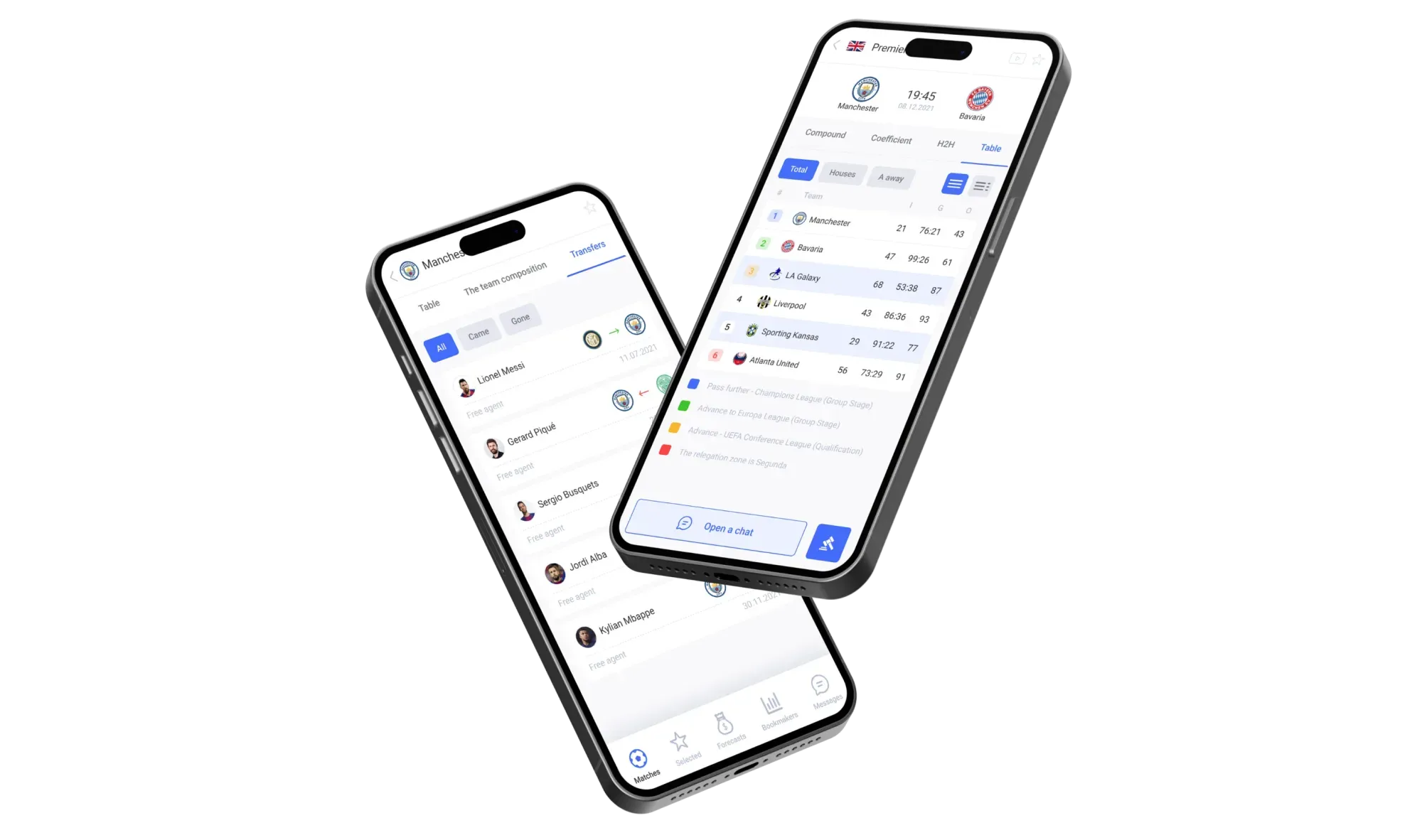
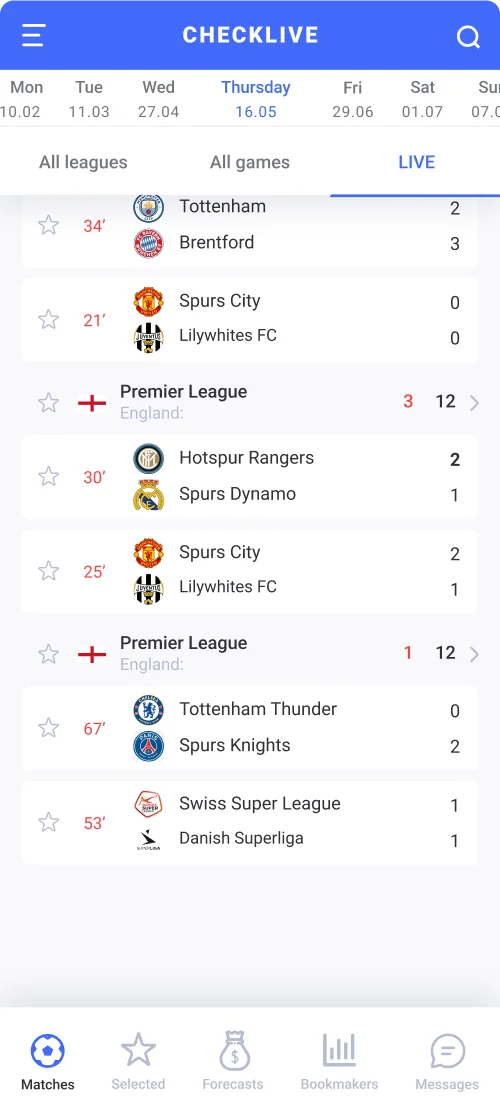
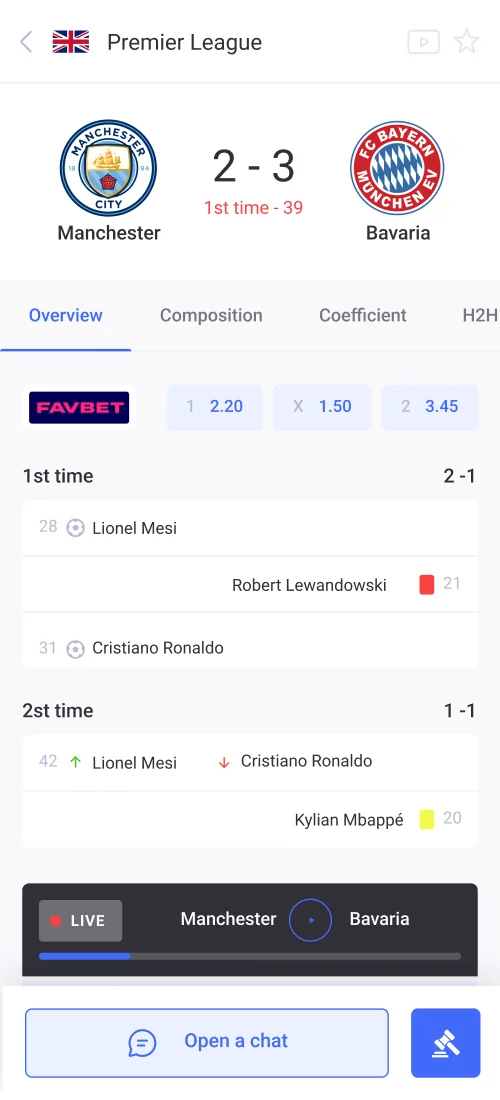
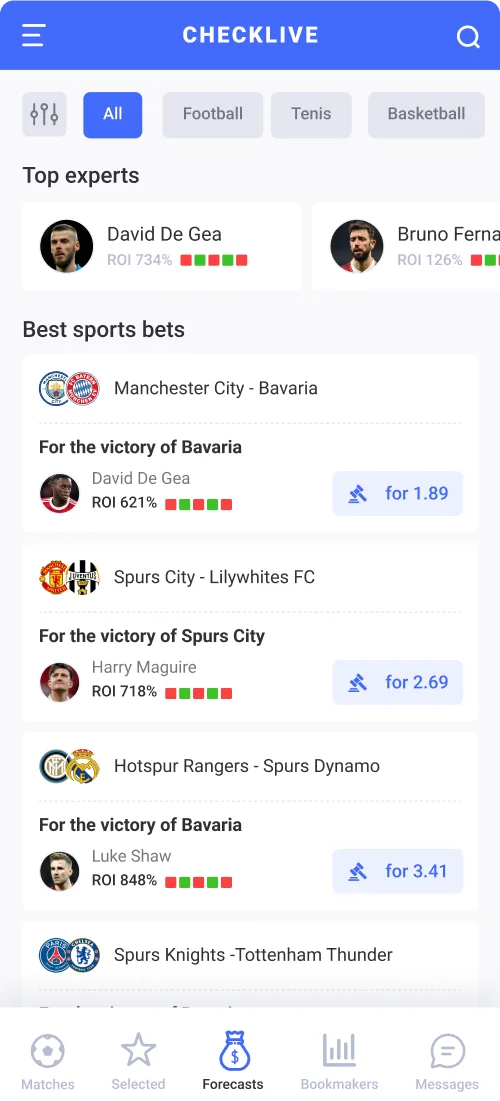
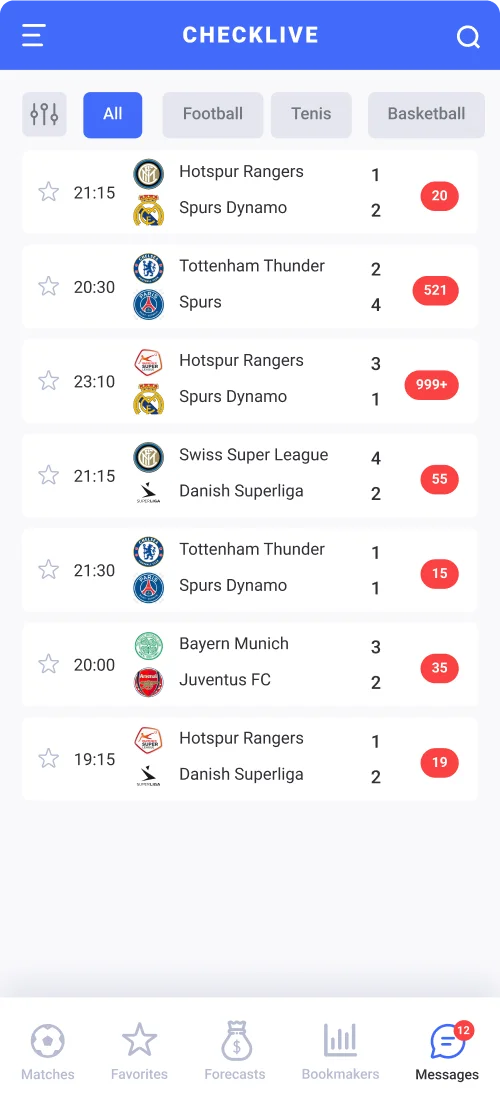
When an application handles massive real-time data streams, jumping straight into visual colors without structural wireframing guarantees cognitive overload. While designing CheckLive—a live sports statistics, match center, and expert predictions mobile app—we first mapped comprehensive UX wireframes establishing a 5-tab bottom navigation architecture.
This structural foundation allowed us to pack live half-by-half match timelines, comparative ball-possession and shot bars, tournament standings, a handicapper marketplace with verified monthly ROI badges, and live fan chat rooms onto a compact smartphone viewport without visual clutter:
Spec Mistakes That Double Engineering Quotes: What Your Designer Must Deliver at Handoff
Why do two development agencies quote $22,000 and $48,000 for the exact same app idea? Because when you hand developers unorganized 'Dribbble-style mockups' missing edge-case states and tokens, the CTO automatically multiplies the engineering estimate by a 1.8x–2.0x risk buffer.
How Investing $6,500 in Tokenized UX/UI Architecture Saves $19,500 in Mobile Engineering Rework
- Junior Freelance Mockups: $1,500 (happy-path screens only, zero system logic)
- Base Mobile Development (600 hrs × $45): $27,000
- Coding Missing Empty/Error States Mid-Sprint: +$11,250 (250 unbudgeted engineering hours)
- Refactoring UI After App Store Rejection: +$5,850 (130 hours fixing HIG & layout bugs)
- Total Cost to Reach App Store Launch: $45,600 + 3 months of lost Time-to-Market
- Full UX/UI Architecture + Prototype + UI Kit: $6,500 (all 110 states, Empty/Error, HIG/Material 3)
- Streamlined Development via Dev Mode (550 hrs): $24,750 (reusable tokens cut UI coding time by 20%)
- Change-Order Overrun Fees: $0 (all edge cases locked before sprint 1)
- First-Submission App Store Approval: 100% Apple HIG & Material 3 compliance
- Total Cost to Reach App Store Launch: $31,250 ($14,350 cheaper than Scenario A)
Trying to 'save $5,000' by hiring a cheap designer who only draws happy-path screens inevitably costs $19,500+ in extra developer billing when engineers are forced to invent error states, responsive constraints, and navigation flows in code at $45–$65/hr.
1. The 4 Spec Blind Spots That Trigger Developer Change Orders
When auditing external Figma files before development, we consistently uncover four expensive omissions:
Missing Screen Flow & Deep-Link Logic: 25 isolated artboards with zero documentation on where secondary buttons lead, how push notifications route (`Deep Linking`), or how password recovery behaves.
Hardcoded Values Instead of Design Tokens: 48 random shades of gray and arbitrary `13px / 17px / 21px` padding instead of semantic tokens (`color-surface-primary`, `spacing-md-16`).
Single-Viewport Blindness: Designing exclusively for a tall iPhone 16 Pro (`393×852pt`) while ignoring compact screens (`375×667pt`), where the software keyboard covers the primary submit button.
Broken Dev Mode Readiness: Unflattened vector icons, missing `Auto Layout` rules, and absent component variants.
2. Our Developer-Ready Handoff Protocol
Because I also build native iOS apps in Swift, every Figma workspace we deliver is structured for immediate engineering handoff:
Atomic UI Kit with interactive component variants (`Default`, `Pressed`, `Disabled`, `Focused`, `Error`).
Semantic Design Tokens mapped for `SwiftUI`, `Jetpack Compose`, `Flutter`, or `React Native`.
Complete User Flow blueprint covering onboarding, payment edge cases, and offline states.
Micro-interaction timing specs (`ms` duration, easing curves, and native `Haptic Feedback` triggers).
Practical Cost Calculator: Real-World Budgets for Service, Logistics & FinTech Apps
To help you benchmark your project before requesting development quotes, here is how screen counts and UI/UX budgets break down across four commercial verticals.
1. Industry Budget Matrix (E-Commerce, SaaS/Tracker, Logistics, FinTech)
| Mobile App Vertical | Core Functional Modules | Unique Screens (MVP) | Total State Frames | UI/UX Design Investment | Delivery Timeline |
|---|---|---|---|---|---|
| E-Commerce & Loyalty App (retail, food delivery, D2C brand) | Filterable catalog, PDP, cart drawer, Apple/Google Pay, QR loyalty card, order tracking | 16 – 22 screens | 65 – 90 frames | $4,500 – $6,800 | 4 – 5 weeks |
| Health / EdTech / AI Utility (nutrition tracker, courses, subscription SaaS) | Personalized onboarding quiz, progress rings, workout/meal logger, subscription paywall | 18 – 26 screens | 75 – 110 frames | $5,000 – $7,800 | 4 – 6 weeks |
| Logistics / Agro / Field Service (2 roles: shipper + driver/courier) | Live GPS map, order wizard, freight bidding, offline queue, chat, dark mode | 35 – 55 screens | 140 – 210 frames | $8,500 – $13,500 | 6 – 8 weeks |
| FinTech / Banking / Live Analytics (wallets, crypto, sports data) | Camera KYC flow, Face ID biometrics, P2P transfers, real-time charts, community chat | 30 – 50 screens | 130 – 190 frames | $9,000 – $14,500 | 6 – 9 weeks |
2. How to Turn Your App Idea Into a Complete Screen Specification in 3 Minutes
Never approach a development agency with a vague half-page Word document—you will automatically receive a padded quote. First, decompose your concept into a concrete list of user roles, unique screens, and state requirements.
You can generate this specification automatically right now using our interactive engineering tool: open the Idea-to-Screens Mobile App Architecture Generator, select your app vertical, and get a structured screen breakdown ready for accurate budgeting.
Key Takeaways
Planning a mobile app and want a transparent, engineering-grade UI/UX estimate?
True mobile app UI/UX design cost in 2026 ($4,000–$14,000) is driven by architecting all 5 operational states per screen (Empty, Loading, Active, Error, Offline), not just top-level menu tabs.
Respecting native Apple HIG (iOS) and Material Design 3 (Android) standards at the token level ensures first-time App Store approval and high user retention.
An interactive Figma prototype lets you validate product-market fit with real users and close investor funding before spending $30,000+ on engineering.
Following Boehm's 1–10–100 Rule, investing $6,500 in a tokenized UI Kit and Dev Mode specification saves founders $14,000–$19,500 by eliminating mid-sprint coding rework.