Native iOS & Android Product Design
Mobile App Product Design: Intuitive Ergonomics Built for Habit-Forming Retention
Designing native mobile experiences for service utilities, fleet logistics, fintech, and consumer products according to Apple Human Interface Guidelines and Google Material 3.
Why businesses lose money here
Over 75% of downloaded mobile applications are uninstalled after day-1 due to confusing onboarding, cluttered micro-screens, and violation of platform-native gesture ergonomics.
What we focus on
Mobile Screen Architecture & User Journey Flows
Native UI System (Apple HIG & Material Design 3)
Interactive Gesture-Driven Mobile Prototype
Mobile Asset Package & Developer Handoff Suite
Problems We Solve
We eliminate interface bottlenecks that drain your ad budget, slow down operations, and lower conversions.
Brutal Day-1 and Day-7 mobile app retention drop-off
Users download an app, get slammed with a barrage of intrusive permission prompts (GPS, camera, push alerts) before seeing any value, and delete it immediately.
Solution:
Contextual progressive onboarding: requesting system permissions strictly at the moment of relevant feature engagement, preceded by clear value framing.
Result:
35–50% increase in Day-1 retention metrics and dramatically elevated app ratings.
Clumsy non-native interaction patterns violating platform guidelines
Porting desktop web components directly into mobile apps results in jarring navigation, sluggish animations, lack of haptic feedback, and App Store review rejections.
Solution:
Strict adherence to Apple HIG (SwiftUI) and Android Material 3 primitives: native tab bars, modal bottom sheets, fluid gesture swipes, and spring physics.
Result:
Guaranteed App Store review approval and an effortless, high-tier native tactile experience.
Cognitive overload in high-stress operational field apps
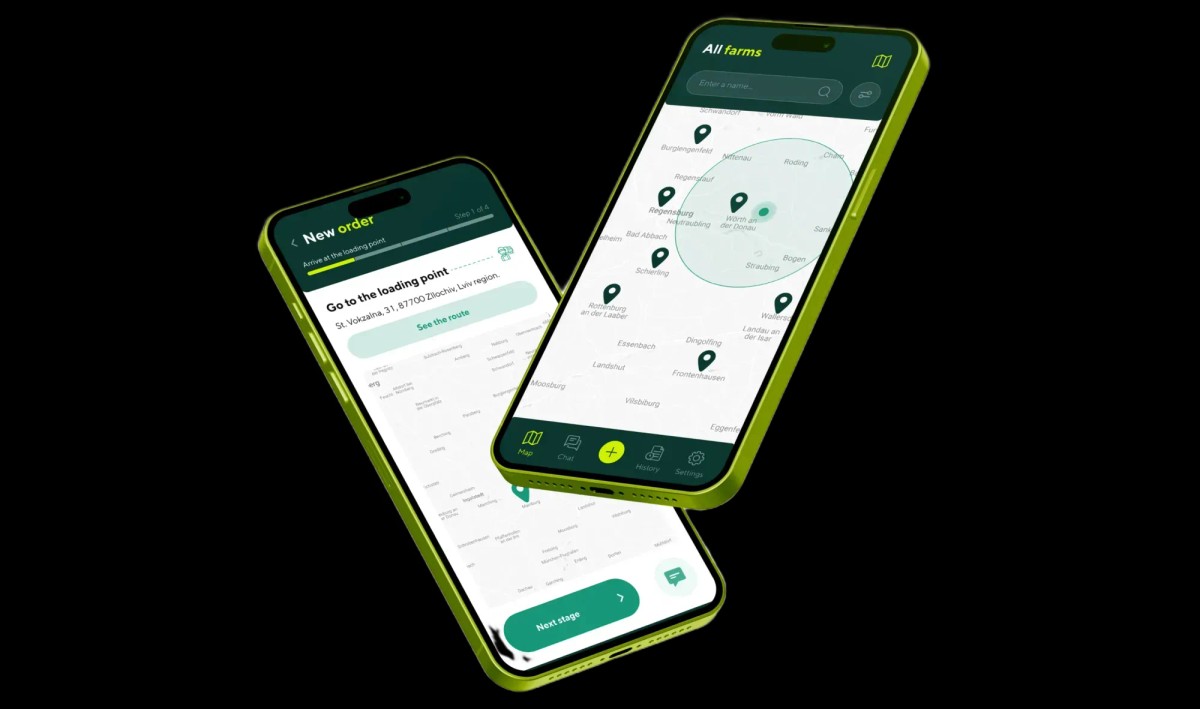
In logistics, dispatch, or driver apps, operators cannot safely tap microscopic buttons while driving; glare washes out low-contrast text, causing critical field errors.
Solution:
High-Contrast operational UI: prominent 56px+ primary action targets, single-handed ergonomics, sunlight-readable contrast, and robust offline sync states.
Result:
60% reduction in operator input errors and accelerated task execution in field conditions.
Impractical UI mockups that break mobile engineering budgets
Graphic designers craft heavy visual gimmicks that fail to render at 60 FPS, causing frame drops, smartphone overheating, and rapid battery depletion.
Solution:
Engineering-first mobile design grounded in Swift architecture: vector asset optimization, native OS blur shaders, and lightweight animation tokens.
Result:
Rock-solid 60–120 FPS smooth rendering with zero battery drain, saving weeks of developer refactoring.
Let's Work Together.
Ready to bring your vision to life? Let's team up on your next project and create something unforgettable together.
What You Get
Every stage is a structured process with concrete deliverables and completion timelines.
Mobile Screen Architecture & User Journey Flows
Mapping app navigational taxonomy, friction-free Apple/Google social auth, push notification permissions, and gesture-driven user flows.
Complete mobile app information architecture and tab taxonomy
User flow maps detailing every user state and branch condition
Low-fidelity wireframes optimizing tap targets and thumb zones
Offline mode recovery states and data synchronization flows
Native UI System (Apple HIG & Material Design 3)
High-fidelity visual design for all screens strictly aligning with Apple Human Interface Guidelines and Material Design 3. Dark & light theme support.
Pixel-perfect Figma layouts for standard viewports (393px / 430px)
Native Dark Mode integration with automatic contrast adaptation
Lock-screen widgets, Dynamic Island states, and rich push alerts
Custom vector iconography optimized for SF Symbols and Android drawables
Interactive Gesture-Driven Mobile Prototype
Clickable mobile prototype ready for physical testing on real smartphones: validating gesture ergonomics, spring physics, and real-world tap accuracy.
Clickable mobile prototype supporting native swipes, drags, and haptics
Hands-on device testing using Figma Mirror and ProtoPie Player
Thumb-zone physical reachability testing across various screen sizes
Fine-tuning tap targets and typography based on live ergonomics feedback
Mobile Asset Package & Developer Handoff Suite
Complete handoff suite for iOS (Swift) and Android (Kotlin) developers: vectorized assets, density scaling (1x, 2x, 3x), and direct sprint QA.
Clean asset export (SVGs, @1x/@2x/@3x density scales, lightweight Lottie)
Spec sheet for spacing tokens, corner radii, elevation shadows, and typography
App Store and Google Play promotional screenshot and app icon suites
Developer sprint support during beta testing and store review submission
FAQ
Answers to common questions from business owners regarding timelines, process, and handoff.
iOS champions fluid minimalism, San Francisco typography, bottom navigation tab bars, edge-swipe back gestures, and native sheet modals. Android leverages Material 3, dynamic theming (Material You), floating action buttons (FAB), and system-wide predictive back gestures. We design tailored variations so the app feels 100% native on both platforms.
Figma files are organized to mirror Swift/Kotlin codebases: 100% Auto Layout structure, design tokens, complete system state coverage (empty states, offline cached states, API error banners, loading skeletons), and vectorized assets scaled to @1x, @2x, and @3x densities.
Yes, absolutely. We deliver clickable prototypes that you and your stakeholders can install and test directly on physical iPhone or Android devices via Figma Mirror or ProtoPie. This allows you to evaluate gesture feel, thumb reachability, and navigational speed before committing engineering budget to code.
Drawing from real-world engineering in agricultural logistics (JetAgro) and US medical transport (NEMT), we implement oversized action targets (56–64px), high-contrast palettes that resist bright outdoor sun glare, rapid 1-tap workflows, and offline local-caching queues that preserve transactions when cellular signal drops.
Expert Breakdowns & Cost Guides
Mobile App UI/UX Design Cost in 2026: Screen Count, HIG Architecture & Development Handoff
02Why 75% of Mobile Apps Are Uninstalled on Day 1: Designing Onboarding for Habit-Forming Retention & Ad Spend ROI
03Mobile Field Worker & Driver App UX: Offline-First Architecture, Rugged Usability & Saving 40 Minutes Per Haul
04Native iOS (Swift) vs Flutter & React Native: A Founder’s Guide to Mobile Development Cost, Maintenance TCO & ROI
05FinTech & Crypto Mobile App UX: Slashing 68% KYC Onboarding Drop-Off, Passkey Biometrics & Transaction Trust