Landing Pages & Paid Traffic
High-Converting Landing Page Design Cost in 2026: Pricing Tiers, Deliverables & Ad Spend ROI
Why businesses lose ad budget before the first lead
When a business owner or CMO plans a paid traffic launch, the first question on the table is: what is the true landing page design cost and how much budget should be allocated so the page consistently converts visitors into qualified leads. The market shows a massive price gap: from "$150 site builder offers" to agency contracts at $3,000–$5,000+. First-time founders often treat this difference as an unjustified markup and pick the cheapest option, overlooking the core truth: the real custom landing page development price is measured not by the developer's invoice on delivery day, but by the amount of ad spend that page will save or burn during its first three months.
Over 14 years of engineering commercial web interfaces, I have seen the exact same pattern play out repeatedly: a company allocates $2,000–$5,000 per month to Meta Ads or Google Ads, yet loses 60% of potential buyers before they even scroll to the lead form due to bloated site-builder code and generic hero screens. When you pay for every click, the gap between a 1.2% template conversion rate and a 4.5% engineered conversion rate equals tens of thousands of dollars in net annual profit. Below is a transparent high converting landing page cost breakdown, unit-economics math, and technical proof of why bespoke engineering pays for itself within weeks of launching paid traffic.
Market Pricing Tiers: From $100 Templates to $5,000 Engineered Landing Pages
The market cost to hire landing page designer or engineering studio falls into three distinct tiers. They differ not just in visual polish, but in technical risk and how the page behaves under real paid-traffic load.
Tier 1: $100–$300 (Templates, Tilda/Wix Builders, Entry-Level Freelancers)
This approach relies on buying a pre-made theme or assembling standard blocks in a drag-and-drop builder. The client writes raw copy in a Word doc, and the freelancer pastes it in without editing. There is no market research, no mobile speed optimization, and lead forms are limited to basic inputs without phone masks. This tier only works for testing a raw idea without paid ads. Once you route Meta or Google Ads traffic here, bounce rates exceed 70% because the page fails to match buyer intent and loads painfully slowly on mobile.
Tier 2: $800–$1,500 (Mid-Tier Studios & Experienced Designers)
Work starts with a basic discovery brief and a custom Figma mockup, followed by implementation on Webflow or WordPress. The page looks clean, adapts to standard breakpoints, and includes basic contact forms. However, contractors in this tier rarely dive into the client's unit economics. Copy often follows generic blocks ("About Us", "Our Advantages") that fail to resolve buyer objections within the first 5 seconds. Conversion typically plateaus at 1.5–2.2%, leaving the business stuck with a high Cost Per Lead (CPL).
Tier 3: $2,000–$5,000+ (Bespoke Conversion Engineering for Paid Traffic)
Here the landing page is built as a high-load conversion system: Next.js (React 19), TypeScript, Sharp image optimization (WebP/AVIF), and Edge CDN deployment. The process starts with Jobs-to-be-Done (JTBD) audience research, competitor ad analysis in Meta Ad Library, and designing 3–4 hero screen concepts for split-testing. Built Mobile-First, it delivers a First Contentful Paint under 0.8s, interactive native calculators, and direct messenger routing—achieving a consistent 3.5–7.8% conversion rate.
| Comparison Metric | Tier 1: $100–$300 (Templates) | Tier 2: $800–$1,500 (Mid-Tier Studio) | Tier 3: $2,000–$5,000+ (Engineered Landing) |
|---|---|---|---|
| Tech Stack | Tilda, Wix, stock WordPress themes | Webflow, WordPress (ACF / Theme) | Next.js, React 19, TypeScript, Edge CDN |
| Load Speed (LCP on 4G) | 4.5–7.5 seconds | 2.2–3.8 seconds | 0.7–1.2 seconds (PageSpeed 95+) |
| Mobile Ergonomics | Auto-scaled from desktop, broken wraps | Standard Webflow breakpoints | Mobile-First 375px, Thumb Zone ergonomics |
| Offer Architecture | Client's raw text pasted as-is | Standard questionnaire brief | JTBD research, competitor audit, 3–4 hero concepts |
| Interactivity | Static form (5–7 fields) | Third-party iframe widgets | Native calculators, quizzes, instant messengers |
| Hidden Monthly Fees | $15–$35/mo platform subscription | $50–$150/mo hosting & plugins | $0 mandatory platform fees (clean code) |
| Paid Ad Performance | Loses 40–60% of mobile ad clicks | Stagnates at 1.5–2.0% conversion | Full development payback in 10–25 days |
Anatomy of a High-Converting Page: Audience Research, Offer, Prototype, Design & Fast Code
When evaluating a landing page redesign agency cost above $2,000, you are not paying for decorative illustrations—you are investing in 5 sequential engineering stages, each directly lifting your conversion rate.
1. Deep JTBD Research & Audience Segmentation
We don't ask "Which colors do you prefer?". We analyze the exact job your customer hires your product to do. We dissect Google Ads search intent and uncover real buyer anxieties (fear of overpaying, doubts about product quality, reluctance to take phone calls). Using the BLUF (Bottom Line Up Front) principle, the hero section answers 3 critical questions within 3 seconds: what the service is, the immediate financial or practical benefit, and the exact next step.
2. Hero Section Engineering & Split-Testing Concepts
The first screen decides the fate of 80% of your ad budget. If a visitor cannot grasp the value proposition within 3–5 seconds, they close the tab and your click cost is wasted. In professional engineering, we craft multiple distinct hero concepts before writing code.
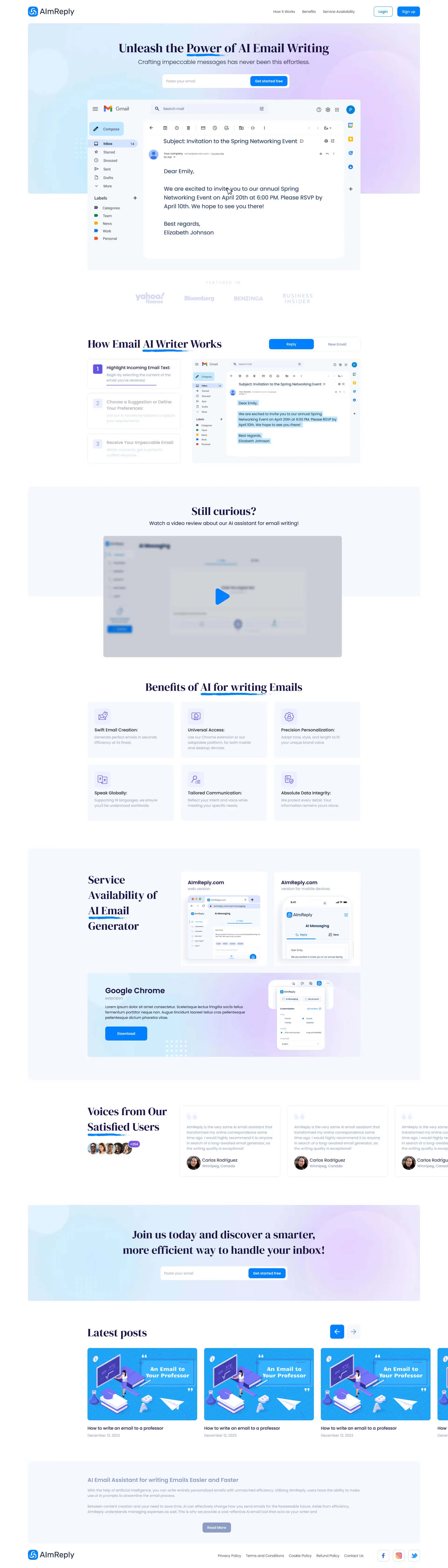
For the AI email assistant AImReply, we designed and tested 4 distinct hero concepts: from dark tech gradients to light minimalism and bold editorial typography. The winning concept embedded the free sign-up input directly inside the hero viewport alongside a live interactive preview transforming an incoming email into a polished reply. Users see the algorithm's output in 3 seconds without navigating away, cutting Time-to-Value to a minimum:
3. High-Impact Visual Proof & Overcoming Niche Objections
Stock photos of smiling office workers trigger instant subconscious distrust. Only authentic product visuals that address real buyer objections drive sales.
A clear example is the landing page for the craft semi-finished food and culinary brand YISTY. The core challenge was overcoming skepticism toward frozen food and driving fast online orders. We explored three hero concepts and selected a centered composition (`Магазин домашніх напівфабрикатів та кулінарії`) featuring a high-contrast `Замовити доставку` (Order delivery) CTA and macro food photography of prepared dishes over a signature turquoise patterned background. During power grid disruptions, we also placed a decisive trust trigger directly in the top navigation bar—the "Світло є" (Power Generator Active) link—removing customer doubts about cold-chain storage and offline store operations:

4. Clean Frontend Without Script Bloat (Next.js & React 19)
While drag-and-drop builders load megabytes of unused JavaScript, custom engineering leverages Server-Side Rendering (SSR) and Static Site Generation (SSG). HTML is pre-rendered, images are compressed into WebP/AVIF via Sharp, and critical CSS arrives in the first network packet—rendering the complete viewport in under 800 milliseconds.
ROI Mathematics: How Lifting Conversion from 1.2% to 4.5% Cuts Lead Cost by 3x
Many executives assume a $3,000 custom landing page is expensive when a $300 template exists. Let's verify the math using straightforward paid-traffic unit economics.
ROI Mathematics: How Lifting Conversion from 1.2% to 4.5% Cuts Lead Cost by 3x
- Conversion: 1.2%
- Inbound Leads: 24
- Cost per Lead (CPL): $83.33
- Closed Deals: 3.6
- Gross Revenue: $1,260
- Conversion: 4.5%
- Inbound Leads: 90
- Cost per Lead (CPL): $22.22
- Closed Deals: 13.5
- Gross Revenue: $4,725
Ad Spend Arbitrage: Generating 90 leads on a 1.2% template requires $7,500/mo in ad spend. An engineered page (4.5% CR) generates those same 90 leads on just $2,000/mo—saving $5,500 in wasted ad budget every single month.
Payback Matrix Across Ad Budgets & CPC Levels
Below is the payback calculation across different ad budgets comparing a 1.2% template against a 4.5% engineered landing page:
| Monthly Ad Budget | Cost Per Click (CPC) | Visitors | Template (1.2% CR) Leads / CPL | Engineered (4.5% CR) Leads / CPL | Extra Closed Deals / Mo | Extra Monthly Profit | Payback Period ($3,000) |
|---|---|---|---|---|---|---|---|
| $2,000 | $0.50 | 4,000 | 48 leads / $41.67 | 180 leads / $11.11 | +19.8 deals | +$6,930 | 13.0 days |
| $2,000 | $1.00 | 2,000 | 24 leads / $83.33 | 90 leads / $22.22 | +9.9 deals | +$3,465 | 26.0 days |
| $2,000 | $2.00 | 1,000 | 12 leads / $166.67 | 45 leads / $44.44 | +5.0 deals | +$1,750 | 51.4 days |
| $5,000 | $0.50 | 10,000 | 120 leads / $41.67 | 450 leads / $11.11 | +49.5 deals | +$17,325 | 5.2 days |
| $5,000 | $1.00 | 5,000 | 60 leads / $83.33 | 225 leads / $22.22 | +24.8 deals | +$8,680 | 10.4 days |
| $10,000 | $1.00 | 10,000 | 120 leads / $83.33 | 450 leads / $22.22 | +49.5 deals | +$17,325 | 5.2 days |
Why Site Builders (Tilda/Wix) Lose to Custom Code on Speed & Mobile Ergonomics
Why do cheap templates underperform so severely? The root cause lies in the architectural bottlenecks of no-code site builders.
1. The In-App WebView Drop-Off
Roughly 85% of Instagram and Facebook ad traffic opens inside the app's built-in WebView browser rather than Safari or Chrome. WebView JavaScript execution is significantly slower. When a user taps your ad and hits a heavy template loaded with third-party scripts, they stare at a blank white screen for 4–6 seconds and close the window. Meta charges you immediately for the click, while the page never even fires a `PageView` event—silently burning up to 50% of paid clicks.
2. Mobile Thumb Zone & 375px Ergonomics
Site builders auto-scale desktop layouts onto mobile screens, creating visual chaos: headlines split across 6 lines, sticky widgets overlap input fields, and primary CTA buttons fall outside comfortable reach.
A clear example of mobile interface transformation is our case study Easy4Busy, a healthy meal-prep delivery service. The client's old site relied on a washed-out template with clunky meal selection. We rebuilt the experience from the ground up: crafting a high-contrast dark UI, an interactive calorie configurator (`800–2400 kcal`) with daily menu previews, and a prominent 2-day trial offer. The four mobile screens below demonstrate the complete `375px` conversion flow: the hero screen with the `Підібрати програму` CTA, the interactive calorie tier configurator (`1500 ккал / 5 страв`), the horizontal swipe carousel of sealed meal boxes with calorie badges (`220 ккал`, `160 ккал`), and the mobile checkout form (`Замовляйте прямо зараз`) with a `-7%` discount checkbox anchored inside the Thumb Zone:


3. Interactive Micro-Tools vs. Static Lead Forms
Modern buyers ignore generic "Name + Phone + Request a Callback" forms. Interactive micro-tools that deliver instant value on the page convert far better.
When designing the alternative landing page concept for the real-estate collateral lending company InvestFinans, we engineered an interactive loan calculator specifically for one-handed smartphone interaction. The four mobile screens below show how visitors move from the clear hero value proposition (`Loan secured by real estate in 2 hours from 5.9% per annum`, `GET APPROVED IN 30 MINUTES`) and the 3D property collateral grid (`Flats`, `Apartments`, `Houses`, `Land plots`) into the approval & refinancing terms (`Refinancing operating loans`) and the interactive monthly payment calculator (`Calculate your monthly payment and get a decision within 30 minutes`—displaying `5 900 UAH` at `from 5.9%` as users adjust the loan amount and term sliders):


Visitors adjust loan amount and term sliders, see their exact monthly payment in real time, and submit their phone number already pre-qualified on terms—filtering out low-intent inquiries and saving hours for the sales team.
Step-by-Step Calculator to Estimate Your Landing Page Budget
To determine the optimal development budget for your niche, evaluate your project across three complexity factors.
Factor 1: Ad Auction Competition & Cost Per Click
If you operate in a low-competition local niche with $0.20–$0.40 CPC, template conversion losses are less painful. But if your Google Ads CPC ranges from $1.50 to $5.00+ (finance, real estate, wholesale, B2B SaaS, custom software), running traffic to a template guarantees negative ROI within the first two weeks.
Factor 2: Interactive Modules & Custom Logic
Core high-converting landing page: 3–4 hero concepts, native masked lead form + instant Telegram/WhatsApp/CRM webhook — $1,800 to $2,500.
Landing page with interactive quiz or cost calculator: custom client ROI/pricing formulas (like Easy4Busy or InvestFinans) — $2,500 to $3,500.
Complex B2B & SaaS landing systems: live interactive product demos, API integrations, dynamic multi-offer routing — $3,500 to $5,000+.
Factor 3: How to Defend the Budget to Your CEO or Investor
Present a return-on-ad-spend forecast rather than a design invoice:
State your planned monthly ad spend (e.g., $3,000/mo).
Compare Cost Per Lead: $83.33 at 1.2% CR vs. $22.22 at 4.5% CR.
Demonstrate that a $3,000 engineered landing page pays for itself in month one through CPL savings alone, and continues saving $2,000–$5,000 in ad budget every month thereafter.
Key Takeaways
Planning a paid traffic launch and need an honest cost breakdown?
A $150 builder template is not a cost-saver—it is a hidden liability that burns up to 50% of mobile ad clicks inside In-App WebViews.
Lifting conversion from 1.2% to 4.5% cuts your Cost Per Lead nearly 4x (from $83.33 down to $22.22 at $1.00 CPC).
On a $2,000/mo ad budget, a $3,000 bespoke engineered landing page reaches full payback in just 26 days.
Clean Next.js (React 19) code guarantees sub-0.8s load times, 95+ Core Web Vitals, and zero recurring platform fees.