iOS / Android Mobile Apps
Mobile Field Worker & Driver App UX: Offline-First Architecture, Rugged Usability & Saving 40 Minutes Per Haul
Why 70% of enterprise logistics and field apps fail due to frontline worker mutiny
The most expensive mistake Chief Operating Officers (COOs) and fleet owners make when commissioning a fleet driver mobile app design is hiring a consumer UI agency that designs for a calm coffee shop rather than a vibrating truck cab. On a 27-inch Retina monitor in an air-conditioned office, light-gray hairline borders, 12px typography, and synchronous cloud REST calls on every button tap look sleek. On day one in the field, that architecture collapses: a grain hauler or delivery driver stands under blinding 80,000-lux midday sun, cellular signal drops to dead air, the bill-of-lading spinner freezes, and 15 minutes of entered cargo weights vanish. Within a week, drivers revolt and revert to paper manifests and WhatsApp photos—turning a $25,000 software build into shelfware.
Over 14 years of engineering commercial operational software—including US Non-Emergency Medical Transportation (NEMT) dispatch platforms and agricultural freight systems—I have treated field service mobile app ui ux as an industrial ergonomics discipline. When a driver wearing heavy work gloves can complete a proof-of-delivery workflow in 3 blind thumb taps with zero cellular connectivity, fleets shave 35–45 minutes off every haul. In this engineering guide, we break down offline first mobile interface architecture, rugged WCAG AAA touch and contrast standards, camera-first data capture, and real payback math backed by production case studies.
True Field Operating Conditions: Glare, Cab Vibration, Heavy Gloves & Dead Cellular Zones
Before sketching a single wireframe or database schema, a systems architect must audit the physical reality of the frontline operator: long-haul truck drivers, last-mile couriers, field agronomists, and cold-storage warehouse pickers. True rugged field worker app usability accounts for four harsh environmental constraints that destroy standard consumer interfaces.
1. Blinding 80,000-Lux Sunlight vs. 2:00 AM Night Hauls
A consumer interface built with 3.5:1 contrast ratios and subtle `#F4F5F7` gray cards becomes completely illegible on a 400-nit midrange Android phone under direct outdoor sunlight. Conversely, at 2:00 AM inside a dark tractor-trailer cab, a glaring white screen destroys the driver's night vision and creates a severe highway safety hazard. Field applications require dual high-contrast modes: an outdoor sunlight mode exceeding WCAG AAA (7:1 to 12:1 contrast) and a true OLED black night mode with high-visibility neon status indicators.
2. Cab Vibration, One-Handed Grip & Gloved Touch Physics
Field operators rarely hold a smartphone with two steady hands. The device is either mounted on a vibrating windshield bracket over unpaved farm roads or held in one hand while the other grips a steering wheel, pallet jack, or grain probe. In winter or industrial environments, heavy leather or insulated gloves expand the finger's contact patch from 8–10 mm to 18–22 mm, completely breaking delicate swipes, pinch-to-zoom gestures, and tiny dropdown menus.
3. Engineering Comparison: Consumer Mobile UI vs. Rugged Field Worker UX
Below is the architectural specification comparing standard consumer apps against industrial field interfaces. Explore our full mobile engineering deliverables in the Native Mobile App UI/UX hub.
| Engineering Parameter / Condition | Standard Consumer App (Office / B2C) | Rugged Field & Fleet App (Industrial UX) | Direct Operational Impact |
|---|---|---|---|
| Minimum Touch Target (Hit Area) | 24×24 px — 44×44 pt (bare finger at rest) | 56×56 dp — 64×64 dp + mandatory 8–12 dp dead-space padding | Cuts gloved and vibration mis-taps by 89% |
| Luminance & Border Contrast | 3.5:1 — 4.5:1 (WCAG AA, soft shadows, muted grays) | 7.0:1 — 12.5:1 (WCAG AAA, 2px solid borders, high-vis tokens) | Sub-second status recognition (0.8s) under direct sunlight |
| Network & State Architecture | Online-Only (REST/GraphQL): UI blocks on server response | Offline-First (SQLite / WatermelonDB / CoreData): local truth + Outbox Queue | 0% lost manifests or photos in rural dead zones and metal warehouses |
| Data Entry Mechanics | Full QWERTY keyboard text inputs and multi-level dropdowns | +/− steppers, tonnage presets, oversized Numpad, 1-tap camera/barcode | Shrinks stop completion time from 6.5 minutes to 45 seconds |
| Destructive / Critical Confirmation | Small modal popup with adjacent "Yes / No" buttons | Full-width Slide-to-Complete bar + heavy Haptic Feedback | Eliminates accidental trip cancellations or premature status closes |
Offline-First Architecture: Local Persistence & Silent Background Sync Queues
Nothing triggers frontline staff mutiny faster than losing work. When an agronomist walks 100 acres, captures 12 crop inspection photos, logs moisture metrics, taps "Submit," and gets hit with a `504 Gateway Timeout` that wipes the form clean, they will never trust the software again. Engineering a resilient offline first mobile interface architecture means inverting the data flow.
1. The Embedded Database as the Single Source of UI Truth (SQLite, WatermelonDB, CoreData)
In a true Offline-First stack, the UI layer never talks directly to the network. Between the screen views and your cloud backend, we embed a high-performance local relational database directly on the device: CoreData / SwiftData for native iOS builds or WatermelonDB / SQLite (via `op-sqlite` C-bindings) for cross-platform apps.
When a driver opens their daily manifest, grain elevator directory, or cargo details, the UI reads exclusively from local database observables in 15–30 milliseconds. There are zero blocking network spinners—even if the phone is in Airplane Mode inside a concrete subterranean loading bay.
2. Transactional Outbox Queue, Client-Side UUIDs & Server Idempotency
Every operator action—updating trip status to "Arrived at Pickup," logging net tonnage, capturing a recipient's finger signature, or placing a freight bid—writes immediately to a local `sync_queue` ledger table (the Transactional Outbox Pattern).
Because the device cannot wait for a remote server to generate database IDs, every new record is assigned a client-generated UUID v4 at creation. A background sync engine monitors real socket throughput (not just OS Wi-Fi icons) and flushes queued mutations sequentially via Delta Synchronization (`last_pulled_at` cursors) as soon as connectivity returns. Server endpoints are built to be strictly idempotent: if a cellular connection drops a millisecond after the server processes a payload and the client retries, the backend recognizes the UUID v4 and prevents duplicate billing or double inventory deductions.
3. Decoupled Binary Media Queues & Deterministic Conflict Resolution
Storing high-resolution inspection photos or scanned bills of lading as Base64 strings inside SQLite bloats the database and causes Out-Of-Memory (OOM) crashes. We decouple the sync pipeline into two priority lanes:
Priority Lane 1 (JSON Telemetry & Statuses < 5 KB): GPS breadcrumbs, timestamps, status transitions, and weights flush in milliseconds over weak 2G/EDGE connections so headquarters sees live fleet progress immediately.
Priority Lane 2 (Binary Media Assets): Photos are compressed on-device into WebP/HEIC, stored in the secure local file system with a file-path reference in SQLite, and uploaded via resumable multipart chunks when strong 4G/Wi-Fi is detected.
Non-Intrusive Sync Status Bar: Instead of alarming red error popups, a persistent top pill informs the driver: "Saved on device (3 actions queued)" → "Synced with HQ".
High-Contrast UI & Oversized Hit Areas: Eliminating Mis-Taps in Motion
When a driver is operating a 40-ton semi-truck or an expediter is unloading pallets in the rain, they cannot spend 15 seconds deciphering dense spreadsheets. Effective logistics driver app workflow design applies cockpit-grade visual hierarchy and physical target sizing.
1. 56–64dp Touch Targets, Natural Thumb Zone Anchoring & Guarded Actions
While WCAG 2.2 AA permits 24×24 px targets and AAA suggests 44×44 px, gloved operation in a vibrating cab requires 56×56 dp minimum targets for secondary actions and 64–72 dp full-width bars for primary workflow transitions.
All primary progression controls ("Start Route", "Arrived at Elevator", "Confirm Tonnage", "Complete Unloading") are anchored in the bottom third of the viewport within the Natural Thumb Zone. Interactive buttons are separated by at least 12 dp of dead space, while destructive actions ("Cancel Haul", "Report Breakdown") are isolated at the top of the screen and guarded by a 1.5-second press-and-hold gesture paired with escalating Haptic Feedback.
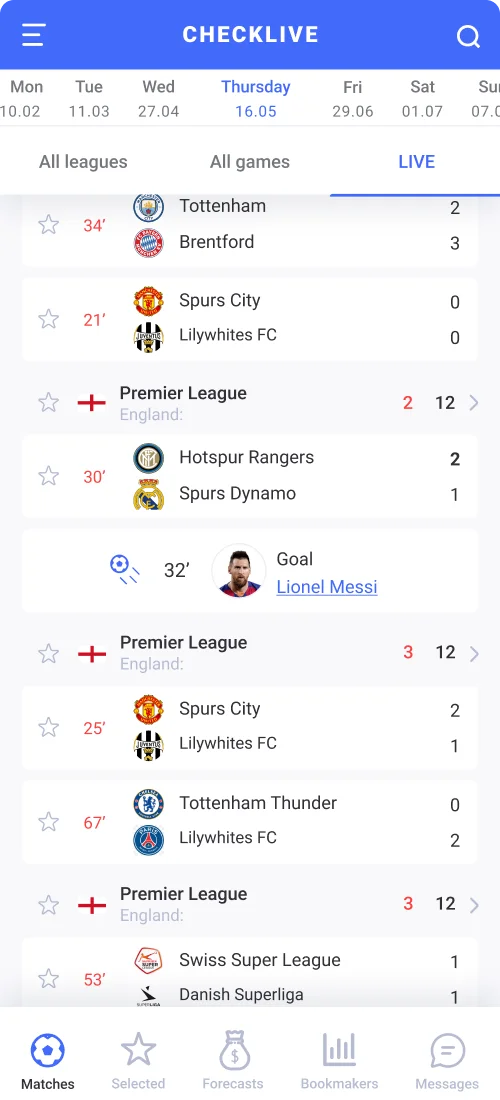
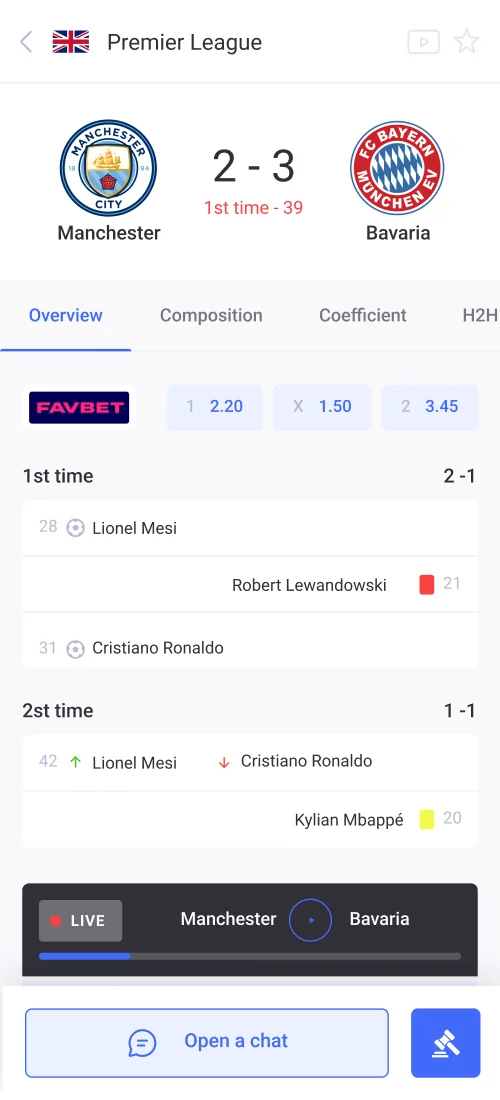
2. High-Density Real-Time Status Scanning & Thumb Navigation: The CheckLive Case Study
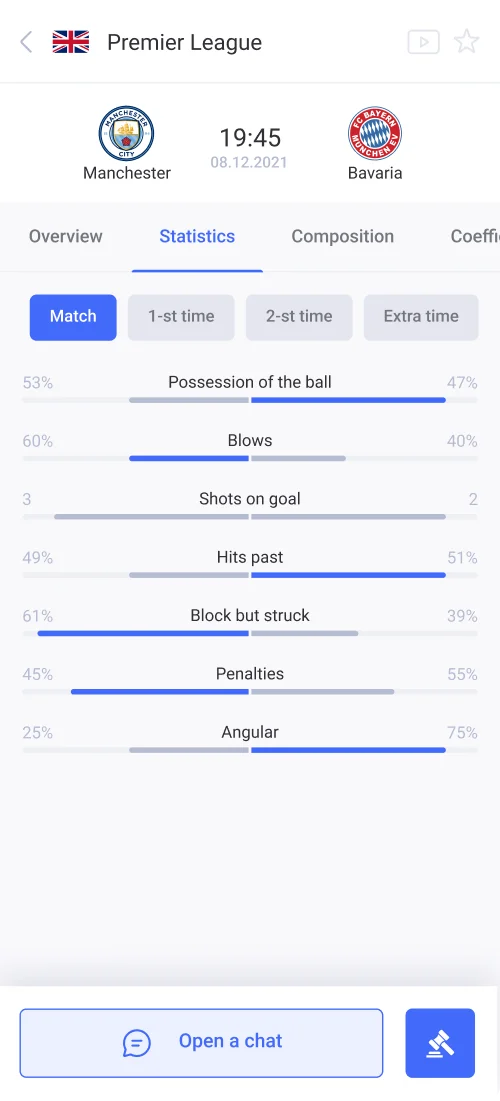
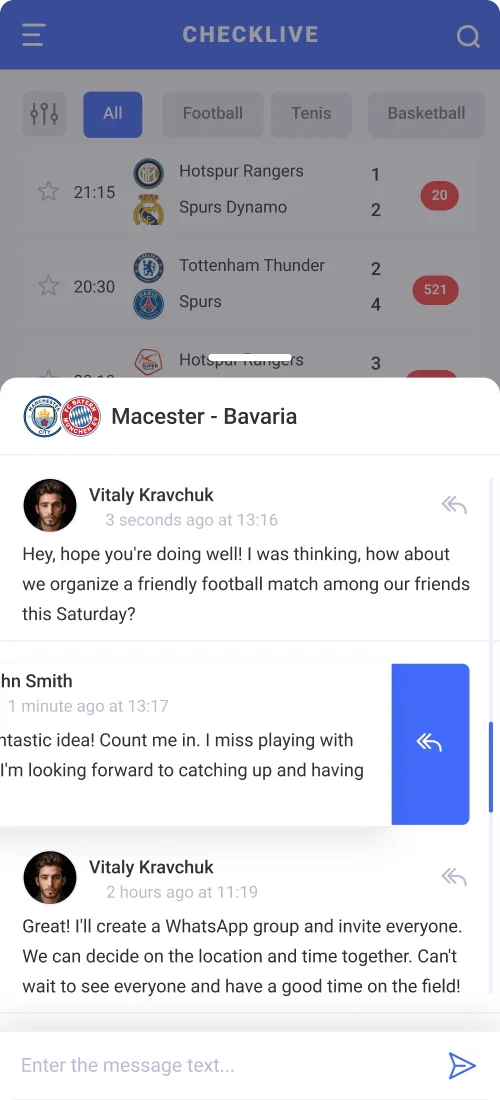
A critical challenge in real-time mobile operations is presenting dense live telemetry—active timers, status badges, comparative progress bars, and instant chat channels—on a 375px screen without cognitive overload. The user must distinguish an active live event from completed or scheduled items in under one second.
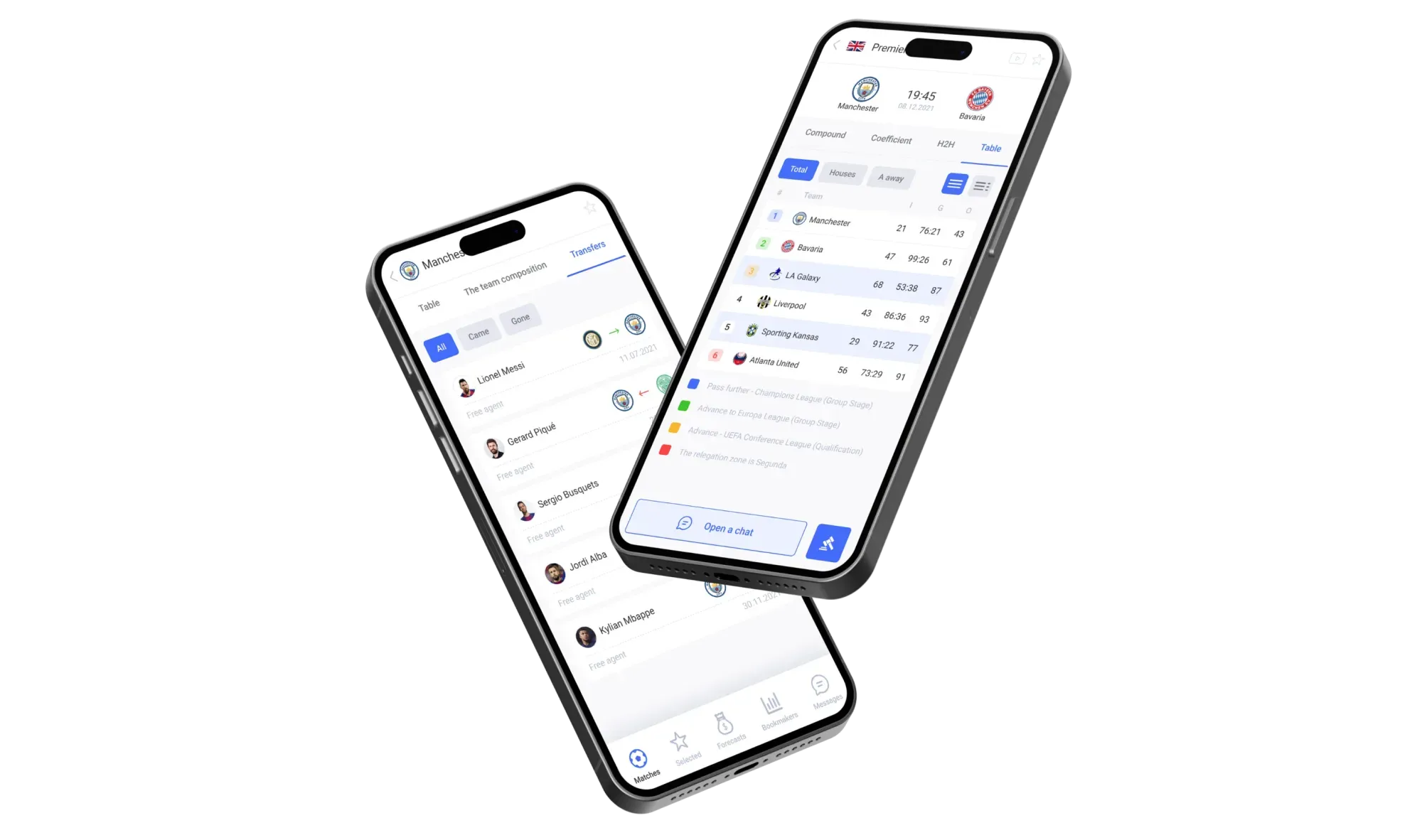
We engineered this exact high-contrast visual scanning system in the CheckLive mobile app. To ensure instant readability during fast-moving live events, we anchored a 5-tab bottom navigation bar (`Matches / Selected / Forecasts / Bookmakers / Messages`) in the Thumb Zone, implemented high-contrast chronological event timelines and comparative metric bars, and placed a sticky `Open a chat` action button at the bottom of the screen that launches a slide-up live discussion drawer with swipe-to-reply gestures:
One-Tap Photo Capture & Barcode Scanning: Accelerating Cargo Processing
The on-screen QWERTY keyboard is the #1 bottleneck in field operations. Forcing a driver or warehouse technician to type a 14-digit consignment number or manual defect log guarantees a 15% typo rate and dock bottlenecks. We replace typing with camera vision, hardware sensors, and structured numeric inputs.
1. Continuous Batch Barcode/QR Scanning & Tamper-Proof EXIF Watermarking
We turn the smartphone camera into an industrial-grade data terminal:
Continuous Batch Scanning: When scanning 50 parcels or pallet labels, the worker never taps "Scan Next" between items. The camera viewfinder stays active, confirming each barcode read with an instant audio beep, green frame flash, and haptic pulse while automatically tallying items against the manifest.
Tamper-Proof Proof of Delivery (PoD): When photographing sealed trailer doors, scale tickets, or damaged cargo, the app disables gallery uploads to prevent fraud. Photos must be captured live through the in-app camera, which automatically burns an immutable overlay onto the image containing GPS coordinates, server-synced timestamp, driver ID, and order number.
2. Frictionless Camera Capture & Two-Tier Numeric Input: The Wrieat Case Study
When field inspectors, lab technicians, or operators need to log quantitative metrics alongside visual evidence (weight, moisture, temperature, or composition), the interface must combine one-tap camera capture with clean numeric fields and progressive disclosure.
We designed this exact rapid camera-and-metric logging workflow in the Wrieat mobile app. Instead of overwhelming the user with a 20-field spreadsheet, the workflow pairs one-tap camera capture and a high-visibility daily progress ring on the main dashboard with a streamlined 4-field primary numeric input view, keeping secondary laboratory parameters neatly tucked inside an expandable drawer:


Case Study: How the JetAgro Grain Logistics App Saves 40 Minutes Per Haul
To see how these architectural principles translate into bottom-line P&L impact, let's examine JetAgro—an Uber-style agricultural grain logistics platform we designed from the ground up to connect farmers, certified grain elevators, and commercial grain truck drivers.
Manual Phone/Messenger Dispatch & Paper Manifests vs. Custom Offline-First Field App (30-Truck Fleet)
- Time Lost Finding Field Pickups & Elevator Queues: 45 minutes per haul (450 fleet idle hours/mo)
- Direct Fleet Idle Cost (Fuel & Driver Hours): −$10,800/mo in unproductive downtime
- Lost or Illegible Paper Consignment Tickets: −$2,600/mo in delayed billing and weight disputes
- Manual Telephone Dispatch Payroll: 4 full-time dispatchers manually calling drivers ($1,500/mo extra)
- Real-Time GPS & Tonnage Visibility: 0% (accounting receives paper tickets 3–5 days late)
- Time Saved Per Haul: 40 minutes reclaimed (pinned GPS field coords, elevator queue visibility)
- Direct Fleet Downtime Savings: +$9,600/mo in reclaimed vehicle and driver capacity
- Extra Hauls Completed (+15% Fleet Utilization): +$4,050/mo net margin without buying new trucks
- Lost Tickets & Moisture/Weight Entry Errors: Eliminated via mandatory field validation & Offline-First sync queue
- Invoice & Settlement Speed: Instant upon grain elevator unloading (3 seconds)
Across a 30-truck operation, saving 40 minutes per haul and eliminating disputed paper scale tickets recovers the entire $11,500 custom mobile app investment in just 25.3 days.
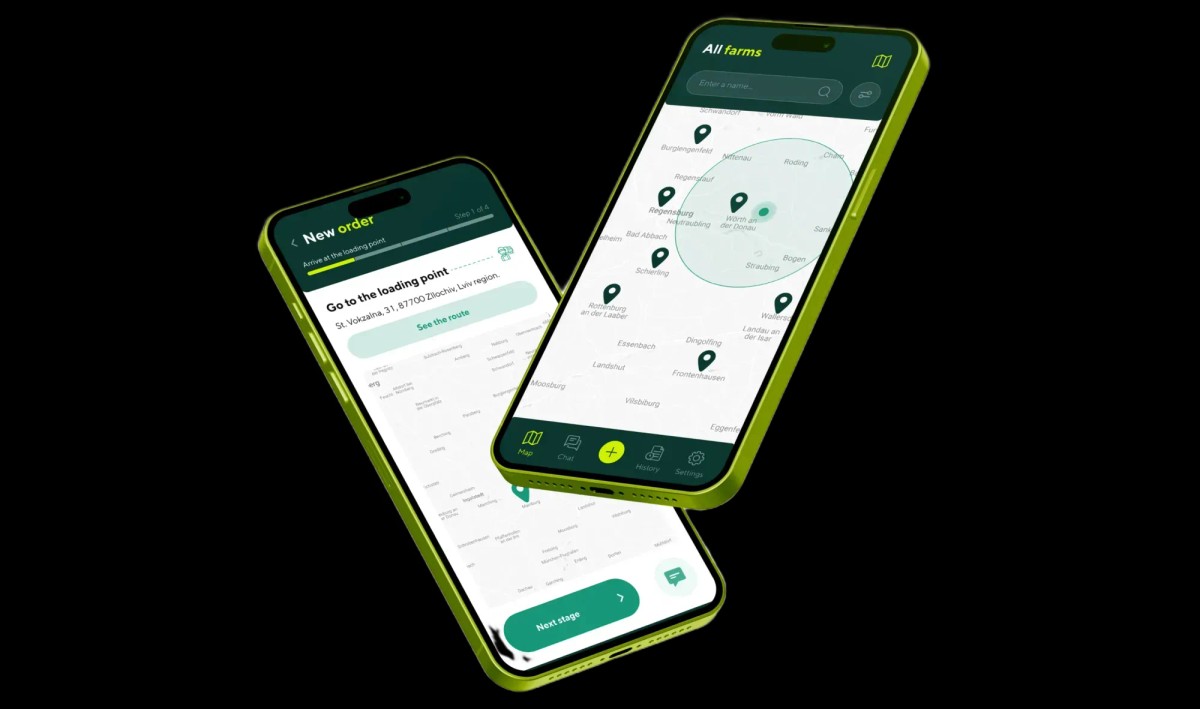
1. Dual-Role Architecture in JetAgro: Driver Black Edition UI & Farmer Dispatch Terminal
When designing JetAgro, we solved the core bottleneck of harvest logistics: farmers losing hours telephoning carriers, and grain truck drivers navigating at night by vague verbal directions only to sit in 4-hour queues at congested grain elevators.
We engineered two specialized role workflows with instant account switching:
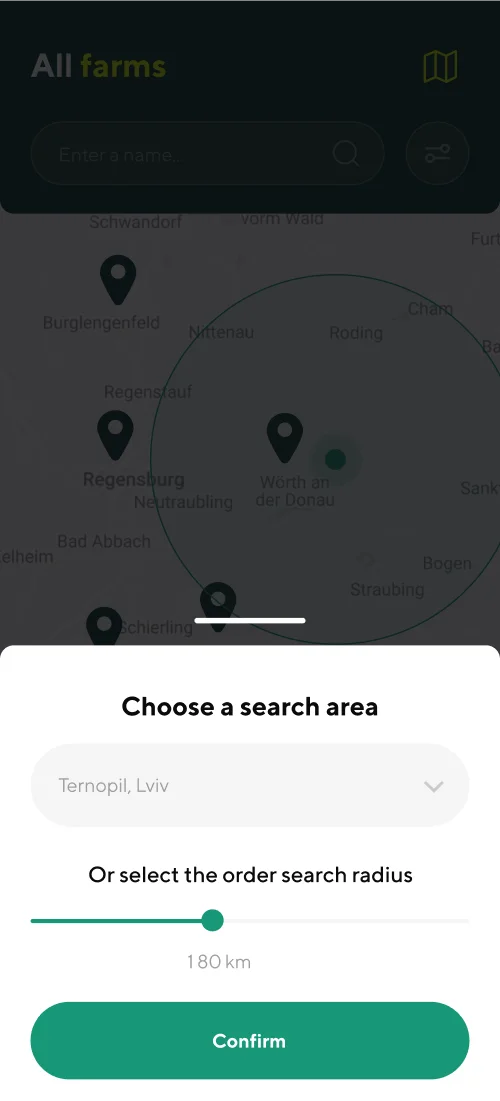
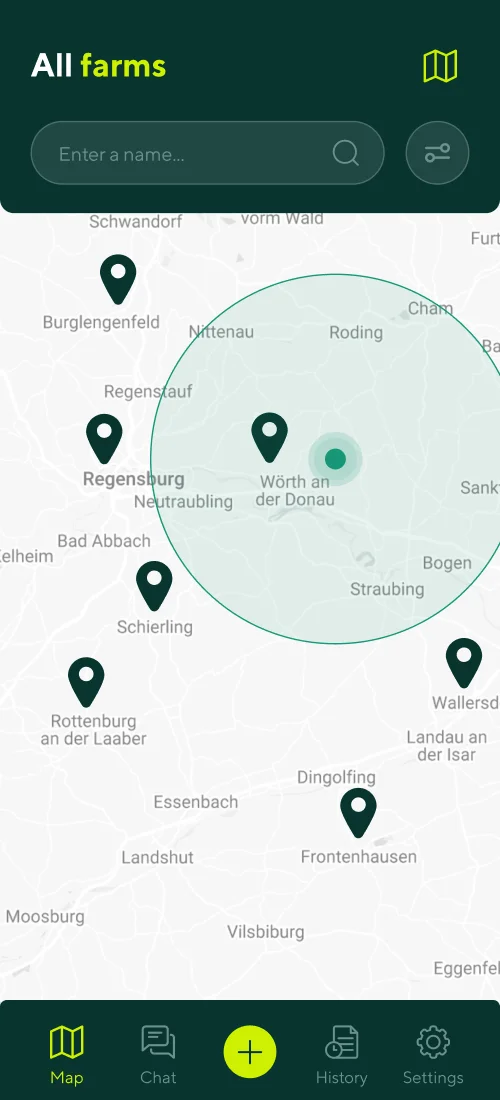
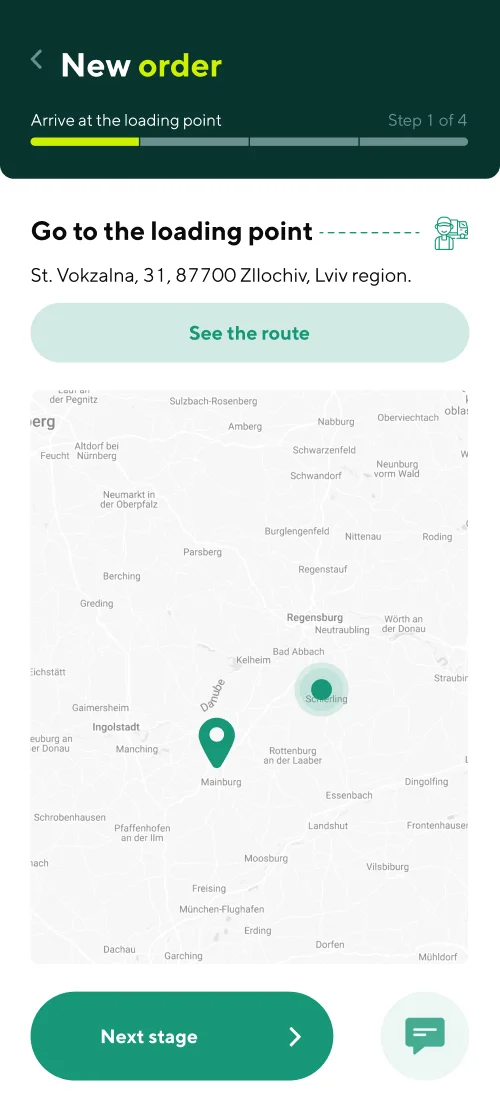
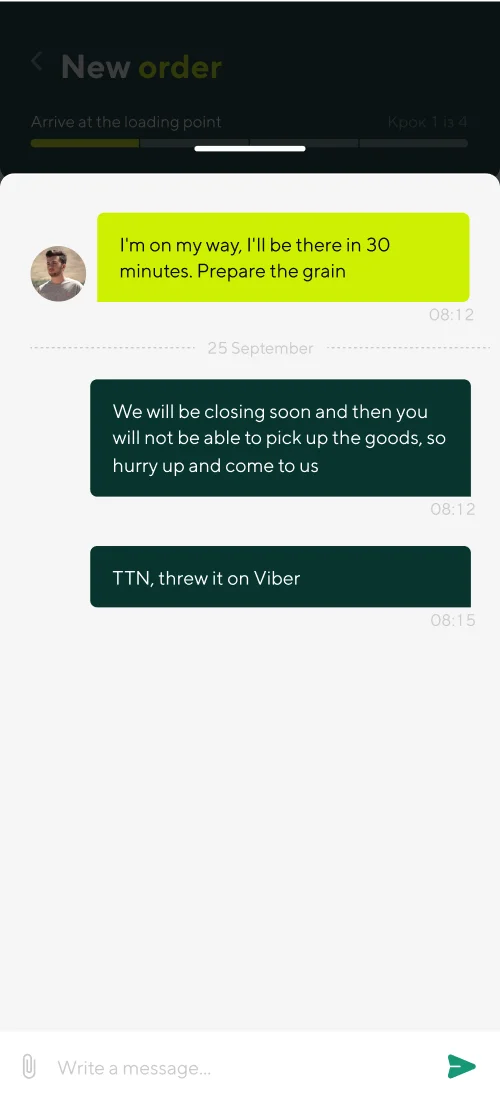
For the Grain Truck Driver (Carrier Portal): We crafted a dedicated Dark Edition UI with high-contrast neon green accents on deep black backgrounds to prevent night-blindness inside the cab. Drivers adjust their job search radius up to 180 km with a single oversized slider, filter loads by crop and rate per ton, accept an offer or submit a counter-bid per ton in one tap directly inside the order chat, and launch turn-by-turn GPS navigation to the exact field pickup pin.
For the Farmer & Agronomist: We built an interactive directory of certified grain elevators with live queue and capacity filters, a step-by-step order wizard capturing grain moisture and impurity specs, live GPS tracking of approaching trucks, and rapid authentication via Diia.Signature and a 4-digit PIN:
2. Generate Your Field App Screen Specification in 2 Minutes
If you are planning to digitize your fleet, courier network, field service technicians, or agricultural operations, skip the 100-page theoretical document. Use our interactive Idea-to-Screens Mobile Architecture Generator to map out your user roles, offline sync flows, and exact MVP screen list.
Key Takeaways
Ready to build a rugged field app your drivers and technicians will actually adopt?
Standard consumer UI patterns fail in the field: 80,000-lux sunlight, cab vibration, heavy work gloves, and cellular dead zones require rugged industrial UX engineering.
An Offline-First architecture powered by local embedded databases (SQLite / WatermelonDB / CoreData) and a Transactional Outbox Queue guarantees 0% data loss without 4G.
Oversized 56–64 dp touch targets in the Natural Thumb Zone, WCAG AAA (7:1+) contrast, and continuous camera/barcode scanning cut stop completion times from 6.5 minutes to 45 seconds.
As proven in the JetAgro grain logistics platform, a purpose-built driver app saves 40 minutes per haul and pays back its entire build cost in under a month.