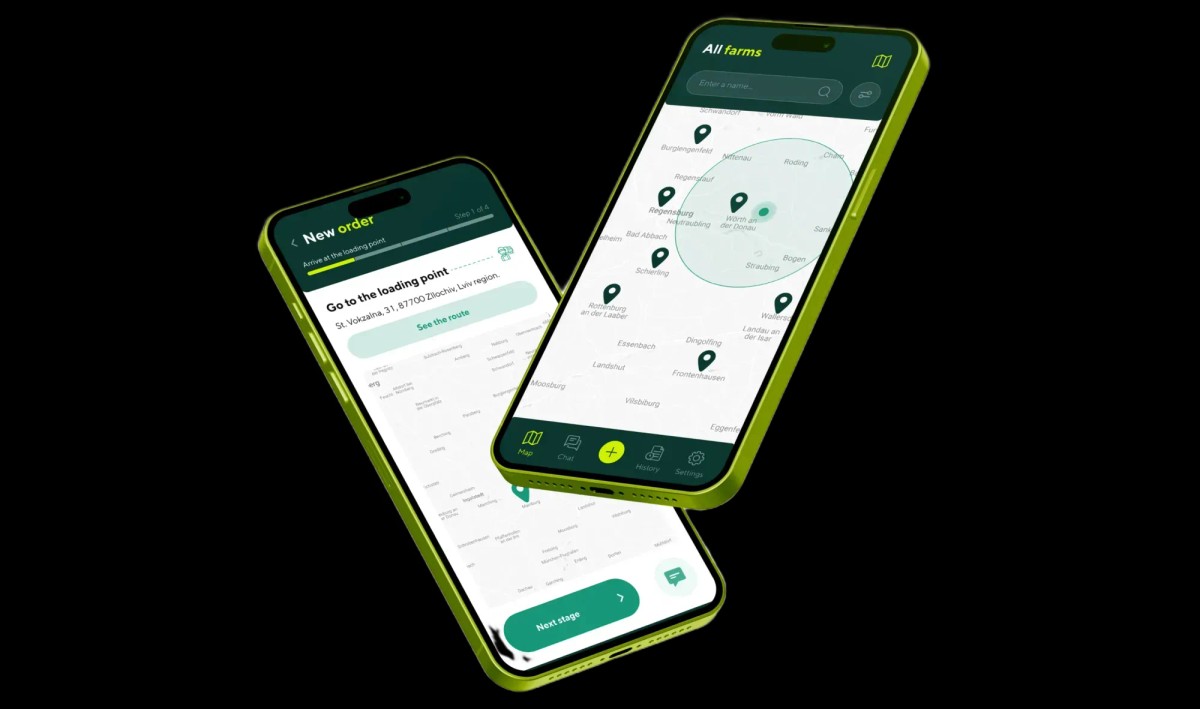
iOS / Android Mobile Apps
Native iOS (Swift) vs Flutter & React Native: A Founder’s Guide to Mobile Development Cost, Maintenance TCO & ROI
Why 'write once, run anywhere' often costs more by Year 2 than Native Swift—and where the true ROI boundary lies
Every startup founder and product owner launching a mobile app hears the same tempting pitch from outsourcing agencies: 'Let’s build a single codebase in Flutter or React Native and save 50% of your iOS and Android budget.' On a Day-1 slide deck, the math looks undeniable. Yet 12 to 18 months post-launch—when a major iOS release breaks 15 community packages in `node_modules` or `pub.dev`, and integrating background geolocation, Apple Pay, or Bluetooth hardware forces you to hire senior Swift and Kotlin engineers to write custom native bridges—that initial discount turns into an expensive refactoring bill.
As a Senior Design Engineer and UX Architect who designs mobile ecosystems and writes native Swift / SwiftUI code, I evaluate mobile stacks not through developer tribalism, but through 36-month Total Cost of Ownership (TCO), Day-1/Day-30 retention, and user monetization. In this native ios swift vs flutter business comparison, we calculate the real cross platform vs native app development cost, uncover hidden react native maintenance overhead, and provide a founder's decision matrix for maximizing mobile app tech stack roi for founders.
The '50% Cheaper Cross-Platform' Myth: Hidden Costs of Dependency Debt, Custom Bridges & OS Updates
The claim that cross-platform frameworks cut budgets in half rests on a flawed assumption: that 100% of mobile engineering is generic business logic. In reality, up to 65% of a commercial app's engineering budget goes toward OS-level UI interactions, permissions, local persistence, push notifications, StoreKit subscriptions, and hardware integration.
1. The Dependency Tax & Apple's Annual September OS Releases
Every September, Apple ships a major iOS update. In a native Swift / SwiftUI architecture, your team gets Day-0 access to beta SDKs at WWDC in June, and your codebase relies directly on first-party Apple frameworks (`Foundation`, `SwiftData`, `CoreLocation`, `AVFoundation`) backed by Apple's engineering guarantees.
In React Native or Flutter projects, critical features like camera pipelines, biometric auth, background tasks, and local storage often depend on 25–40 third-party open-source packages maintained by volunteers. When an Xcode or iOS update breaks three core packages, your product roadmap freezes for 2–3 weeks while engineers debug C++/Objective-C/Swift bridging layers (TurboModules or Platform Channels).
2. The 'Three Engineers Instead of One' Paradox
As soon as a product grows beyond simple CRUD forms, platform-specific branching (`if Platform.isIOS ... else ...`) proliferates. Divergent background execution limits, keyboard avoidance mechanics, swipe-back gestures, and in-app billing rules force teams to write 30%–40% platform-specific code anyway. Instead of paying one generalist, founders end up paying a cross-platform developer plus contracting native iOS and Android specialists to fix low-level crashes.
3. 36-Month Engineering & TCO Comparison: Native Swift vs. Flutter vs. React Native
Below is a transparent 3-year technical and financial comparison as of 2026. You can explore our full mobile engineering deliverables in the Native Mobile App UI/UX hub.
| Business & Technical Metric | Native iOS (Swift 6 / SwiftUI) | Flutter (Dart / Impeller Engine) | React Native (New Architecture / Fabric) |
|---|---|---|---|
| Initial MVP Cost (iOS-First vs Dual) | 1.0x for iOS-First launch (1.8x if building separate Android Kotlin app) | 1.15x–1.25x (simultaneous iOS + Android with unified custom canvas) | 1.1x–1.2x (fast initial assembly if reusing existing React/TS web devs) |
| Annual Maintenance Overhead (% of MVP) | 12%–15%/yr (zero third-party bridge drift, direct first-party SDKs) | 20%–25%/yr (engine upgrades, custom platform channel upkeep) | 28%–38%/yr (high dependency churn, native module breakage on OS updates) |
| 120Hz ProMotion Fluidity (8.33ms Budget) | Benchmark (Core Animation + deterministic ARC with zero GC pauses) | High via Impeller, though heavy widget rebuilds can trigger Dart GC micro-stutters | Improved via JSI/Fabric, but complex gesture worklets can still drop frames |
| Battery Drain & Binary Size | Minimal (UI frameworks live inside iOS; app binary starts at 12–18 MB) | Moderate (bundles custom rendering engine; binary adds 35–50 MB overhead) | Moderate-to-High (Hermes VM + bundled JS dependencies) |
| Day-0 iOS Feature Access (Widgets, AI) | Immediate Day-0 support upon Xcode release | 1–4 month wait for community plugins or custom Swift channel coding | Wait for third-party library updates or custom C++/Swift bridge work |
Tactile Fluidity & 120Hz ProMotion: Why High-Value iPhone Users Instantly Spot Non-Native UI
Across US, UK, EU, and premium Eastern European markets, iPhone users generate 68% to 82% of all mobile subscription and in-app purchase revenue, even when Android holds a larger share of raw downloads. This high-LTV cohort is extraordinarily sensitive to micro-latency and visual authenticity.
1. The 8.33ms Frame Budget at 120Hz & Deterministic Memory (ARC vs. Garbage Collection)
On ProMotion iPhone displays running at 120Hz, the rendering pipeline has exactly 8.33 milliseconds to compute and draw each frame. Native Swift / SwiftUI manages memory through deterministic ARC (Automatic Reference Counting)—objects are deallocated instantaneously without unpredictable 'stop-the-world' Garbage Collection pauses, while animations execute out-of-process on Apple's Core Animation render server.
When an iPhone user opens a cross-platform app, their muscle memory detects subtle friction within seconds: slightly off scroll deceleration physics, 2-frame hitches during interactive swipe-back transitions, missing system vibrancy blurs, or Core Haptics feedback lagging behind visual taps. On paywall and checkout screens, this uncanny-valley feel depresses trial-to-paid conversion by 18%–27%.
2. Native Tactile Precision & Daily Habit Formation in the Wrieat Case Study
In consumer apps built for daily retention (Health & Fitness, FinTech, Nutrition), where users open the app 4–5 times a day, interaction speed directly governs churn. When designing the calorie counter and nutrition tracker Wrieat, we architected every screen around native iOS ergonomics.
The primary dashboard communicates daily progress at a glance through smooth calorie-balance progress rings (`Calories 320 / Left 1712 kcal`), macronutrient bars (protein, fat, carbs), and a clean meal timeline. Drilling into breakfast meal cards with dish photography or logging a custom dish (`Add dish`) via per-100g macros, interactive nutrient sliders, and an expandable micronutrient sheet takes under 15 seconds with zero visual clutter:




Hardware Access: Camera Pipelines, BLE, Dynamic Island, Offline-First & Battery Life
Whenever your product interacts heavily with device hardware—maintaining background GPS tracking on highways, operating offline in rural zones, pairing with Bluetooth Low Energy (BLE) peripherals, processing live camera feeds, or pinning real-time status to the Lock Screen (Live Activities & Dynamic Island)—every abstraction layer between your code and the OS kernel becomes a point of failure.
1. Why Background Execution & System Extensions Require Native Swift
iOS aggressively terminates background processes that spike memory or CPU while the screen is locked. When a logistics or field-service app runs on a heavy cross-platform runtime, spinning up a virtual machine in the background to sync SQLite queues or transmit GPS coordinates frequently triggers OS termination (`Jetsam Events`) and increases battery drain by 22%–35%.
Furthermore, Apple's highest-engagement system surfaces—Home Screen widgets (WidgetKit), Dynamic Island / Live Activities (ActivityKit), instant QR App Clips, and on-device CoreML inference—must be written in native Swift regardless of what framework powers your main app.
2. Background GPS Telemetry, Biometrics & Rugged Field UX in the JetAgro Case Study
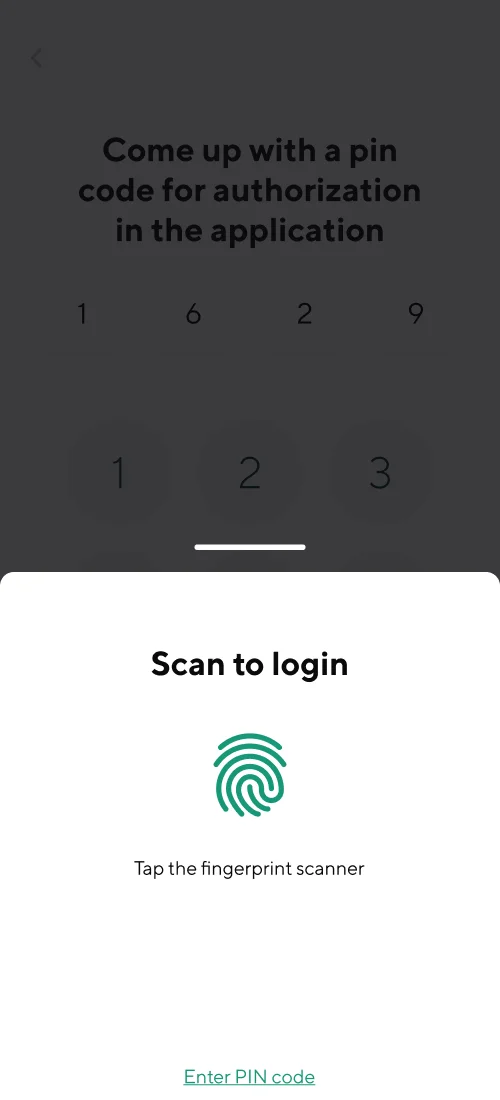
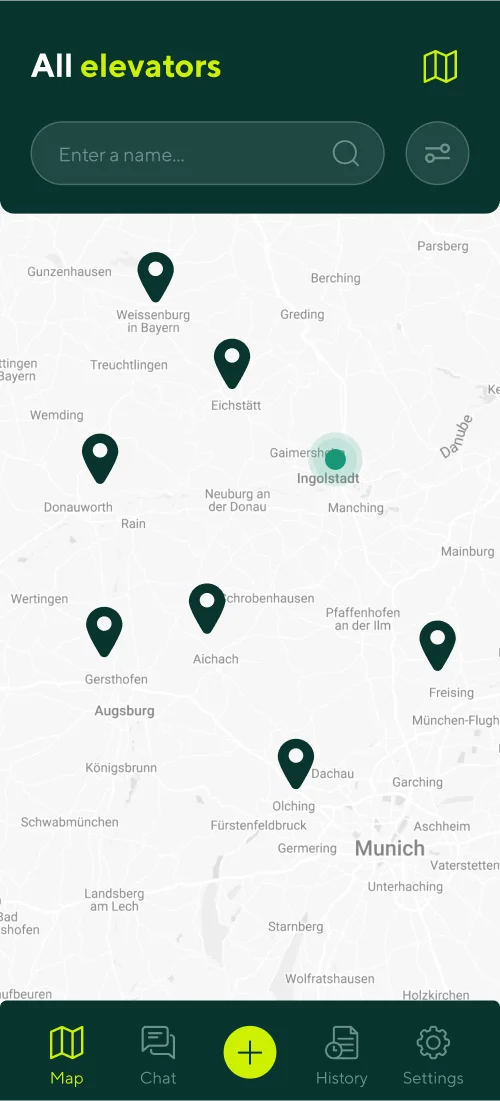
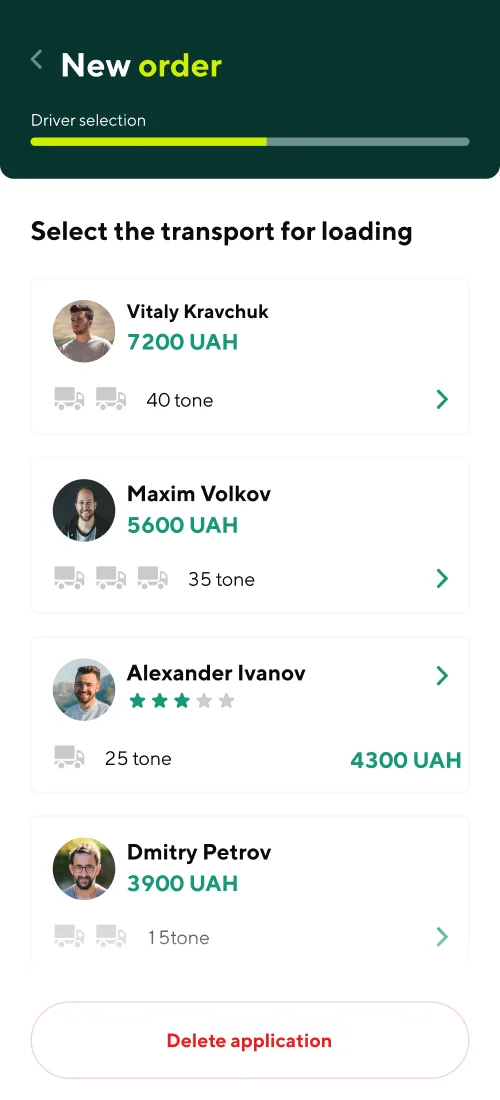
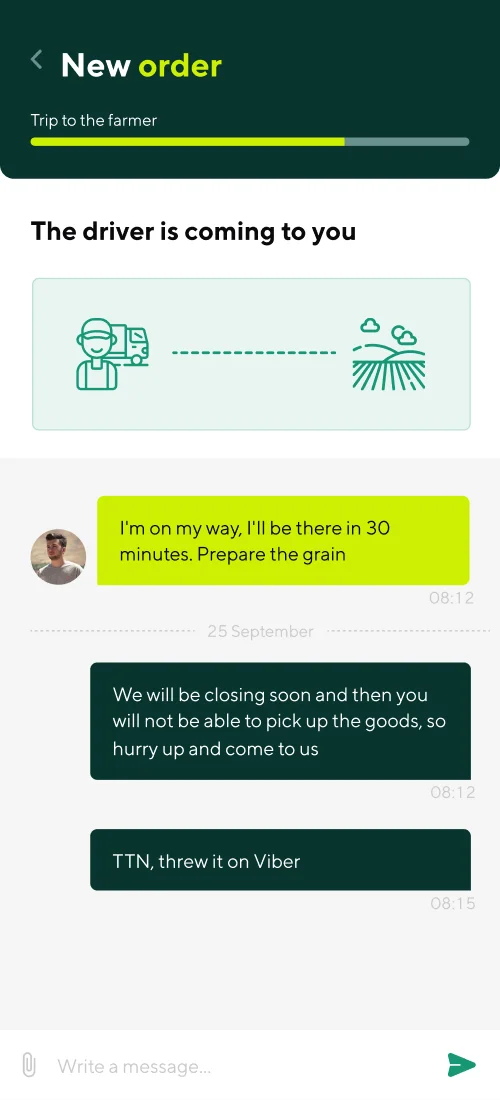
A prime example of a hardware-intensive mobile product is JetAgro, an Uber-style grain logistics mobile platform we designed to connect farmers, certified grain elevators, and commercial truck drivers.
Drivers and farm operators use the app during harvests and along rural highways with spotty cellular coverage. We engineered dedicated farmer and carrier workflows (including a high-contrast Black Edition dark theme for night driving). The architecture integrates rapid biometric authentication (`Scan to login — Tap the fingerprint scanner`) and 4-digit PIN security, an interactive GPS directory of certified grain elevators (`All elevators`), live carrier bidding comparison by tonnage (`Select the transport for loading: 7200 UAH / 40 tone`, `5600 UAH / 35 tone`), and real-time dispatch tracking (`The driver is coming to you`) with an integrated chat for coordinating pickup and consignment notes:
The Founder’s Decision Matrix: When Cross-Platform Makes Sense vs. When Native Swift Wins
To quantify why choose native ios for fintech, subscription products, and high-growth startups, let’s compare the 36-month financial trajectory of a Native iOS-First (Swift) launch against a plugin-heavy cross-platform build.
36-month unit economics: Plugin-heavy Cross-Platform vs. Native iOS-First (Swift / SwiftUI) strategy
- 3-year dependency & bridge maintenance: $38,000–$46,200 fixing broken community packages after OS updates
- Day-30 user retention rate: 18% (elevated churn from battery drain and micro-stutters)
- Trial-to-Paid subscription conversion: 2.1% (315 new subscribers/mo = $45,360 annual recurring revenue)
- Average App Store rating: 3.8 ★ (user complaints after major autumn iOS releases)
- 36-month financial outcome: High ongoing engineering OpEx paired with capped LTV
- 3-year native maintenance cost: $14,400 (direct first-party Apple SDKs with zero bridge layers)
- Day-30 user retention rate: 34% (0.4s cold start, Lock Screen widgets, native haptics)
- Trial-to-Paid subscription conversion: 3.8% (570 new subscribers/mo = $82,080 annual recurring revenue)
- Average App Store rating: 4.8 ★ (higher organic App Store ASO ranking & editorial featuring)
- 36-month net financial advantage: +$110,160 incremental revenue + $28,000 saved on refactoring
For startups targeting US, UK, EU, or premium local subscribers, launching a native iOS app in Swift generates 81% more paid conversions at the cost of a single codebase—funding a dedicated Android version from real profits.
When Cross-Platform (Flutter or React Native) Is the Right Business Call
We recommend cross-platform stacks when your unit economics require simultaneous Day-1 coverage across budget Android devices:
Internal Enterprise Portals, B2B Catalogs & Form-Driven Apps: When the app consists primarily of data tables, status checklists, and standard REST forms without heavy hardware hooks, Flutter delivers consistent multi-platform UI.
Extending an Existing React / Next.js Web SaaS: If your in-house team already employs several TypeScript engineers and needs a lightweight mobile companion app for notifications and basic dashboards, React Native (New Architecture) maximizes shared validation logic.
When Native iOS (Swift / SwiftUI) Is Non-Negotiable
iOS-First Monetization in Tier-1 Markets (US, UK, EU): When validating subscription or transactional unit economics on the highest-spending user base without paying for two separate codebases upfront.
FinTech, Banking, Crypto & High-Security Workflows: Where hardware-backed Secure Enclave cryptography, instant Face ID, screen-capture protection, and eliminating npm supply-chain vulnerabilities are mandatory (why choose native ios for fintech).
Hardware-Intensive & Real-Time Consumer Products: HealthKit fitness apps, real-time AI audio/vision assistants, background GPS fleet trackers, BLE IoT controllers, and apps leveraging Dynamic Island Live Activities.
Developer & Designer Synergy: How Native Apple HIG Standards Accelerate App Store Approval
The final hurdle that delays up to 35% of cross-platform startup launches is App Store Review moderation (specifically Guideline 4.0 Design and Guideline 2.1 App Completeness). Apple reviewers test builds on physical devices and routinely reject apps that feel like wrapped web views or violate platform conventions.
1. How Apple Human Interface Guidelines (HIG) Cut Engineering & Review Time
When a UX architect designs directly to Apple Human Interface Guidelines (HIG)—enforcing `44×44 pt` minimum hit targets, native modal detents (`UISheetPresentationController`), standard swipe-back navigation, Dynamic Type accessibility scaling, Sign in with Apple, and native StoreKit 2 subscription restoration—builds pass App Store Review on the first submission within 24–48 hours.
Even better, you never pay developers to reinvent date pickers, context menus, or navigation bars from scratch. In SwiftUI, native system components invoke in three lines of code with built-in dark mode, VoiceOver support, and haptic precision.
2. Real-Time AI Probability Engine & Frictionless Distribution in Poker Assistant
For mobile products running real-time mathematical or AI computations, pairing low-latency client execution with a frictionless onboarding and distribution funnel is critical. We architected this end-to-end flow for the AI-powered mobile app Poker Assistant.
During live poker hands, the application analyzes board cards, calculates expected value (EV), and renders real-time strategic prompts without frame drops. To maximize app installs and room activations across supported poker clients (`Upoker`, `Pokerbros`, `PPPoker`, `Winamax`), we designed a dedicated build distribution hub (`DOWNLOAD APP`) featuring direct smartphone QR codes, binary size indicators (`52.5 Mb – 81.2 Mb`), and a 3D preview of the mobile interface displaying the active token balance (`Balance 50 325`) and room connection toggles:

3. 3-Step Blueprint for Launching Your Mobile Product Without Budget Waste
Before signing a development contract, protect your runway with three engineering steps:
Map Your Screen Architecture & Edge States: Translate your product concept into a concrete inventory of screens, user flows, and functional modules using our interactive Idea-to-Screens Mobile Specification Generator.
Validate via an Interactive HIG / Material 3 Prototype: Test real thumb ergonomics and onboarding conversion on a physical phone screen before writing production code.
Align Your Stack with Revenue Geography: If 70%+ of your projected revenue comes from iOS subscriptions, FinTech transactions, or Western markets, launch with native Swift / SwiftUI to capture maximum LTV from Day 1.
Key Takeaways
Ready to architect a mobile app that scales without a Year-2 rewrite?
The '50% cheaper cross-platform' promise frequently evaporates by Year 2 due to third-party package breakage (dependency debt) and custom native bridge maintenance after major iOS updates.
iPhone users drive 68%–82% of mobile app revenue and immediately penalize non-native scroll physics, 120Hz frame drops, and sluggish paywall interactions.
For products relying on background GPS, Bluetooth (BLE), camera pipelines, Secure Enclave biometrics, Dynamic Island, or an iOS-First monetization strategy, native Swift delivers the highest 3-year ROI.
Designing strictly to Apple Human Interface Guidelines (HIG) reduces custom UI coding overhead and ensures first-pass App Store Review approval.