iOS / Android Mobile Apps
FinTech & Crypto Mobile App UX: Slashing 68% KYC Onboarding Drop-Off, Passkey Biometrics & Transaction Trust
Why 68% of users acquired at $25–$60 CPI abandon FinTech apps before funding their account
In digital banking, payment platforms, lending, and Web3 crypto wallets, Customer Acquisition Cost (CAC) is among the highest in mobile software—ranging from $25 to $75+ per registered install across the US, UK, and EU. Yet according to industry benchmarks from Signicat (Battle to Onboard), Sumsub, and Onfido, 63% to 68% of prospective users abandon FinTech onboarding during KYC identity verification or initial card linking. That makes fintech mobile app ui ux design first and foremost an unit-economics discipline: preventing paid traffic from leaking out of compliance funnels while maintaining institutional-grade security.
Over 14 years of architecting complex financial interfaces and native mobile applications, I have repeatedly seen engineering teams implement compliance rules (PCI DSS, AML/KYC, 2FA) as brute-force roadblocks—turning account creation into a 14-field interrogation and money transfers into stressful waiting games. In this guide, we examine modern banking app transaction security ux, show how fintech onboarding and kyc ux optimization cuts verification from 4 minutes down to 35 seconds, detail biometric authentication flow design with Passkeys and Haptics, and demonstrate why partnering with a specialized financial mobile app design agency pays for itself within weeks of launch.
Balancing Security and Speed: Where Friction Protects vs. Where It Destroys Conversion
In retail e-commerce, the golden rule is eliminating every ounce of friction between the user and the buy button. In financial and crypto applications, however, zero friction on high-value transfers triggers user anxiety: 'If I can accidentally wire $5,000 with one stray tap, an attacker can drain my wallet just as easily.' High-trust banking app transaction security ux relies on Dynamic / Intentional Friction.
1. The Friction Allocation Matrix: 0.3-Second Speed vs. Deliberate Confirmation
We segment every FinTech user flow into two distinct buckets: high-frequency read/micro-actions (where latency kills retention) and irreversible high-risk capital movements (where deliberate micro-friction prevents costly human error and social engineering).
Explore our full mobile engineering methodology inside the Native Mobile App UI/UX hub.
| FinTech Workflow Stage | Broken UX Pattern (High Churn or Fraud Risk) | Engineered UX Standard (Speed + Visual Trust) | Measurable Business Impact |
|---|---|---|---|
| First Launch (Pre-Deposit Exploration) | Mandatory passport/SSN wall on Screen 1 before showing product value | Progressive Onboarding: 1-tap Apple/Google sign-in + interactive rate/wallet preview before KYC | +42% to +55% higher KYC initiation rate |
| Recurring App Login (Daily Session) | Typing 12-character passwords + waiting 40s for SMS OTP codes | Device Biometrics (Face ID) & Passkeys (FIDO2): 0.4s login via hardware Secure Enclave | 2.3x increase in DAU/MAU session frequency |
| Routine Peer/Card Payments (< $100) | 3 consecutive confirmation modals + manual CVV entry | Thumb-Zone Slide-to-Pay gesture + instant Face ID with zero keyboard popups | Checkout time drops from 28s to 2.5 seconds |
| High-Value Wire or Crypto Withdrawal ($1,000+) | Instant 1-tap execution without network/recipient checksum review | Intentional Friction: summary sheet (network TRC20/ERC20, net fee, highlighted address) + 1.5s Long-Press hold | −78% reduction in misrouted funds & support tickets |
| Settlement & Blockchain Confirmation | Frozen loading spinner or cryptic `Error 502` alert | Optimistic Stepper UI: 'Initiated → Clearing Network → Settled' with live timestamp & receipt | Eliminates duplicate transfer attempts & panic churn |
2. Instant Thumb-Zone Loan Math & Fee Transparency (375px): Kredit24 Case Study
When a mobile user opens a lending or consumer finance service, hidden fees and forced registration forms before seeing real repayment math destroy trust immediately.
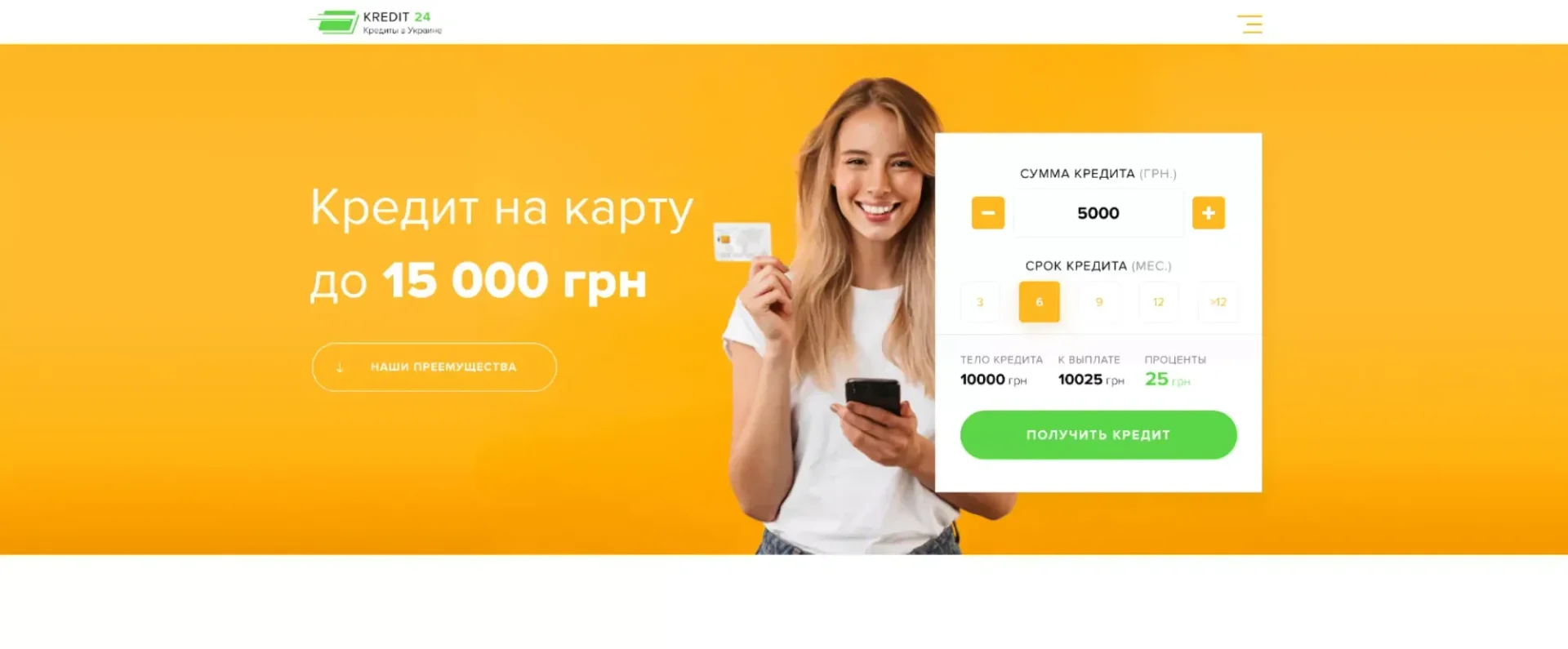
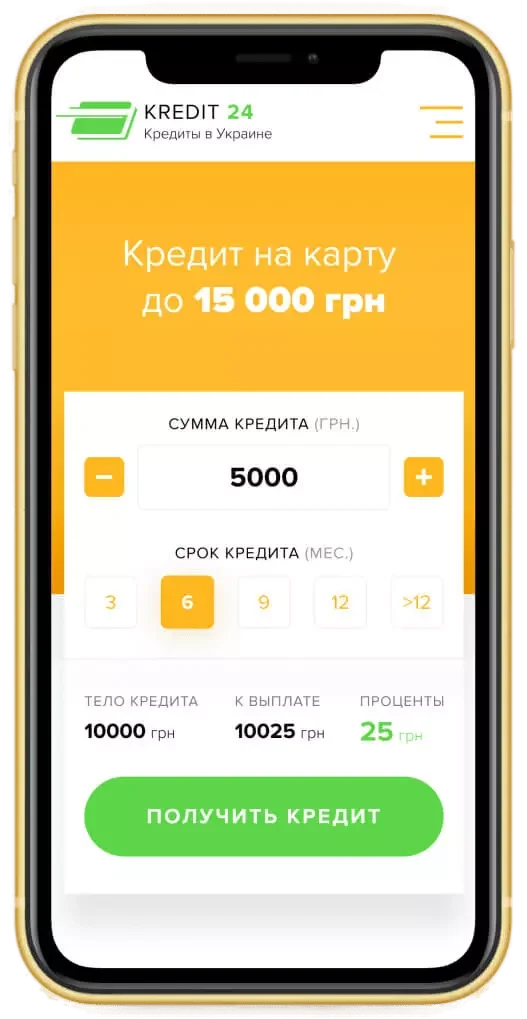
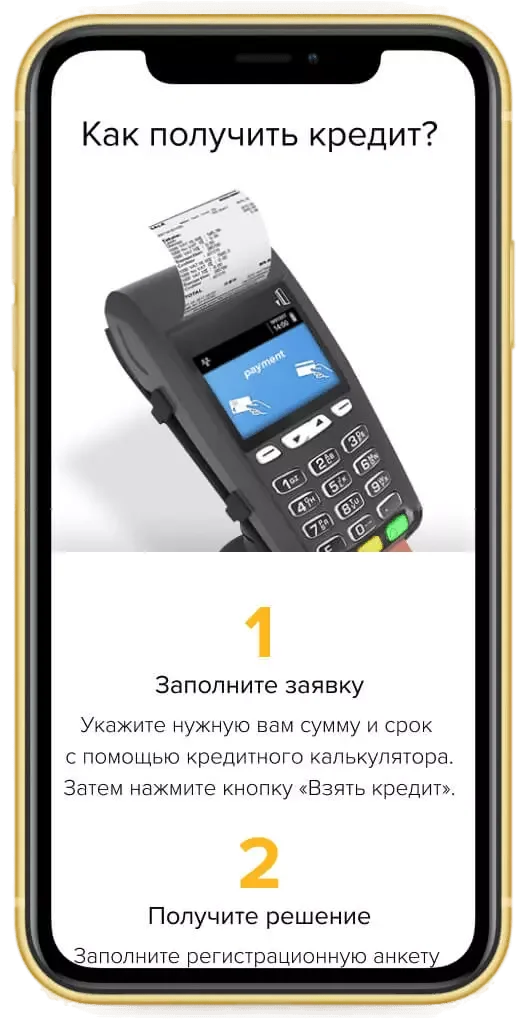
We solved this transparency challenge in Kredit24, an online loan comparison and lending platform designed with a strict Mobile-First (375px) architecture. Right on the hero screen, we placed an interactive loan calculator with ergonomic touch sliders positioned in the Thumb Zone: as users adjust principal amount and term length, the UI instantaneously recalculates principal, interest, and total repayment with zero hidden fine print. Below, verified lending institutions are structured into compact mobile comparison cards displaying interest rates, limits, and eligibility criteria for one-tap application:


Optimizing KYC Onboarding: Camera OCR, NFC Chip Reading & Passive Liveness Without Manual Typing
Regulatory KYC (Know Your Customer) compliance is mandatory under FCA, FinCEN, SEC, and EU MiCA frameworks—but poorly designed verification flows torch acquisition budgets. Industry data from Sumsub and Signicat shows that 70% of users abandon onboarding flows taking longer than 3 minutes, and forcing a user to re-upload a rejected document triples (3x) the likelihood of permanent drop-off.
1. 4 e-KYC UX Patterns That Compress Verification from 4 Minutes to 35 Seconds
To turn regulatory compliance into a high-converting flow, we architect fintech onboarding and kyc ux around four engineering principles:
Zero Manual Data Entry (OCR + NFC Biometric Chip Read): Forcing users to type passport numbers, issue dates, and residential addresses on a smartphone keyboard guarantees a 50% drop-off. We trigger the camera immediately with real-time OCR / MRZ optical scanning and NFC passport chip reading (plus 2-tap digital ID sharing where supported), auto-populating every form field in 2 seconds.
Passive Liveness Detection Over Active Head-Turning Tests: Legacy liveness checks ask users to blink, smile, or rotate their head for 10–12 seconds, causing performance anxiety and high false-rejection rates. Modern biometric authentication flow design uses Passive Liveness: the user simply looks at the screen for 1.5 seconds while background AI validates 3D facial depth and anti-spoofing.
Real-Time Camera Coaching Over Delayed Rejections: Instead of accepting a blurry photo and sending a 'Verification Failed' push notification an hour later, the camera overlay provides instant live feedback ('Move away from direct glare', 'Hold steady—capturing automatically') and snaps the frame the millisecond focus locks.
Tiered KYC & Progressive Limits: Do not demand utility bills or source-of-wealth documents on Day 1. Unlock a Tier-1 wallet ($500 limit) immediately after a 30-second ID check, triggering enhanced due diligence only when transaction volume crosses regulatory thresholds.
2. Institutional Identity Verification (QBS ID), Custody & Crypto-Fiat Exchange: QBS Case Study
For multi-product FinTech and crypto ecosystems, identity verification and security architecture must inspire confidence across both retail users and institutional compliance teams.
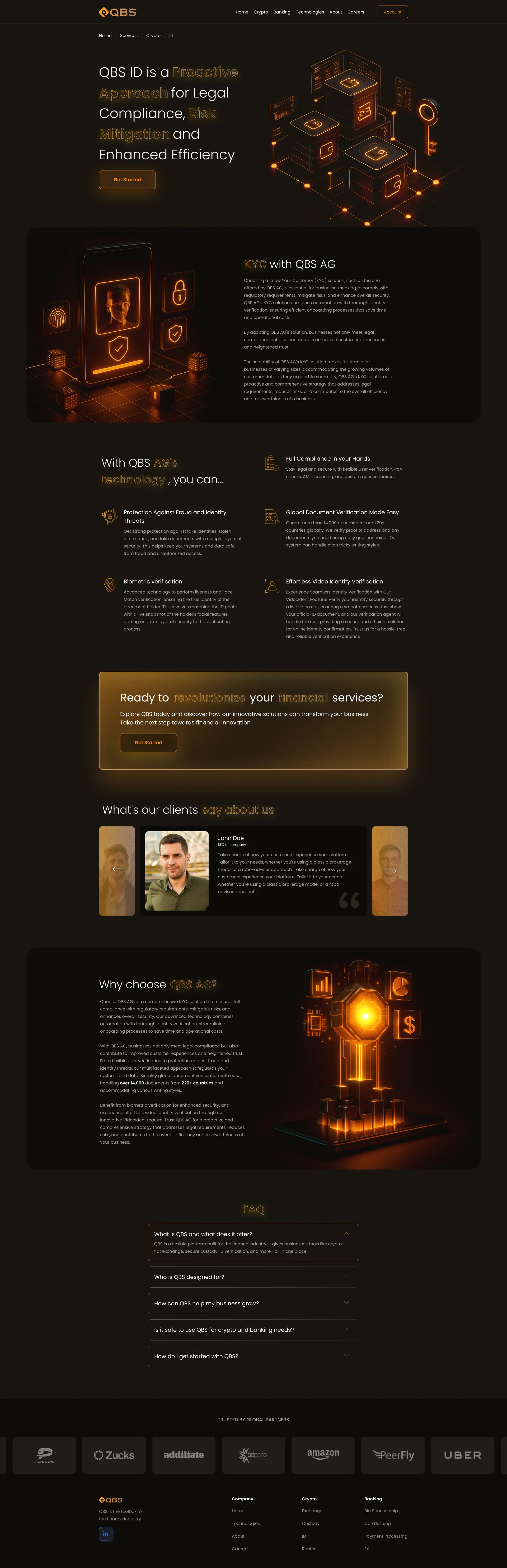
A prime example is QBS, a comprehensive FinTech and crypto platform we designed and built. After exploring 5 visual concepts, we crafted an institutional dark-and-gold 3D aesthetic uniting banking infrastructure (BIN Sponsorship, Card Issuing, Payment Processing, FX) with four specialized crypto verticals: institutional Custody, OTC Exchange, Smart Order Router, and QBS ID identity verification. In the top viewport of the QBS ID product page, visitors immediately see the core compliance value proposition (`QBS ID is a Proactive Approach for Legal Compliance, Risk Mitigation and Enhanced Efficiency`), a gold 3D illustration of cryptographic vault nodes, and the `KYC with QBS AG` section featuring a 3D smartphone with facial biometric recognition and fingerprint security:
Face ID / Touch ID Confirmation & Tactile Haptic Feedback for Instant Payment Confidence
The exact moment a user authorizes a transfer or signs a blockchain transaction is the emotional peak of the FinTech experience. If the screen hesitates for even 1.5 seconds after tapping 'Send $1,200', users fear double charges or lost funds. World-class biometric authentication flow design pairs hardware cryptography with immediate physical tactile confirmation.
1. Passkeys (FIDO2), Apple Secure Enclave & Haptic Engine Choreography
Why have top neobanks and crypto wallets replaced SMS OTP codes with native biometrics and Passkeys?
Eliminating SMS OTP Latency & SIM-Swap Risk: Waiting 15–45 seconds for a 6-digit SMS code breaks checkout momentum, fails during international travel, and exposes users to SIM-swapping attacks. Anchoring authentication to Passkeys (FIDO2 / WebAuthn) stored inside the device's hardware Apple Secure Enclave or Android StrongBox completes cryptographic signing in 0.4 seconds with zero phishing surface.
Tactile Haptic Feedback as a Physical Receipt: On iOS (`UINotificationFeedbackGenerator`) and Android, every transaction state is paired with distinct Taptic Engine patterns. A crisp double-tap pulse (`.success`) synchronized with a vector checkmark gives the user's nervous system immediate physical reassurance that funds are safely sent, while a sharp triple-pulse (`.error`) signals insufficient balance before the user even reads the error banner.
The 5-Second Undo Buffer: For peer-to-peer transfers and bill payments, displaying a 5-second 'Cancel Transfer' countdown bar at the bottom of the screen eliminates tap anxiety and paradoxically speeds up transaction completion.
2. Frictionless In-App Currency Packages & Multi-Rail Checkout (Crypto / Google Pay / Cards): Poker Assistant Case Study
Real-time AI mobile services require even faster payment execution, as users frequently top up in-app balances mid-session.
We engineered this high-speed monetization flow for Poker Assistant, an AI-powered mobile app that calculates real-time Expected Value (EV) and optimal table decisions. To ensure players can top up in seconds without leaving their game flow, we designed QR-code instant onboarding, a `BUY COUPON` showcase (`1000 VAV — 10$` up to `100000 VAV — 750$`), and the mobile `Buy points` screen (`Select value` / `I have a coupon` tabs) featuring volume discount badges (`5% OFF`, `10% OFF Popular`, `20% OFF`, `30% OFF Best value`) before seamless checkout via cryptocurrency (USDT/BTC), Google Pay, or Visa/MasterCard:

Spending Analytics & Portfolio Balances: Interactive Charts Readable in 1 Second
Users open banking, portfolio, and analytics apps 3–5 times a day, yet average session duration is just 18–25 seconds. Nobody wants to decipher dense accounting spreadsheets on a 6-inch screen—users want instant clarity on available balance, monthly cash flow, and net ROI.
Legacy FinTech Onboarding vs. Engineered UX (OCR/NFC KYC + Passkeys + 1-Tap Funding) on a $15,000/mo Paid UA Budget
- Registration & KYC Funnel Abandonment: 68% drop-off (2,040 of 3,000 installs churn before verification)
- Install-to-First-Deposit Conversion (FTD): 14.0% (only 420 users fund their account)
- Effective Funded Customer Acquisition Cost: $35.71 per funded user (7.1x higher than top-of-funnel CPI)
- Manual Compliance & Support Ticket Overhead: $4,500/mo resolving blurry IDs and stuck transfer tickets
- Monthly Wasted Media Spend: $10,200/mo burned on installs that abandon KYC
- 35-Second KYC Completion (OCR + Passive Liveness): 74% first-attempt verification pass rate (up from 32%)
- Install-to-First-Deposit Conversion (FTD): 34.0% (1,020 funded active accounts every month)
- Effective Funded CAC Reduction: Drops from $35.71 to $14.70 (−58.8% on identical ad auctions)
- Compliance & Support Overhead Savings: −$3,100/mo saved via live camera coaching & status trackers
- Monthly Net Cohort LTV Uplift: +$54,100/mo (+$649,200 annually)
Slashing KYC onboarding drop-off from 68% to 26% unlocks 600 additional funded accounts every month without spending an extra dollar on paid user acquisition.
1. High-Density Financial Data Visualization on 375px Viewports
When architecting analytics dashboards for banking and crypto apps, we enforce three precision UI rules:
Tabular Monospace Numerals (`font-variant-numeric: tabular-nums`): Live crypto tickers, account balances, and percentage yields use fixed-width numeral glyphs so figures never jitter horizontally during real-time WebSocket updates.
Single-Thumb Chart Scrubbing: Instead of tiny tap targets, users press and slide a finger across performance curves—updating exact historical balances at the top of the screen accompanied by subtle selection haptics (`UISelectionFeedbackGenerator`).
Enriched Merchant Logos & Category Bars: Cryptic raw statement strings (`POS TERM 48291`) are transformed into clean merchant logos, category tags, and visual budget progress bars.
2. High-Density Mobile ROI Analytics & Coefficient Dynamics Charts: CheckLive Case Study
Presenting real-time yield, ROI percentages, and historical win/loss performance on a compact smartphone screen requires strict visual hierarchy.
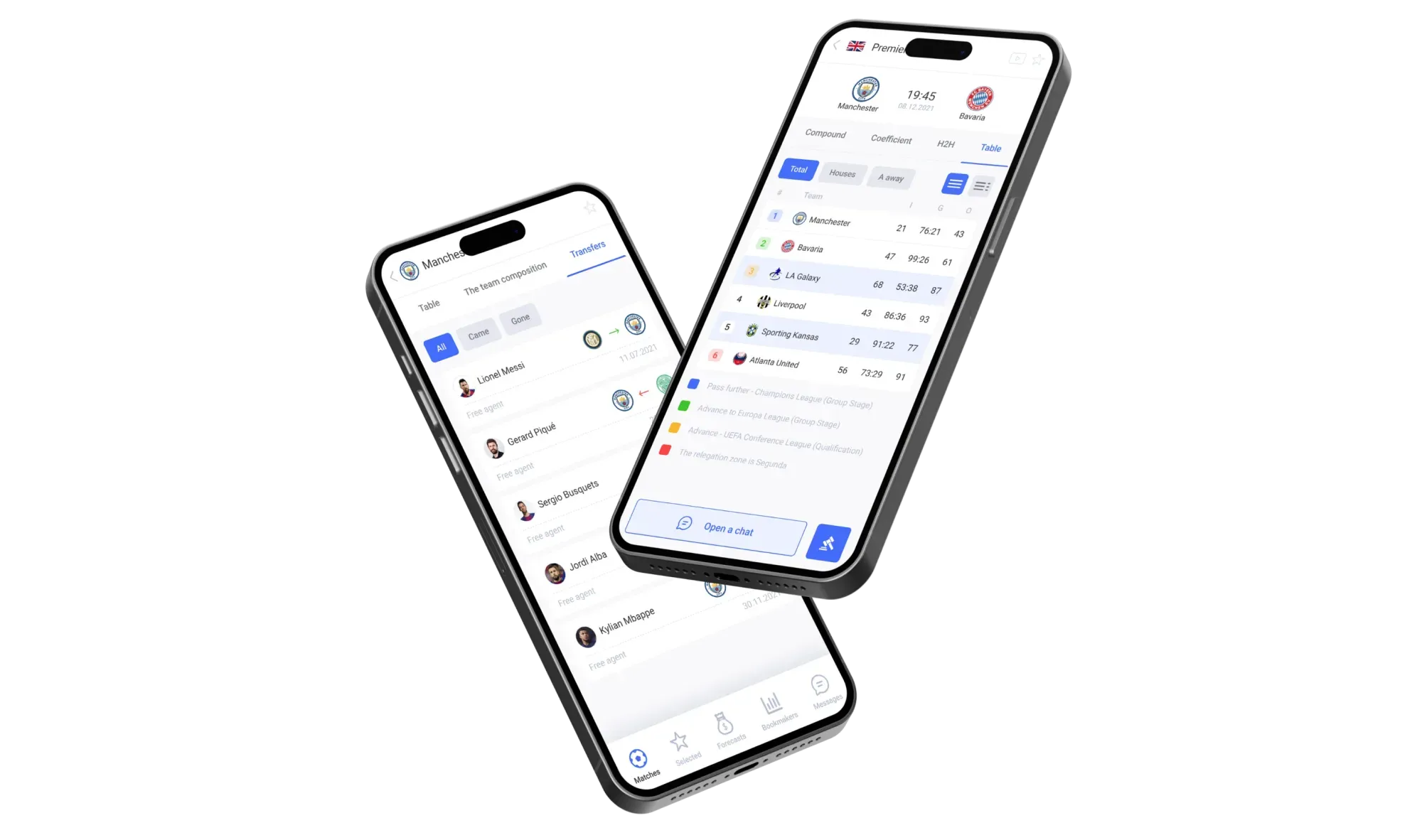
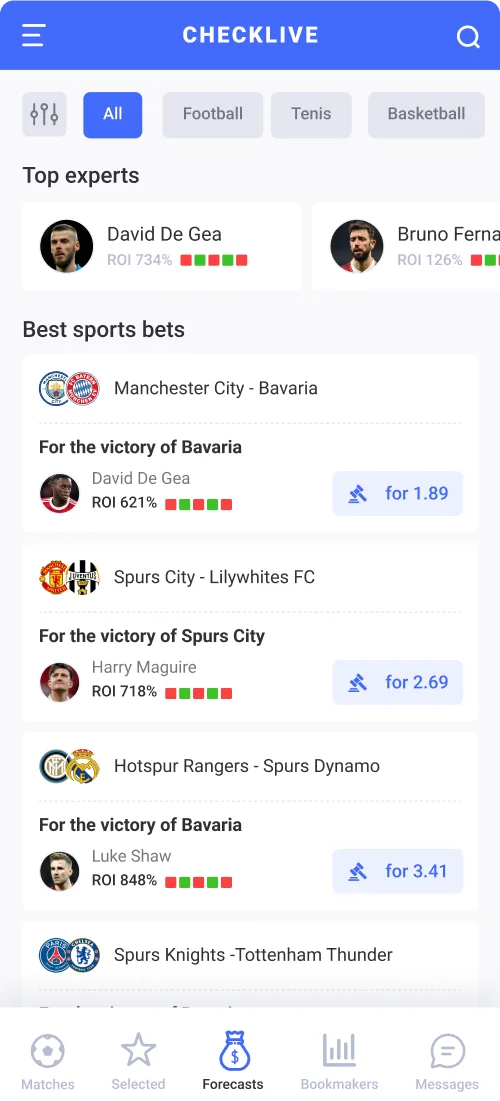
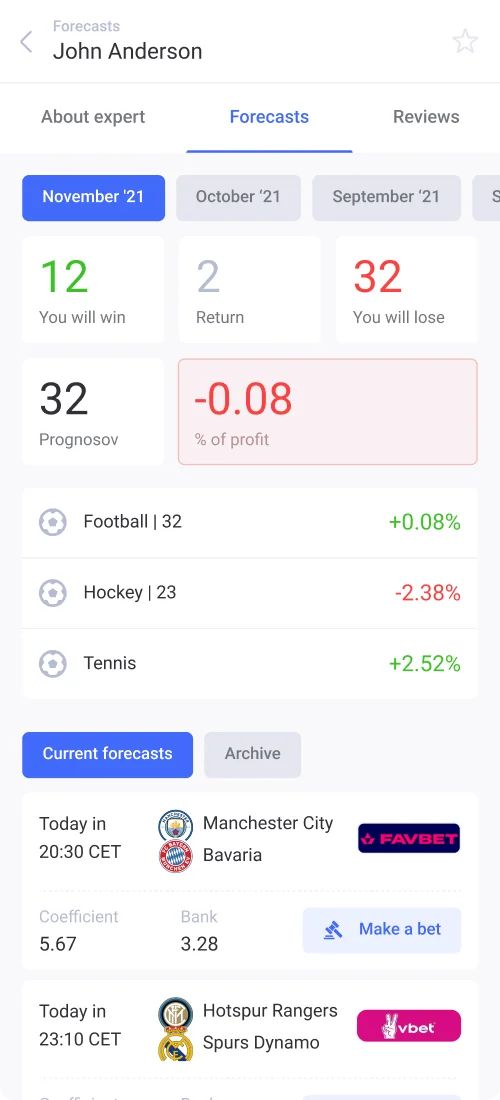
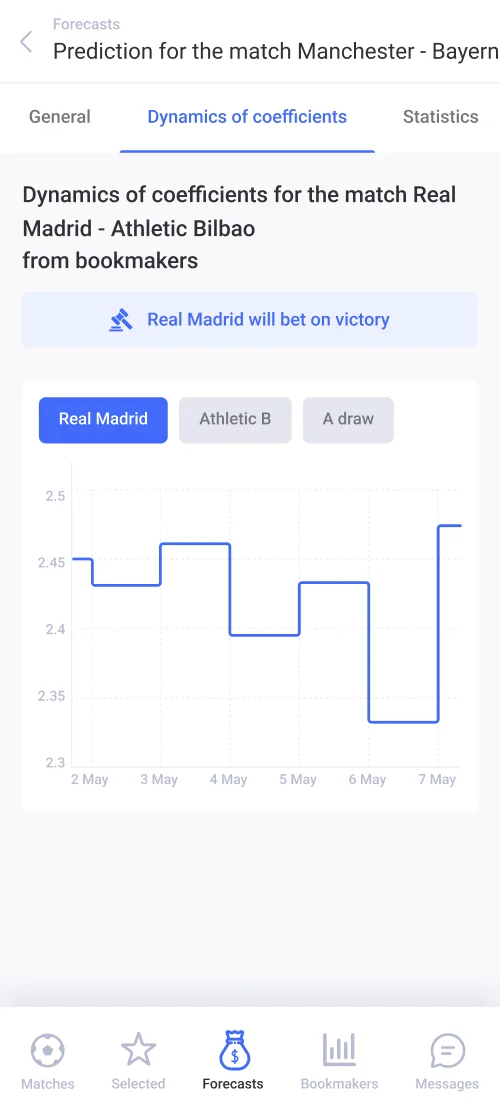
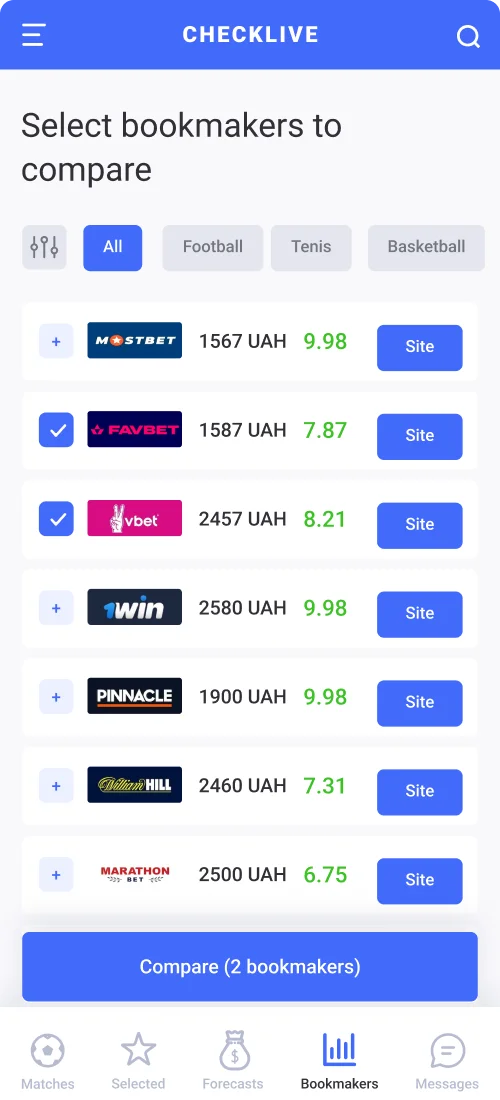
We engineered this exact high-density mobile analytics experience for CheckLive, a sports statistics and handicapper ROI tracking mobile app. Across the four `375px` screens below, complex financial performance metrics are structured for instant scanning: the `Top experts` carousel and `Best sports bets` feed displaying `ROI 734%`, `ROI 621%`, and `ROI 848%` with color-coded form squares; the monthly analyst performance tab (`November '21`, `October '21`) with summary cards (`12 You will win`, `2 Return`, `32 You will lose`, `% of profit`) and sport-by-sport yield (`Football +0.08%`, `Tennis +2.52%`); the interactive `Dynamics of coefficients` step-line chart (`2 May – 7 May`); and the `Select bookmakers to compare` screen with UAH bonus amounts (`1567 UAH`, `2457 UAH`) and ratings:
Security Standards & Component Design: Preventing Shoulder Surfing in Public Spaces
Unlike desktop web banking, mobile FinTech apps are used on crowded subways, in checkout lines, and at coffee shops. True banking app transaction security ux protects sensitive visual data from physical onlookers (Shoulder Surfing Protection) and clipboard hijacking.
1. Privacy Blur Gestures, PCI DSS Card Masking & App Switcher Overlays
Every FinTech component library we deliver incorporates four defensive UI patterns:
Tap-to-Blur & Flip-to-Hide Privacy Mode: Users can tap their total balance—or flip their phone face-down using accelerometer detection—to instantly mask all currency amounts behind `••••••` or a frosted Gaussian blur across the entire app.
Gated PAN & Ephemeral CVV Reveal (PCI DSS): Full 16-digit card numbers and 3-digit CVV codes are hidden by default. Revealing or copying card credentials requires an explicit tap verified by Face ID, displaying the CVV for just 15 seconds before auto-masking.
OS App Switcher Privacy Curtain: When a user backgrounds a FinTech app on iOS or Android, the OS captures a snapshot for the multitasking carousel. We enforce a system blur overlay on `applicationWillResignActive` so balances and seed phrases are never exposed in the app switcher.
Crypto Address Poisoning Defense: In Web3 wallets, scammers send dust transactions from lookalike addresses matching the first and last 4 characters. On final confirmation screens, we never truncate wallet addresses to `0x71...89A2`—we display the full string with color-chunked character groups for visual verification.
2. Pre-Development Checklist: Mapping Your FinTech MVP Screen Architecture in 5 Minutes
The primary reason FinTech app development budgets balloon from $15,000 to $45,000+ mid-sprint is unmapped edge cases: rejected KYC retry screens, regulatory limit alerts, lost-device recovery flows, and pending blockchain settlement states.
Before writing a single line of Swift or Kotlin code, verify that your UX specification includes:
Biometric Fallback Flows when Face ID fails or cameras are damaged.
Granular Transaction States (Pending, Declined — Insufficient Funds, Compliance Hold, Reversed).
Active Device & Session Management screens for instant remote sign-out.
You can generate a complete screen-by-screen architecture and edge-case map for your FinTech or crypto product in 2 minutes using our interactive Mobile App Idea-to-Screens Generator.
Key Takeaways
Building or redesigning a FinTech, banking, or crypto mobile app?
Up to 68% of users abandon FinTech apps during onboarding—replacing manual forms with OCR/NFC document scanning and Passive Liveness cuts KYC time to 35 seconds and reduces funded CAC by 58.8%.
Use Dynamic Friction: deploy 0.4-second Face ID and Passkeys (FIDO2) for logins and routine payments, while reserving intentional Long-Press confirmation and checksum screens for high-value transfers.
Synchronize Taptic Engine haptic feedback with step-by-step optimistic transaction trackers to eliminate user anxiety during settlement and slash support tickets by 70%+.
Built-in public privacy patterns (Tap-to-Blur balances, Face-ID gated CVV reveal, and OS App Switcher privacy curtains) turn security into a visible competitive advantage.