Landing Pages & Paid Traffic
Webflow vs Custom Next.js Architecture: 24-Month TCO Breakdown, Ad Spend ROI & Selecting the Right Engine for B2B Landing Pages
Why your landing page engine directly dictates your Google Ads and Meta Ads Cost Per Lead
Before launching a new product tier or scaling paid acquisition, founders and CMOs inevitably face an architectural crossroads: choosing webflow vs custom code for landing pages built on React and Next.js. On the surface, visual no-code builders promise rapid deployment without engineering tickets; however, once monthly ad spend scales past $5,000–$15,000, every extra 800 milliseconds of third-party script execution degrades Google Ads Quality Score, inflates Cost Per Click (CPC) by 18–25%, and slashes mobile conversion rates inside social In-App WebViews.
Over 14 years of architecting high-converting commercial interfaces and shipping production applications on Next.js, I have audited both sides of the equation: early-stage startups where Webflow saved three weeks during pre-seed validation, and scaling companies forced to rebuild their entire funnel from scratch 12 months later due to CMS item caps, steep localization add-on fees, and the inability to run secure server-side pricing calculators. In this engineering breakdown, we compare webflow vs nextjs for marketing sites, calculate 24-month Total Cost of Ownership (TCO) including hidden webflow hosting and maintenance costs, and demonstrate across four verified case studies when a bespoke Next.js architecture pays for itself within the first two weeks of paid traffic.
Speed to Market vs Architectural Freedom: Where Visual No-Code Builders Hit a Ceiling
To make a sound capital allocation decision, executives must evaluate platforms not by their sales demos, but by the technical constraints their marketing team will hit 3 to 6 months into scaling paid campaigns. You can explore our complete engineering deliverables inside the High-Converting Landing Pages & CRO hub.
1. When Webflow Is a Rational Choice for Early Hypothesis Testing
Unlike rudimentary drag-and-drop site builders (Wix, Squarespace, or Tilda), Webflow compiles visual layouts into relatively clean HTML and CSS Flexbox/Grid. This makes it a pragmatic choice in three narrow scenarios:
5-to-7 Day Pre-Seed Validation: when a founder needs to test a value proposition on a $1,000 ad budget before committing capital to custom software architecture.
Static Brochure Pages Without Business Logic: when the entire user journey consists of linear copy, a basic image gallery, and a 3-field contact form routed via a Zapier webhook.
Non-Technical Teams Cloning Simple Event Pages: when a marketing coordinator needs to duplicate basic webinar registration pages weekly without developer involvement.
2. The Four Architectural Walls of Webflow That Block Scaling
Friction emerges the moment a landing page evolves from a static digital flyer into your primary revenue engine. That is where businesses collide with four hard ceilings of visual SaaS platforms:
Zero Server-Side Execution & Exposed Business Logic: Webflow has no native backend execution layer where you can hide proprietary pricing formulas or private API keys. Any custom JavaScript injected into `<script>` tags runs openly in the user's browser—meaning competitors can inspect your exact margin formulas in 10 seconds, and bots can spam your exposed webhook endpoints.
Fragile State Management for Interactive Tools: building a multi-step ROI calculator, a dynamic credit configurator, or a live product sandbox inside Webflow requires writing ratusan lines of imperative vanilla JS or jQuery workarounds on top of visual DOM classes that break whenever a designer renames a style.
Hard CMS & API Rate Limits: even on premium tiers, teams face strict ceilings on CMS collection items, nested collection lists (capped at 5 items), and API requests per minute.
100% Vendor Lock-In: you cannot export a live dynamic Webflow site to your own $10/mo cloud server. Code export strips out CMS collections, forms, localization routing, and dynamic logic, leaving only static HTML files.
3. Product-Led Hero Engineering in Action: The AImReply Case Study
When engineering a landing page for a SaaS or AI product, paid search visitors do not want to read generic claims—they expect to experience the product mechanics within the first 5 seconds.
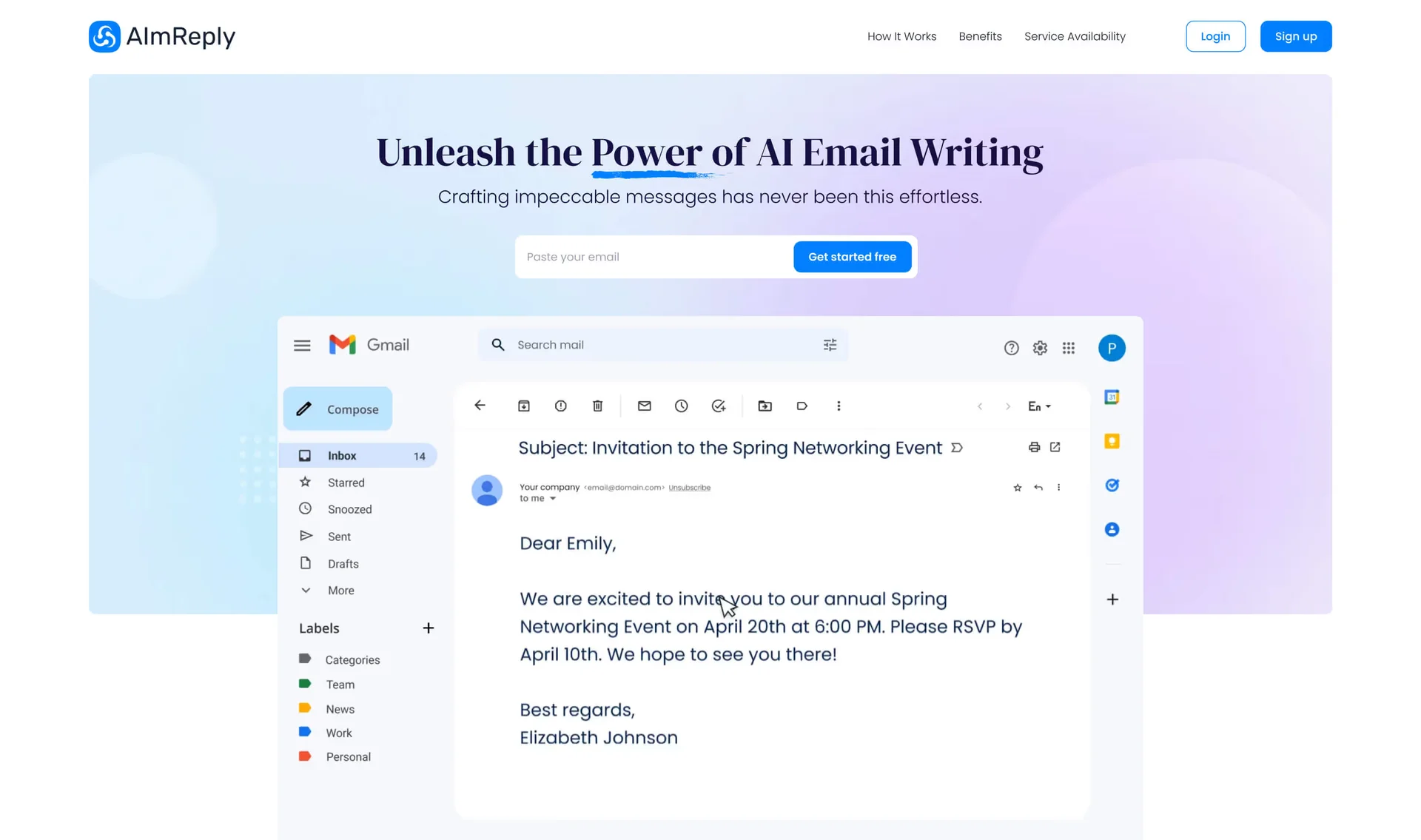
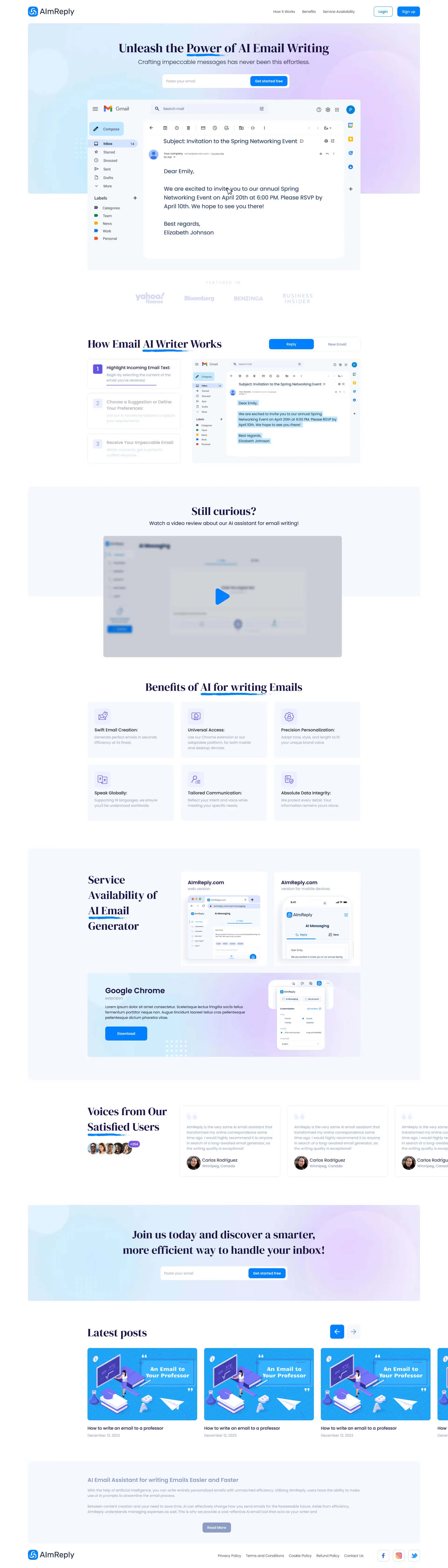
A clear example is the high-converting landing page we designed for the AI email writing assistant AImReply. To maximize sign-up conversion and Chrome extension installs, we explored 4 distinct hero section concepts and structured the page around an interactive 3-step email generation demonstration embedded directly inside an inbox preview. Visitors immediately see live reply context, multilingual tone controls, and cross-platform availability across Web, Mobile, and Chrome:
24-Month Real Cost Comparison: Webflow Workspace, CMS & Localization vs Vercel Edge
A widespread misconception is that building on a visual platform is cheaper than commissioning Next.js code. That assumption ignores Webflow's multi-layered 2025–2026 pricing stack, where companies pay simultaneously for a Site Plan, a Workspace Plan, per-user Seats, per-language Localization Add-ons, and Bandwidth Overages.
1. The Compounding SaaS Tax: Unpacking Webflow Hosting and Maintenance Costs
Let's calculate the real webflow hosting and maintenance costs for an active B2B or B2C business running paid traffic across a main landing hub and regional campaign pages in 3 languages (e.g., English, German, and Ukrainian/Spanish):
Base Hosting (Business / Premium Site Plan): $29–$49/mo billed annually just to unlock higher form limits and CDN bandwidth.
Localization Tax (Webflow Localization): if your company expands into EU and US markets requiring localized subdirectories (`/en/`, `/de/`) and automatic geo-routing, each Advanced locale costs $29–$35/mo per language. Three additional locales immediately add $87–$105 every month.
Workspace & Team Seats: allowing a designer, marketer, and copywriter to collaborate requires a Core/Growth Workspace ($28–$60/mo) plus $39/mo per full seat and $15/mo per limited editor seat.
Third-Party Middleware (Zapier, Make, Jetboost, Finsweet): routing leads into a custom CRM and enabling dynamic filtering adds another $49–$110/mo in external SaaS subscriptions.
Bandwidth Overage Penalties: high-traffic video landers or viral ad campaigns that cross monthly transfer caps trigger $20–$40 overage blocks per 50–100 GB.
Combined, recurring infrastructure overhead for a single commercial Webflow funnel easily reaches $180–$290/month ($4,320–$6,960 over 24 months) before adding a single new feature.
2. Next.js + Vercel / Cloudflare Economics: $0 Per Locale & Full Code Ownership
When you invest in a headless landing page architecture built on Next.js (App Router, React 19, TypeScript), your operational cost structure changes fundamentally:
Framework Licensing: $0 forever (open-source MIT license).
Multi-Region Localization (i18n): engineered directly into the routing layer (`next-intl` or typed JSON dictionaries). Whether you launch 2 languages or 15 languages, your monthly software fee for localization is strictly $0/mo.
Edge CDN Hosting: Vercel Pro costs a flat $20/mo (including 1 TB of global edge bandwidth), while deploying on Cloudflare Pages or a containerized Hetzner/DigitalOcean VPS costs $0 to $12/mo with unlimited form submissions.
Native Server Actions & API Routes: lead payloads, CRM sync, Stripe checkouts, and Telegram/Slack alerts execute directly on your server in under 50ms—eliminating $50/mo Zapier middleware.
3. 24-Month Total Cost of Ownership (TCO) Matrix: Webflow vs Custom Next.js
Below is a transparent 2-year financial comparison for a commercial funnel operating in 3 languages with live CRM integration.
| Cost Factor / Engineering Metric | Option 1: Webflow Stack (Business + Workspace + Localize) | Option 2: Custom Next.js Code (React 19 + Vercel / VPS) |
|---|---|---|
| Initial Design & Engineering | $1,500–$2,800 (visual template assembly) | $2,200–$4,500 (turnkey bespoke engineering) |
| 24-Month Domain Hosting | $936 ($39/mo Business Site Plan) | $0–$480 ($0 Cloudflare / $20/mo Vercel Pro) |
| 24-Month 3-Language Localization | $2,088 ($87/mo Advanced Localization add-on) | $0 (native i18n routing with zero monthly fees) |
| Team Workspace + 2 Editor Seats | $1,872 ($78/mo workspace & seat charges) | $0 (unlimited admin editors in headless CMS) |
| Middleware & Webhook Connectors | $1,440 ($60/mo Zapier + filtering plugins) | $0 (direct Next.js Server Actions to CRM API) |
| Total 2-Year Recurring OpEx | $6,336 in non-recoverable subscription rent | $0–$480 (saves up to $5,856 in SaaS fees) |
| Total 24-Month Cost (2-Year TCO) | $7,836–$9,136 (0% platform ownership) | $2,200–$4,980 (100% proprietary code ownership) |
Ad Spend ROI Impact: 98/100 PageSpeed on Next.js vs Bloated Builder Scripts
For a CEO or CMO, custom react landing page performance is not a vanity engineering metric—it is a direct multiplier on Customer Acquisition Cost (CAC). When a prospect clicks your Instagram, Facebook, or Google Search ad on a smartphone over 4G inside an In-App WebView browser, the fate of your ad budget is decided in the first 1.2 seconds.
How Migrating from a Heavy Visual Builder to Custom Next.js Cuts CPL by 64% & Saves $5,800+ in SaaS Rent
- Mobile 4G LCP Render Speed: 3.4s (28% of ad clicks bounce before hero loads)
- Effective CPC (Quality Score 5/10): $1.40 (ad auction penalty for slow landing experience)
- Visitors Reaching Offer: 2,857 landed sessions from $4,000 spend
- Monthly SaaS Stack (Webflow + Localize + Zapier): $264/mo ($6,336 over 24 months)
- Bottom-Line Monthly Outcome: Break-even trap—ad waste and SaaS rent consume all margin
- Mobile 4G LCP Render Speed: 0.7s (instant server-rendered hero, PageSpeed 98/100)
- Effective CPC (Quality Score 9/10): $1.10 (auction discount for high landing page speed)
- Visitors Reaching Offer: 3,636 landed sessions (+779 free clicks gained)
- Monthly Infrastructure (Vercel / Cloud VPS): $20/mo ($0 for 3 locales & direct CRM API actions)
- Bottom-Line Monthly Outcome: +$89,856 in additional net profit per year
Combining a higher Google Ads Quality Score (cutting CPC from $1.40 to $1.10), eliminating mobile pre-render drop-offs (0.7s LCP), and lifting conversion to 4.2% pays back a $3,500 custom Next.js build within 14 days of live campaign traffic.
1. Core Web Vitals Engineering: Why Next.js Wins on LCP, INP, and TBT
When marketers inject Google Tag Manager, Meta Pixel, live chat widgets, and custom filtering scripts into a visual builder, all of that JavaScript executes on the browser's Main Thread, freezing touch responsiveness. Total Blocking Time (TBT) spikes past 600–900ms, and Interaction to Next Paint (INP) degrades above 350ms.
In a custom Next.js architecture, we eliminate main-thread bottlenecks through four core mechanisms:
React Server Components (RSC) & Zero Client Bundle Bloat: static copy and layout sections render into pure HTML on the server, shipping zero unnecessary JavaScript to the user's phone.
Automated Media & Font Pipeline (`next/image` & `next/font`): images are automatically served in AVIF/WebP sized strictly for `375px` mobile viewports with instant blur placeholders, while self-hosted fonts load with zero layout shift (CLS = 0.00).
Off-Thread Ad Pixel Isolation (`next/script`): third-party tracking pixels are deferred or offloaded to Web Workers so the hero CTA button is responsive in 0.6–0.8 seconds.
2. 375px Mobile Ergonomics & Thumb-Zone Speed: The Easy4Busy Redesign Case Study
In consumer and subscription verticals, up to 85% of paid traffic arrives from mobile social ads. If a prospect taps an Instagram story ad and encounters slow-loading meal photos or a desktop table that requires horizontal pinching, they close the tab within 3 seconds.
We solved this exact mobile bottleneck during the redesign of healthy meal delivery service Easy4Busy. Replacing a sluggish legacy template, we engineered a high-contrast nutrition configurator (800 to 2400 kcal) with daily meal breakdowns. Across the `375px` mobile adaptation, calorie selectors (`1500 ккал / 5 страв`), the horizontal swipe carousel of sealed meal boxes (`220 ккал`, `160 ккал`), and the order form (`Замовляйте прямо зараз`) with a `-7%` discount checkbox are anchored inside the natural Thumb Zone, enabling one-handed checkout in under 40 seconds:


Complex Interactivity: Custom GSAP Masks, WebGL & 60 FPS Micro-Interactions Impossible on Templates
When selling financial products, luxury hospitality, or high-ticket B2B services, generic template layouts undermine brand authority. Custom frontend engineering unlocks two capabilities that visual builders cannot replicate cleanly: reactive real-time financial calculators and hardware-accelerated 60–120 FPS motion choreography.
1. Reactive Financial Calculators & Custom 3D Visuals: The InvestFinans Case Study
In lending and FinTech, borrowers only submit their phone number when they trust the repayment math. Attempting to combine custom 3D graphics with a real-time loan calculator inside a no-code builder frequently causes slider input lag due to unoptimized DOM re-renders.
For auto-equity lending company InvestFinans, we paired custom 3D visuals with a reactive monthly payment calculator positioned directly below the hero value proposition. Borrowers adjust loan amounts and terms (up to 90% of vehicle value at rates starting from 2%), see instant amortization updates (`5 900 UAH`) with zero page reload, and pass their exact calculation parameters directly into the 15-minute approval lead form:

2. Luxury Dark-Mode Aesthetics & Smooth Hover Choreography: The NOM Case Study
Another scenario where custom code outperforms visual builders is luxury hospitality and high-end brand storytelling, where smooth scrolling, hover reveals, and editorial typography establish perceived value.
We engineered this experience for European cuisine restaurant NOM. Crafted in a deep evening dark palette, the hero viewport (`We create a festive atmosphere with live music`) pairs high-contrast serif typography, a minimalist `VIEW MENU` CTA, and header phone reservation access with subsequent interior storytelling, an interactive signature menu that reveals dish ingredients on hover, and in-house delivery sections. Powered by GPU-accelerated CSS transforms and GSAP ScrollTrigger, the interface maintains a locked 60 FPS across both 4K desktop displays and mobile screens:

The Hybrid Approach: Pairing a Reactive Next.js Frontend with a Marketer-Friendly Admin Panel
The most common objection CMOs raise against custom code is: "If we build on Next.js, will our marketers have to file a developer ticket and wait three days just to change a headline or update a promo price?" That fear belongs to 2015. Today, we deploy a hybrid headless architecture (Next.js + visual CMS admin) that gives your team instant content autonomy without sacrificing speed.
1. How Next.js + Zero-Cost Headless CMS Gives Marketers 30-Second Edits
When we deliver a turnkey Next.js landing page, we decouple the immutable engineering core (responsive layout grid, GSAP animations, calculator math, and secure CRM Server Actions) from the editable content layer managed by your marketing team:
Embedded Git/JSON Visual Admin (Keystatic, TinaCMS, or Custom Admin Panel): your marketer logs into `/admin`, edits structured fields in English or Ukrainian ("Hero Headline", "Pricing Tier Rate", "CTA Button Copy", "FAQ Items", "Client Testimonials"), and clicks "Publish". There are zero monthly SaaS CMS fees—ongoing software cost is $0/mo.
Cloud Headless CMS (Sanity or Strapi) with On-Demand ISR: when an editor updates a price or swaps a banner, a webhook triggers Next.js Incremental Static Regeneration (ISR), updating the global edge cache in 200 milliseconds. Better yet, your marketer can never accidentally break mobile padding or misalign a button because the design tokens are locked in TypeScript components.
2. Executive Decision Matrix: 5 Financial Triggers for Choosing Your Stack
Use these 5 capital efficiency rules to pick the right engine for your next campaign launch:
Choose Webflow ($1,500–$2,500) if: you are testing a short-term 60-day hypothesis in a single language, require zero custom calculators, and spend under $1,000/mo on ads.
Invest in Custom Next.js Engineering ($2,200–$5,500) if:
Your monthly paid traffic budget (Google Ads, Meta Ads) is $1,500–$2,000+, where a 50–64% drop in CPL from 98/100 PageSpeed pays back the build in 2–4 weeks.
You operate across 2 to 5+ language locales and refuse to pay $1,000+/year in per-locale SaaS add-on fees.
Your conversion funnel relies on interactive engineering: loan calculators, dynamic pricing configurators, branching quizzes, or live product previews.
You want 100% IP ownership of your code and direct, zero-cost server integrations with your CRM or ERP.
Estimate the exact budget and timeline for your custom landing page in under 2 minutes using our interactive Design & Engineering Cost Calculator.
Key Takeaways
Ready to stop losing paid ad traffic to slow builders and compounding SaaS fees?
Webflow is justified for rapid single-language MVP tests, but scaling to 3 locales with a marketing team pushes recurring subscription rent past $6,300 over 24 months.
Custom Next.js landing page development delivers 100% code ownership, $0/mo fees for unlimited language locales, and direct Server Action integrations with your CRM without Zapier rent.
With React Server Components and zero client-side bloat, Next.js landers achieve 96–100 PageSpeed and 0.7s mobile LCP—lowering ad CPC and cutting CPL by 50–64%.
A hybrid headless architecture (Next.js + visual admin panel) lets marketers update copy, pricing, and promos in 30 seconds without risking layout breakage.