Landing Pages & Paid Traffic
Why Paid Ads Burn Budget: 10 Critical Technical & UX Flaws Killing Landing Page Conversions
Why your ad agency reports a 6% CTR while your sales pipeline sits empty
Across B2B and high-ticket B2C companies, founders repeatedly hit the same expensive stalemate: you wire $3,000–$5,000 every month into Google Ads and Meta Ads, campaign dashboards report thousands of clicks with healthy CTRs, yet the sales floor receives almost zero qualified inquiries. When executives ask why google ads traffic is not converting, a blame game begins: the media buyer blames a "weak website," while the web agency claims the traffic is "low quality." While both sides point fingers, landing page friction silently incinerates $35,000 to $60,000+ of working capital per year.
According to 2025–2026 conversion benchmarks from Unbounce and WordStream, the all-industry median landing page conversion rate is 6.6%, while top-decile engineering teams convert 11.4%+ of paid traffic. If your campaigns suffer from a high landing page bounce rate paid traffic and convert at a dismal 0.7%–1.3%, the bottleneck almost always lies inside 10 specific technical and UX flaws on the page itself. In this guide, we execute a comprehensive paid ads landing page conversion audit, show how to fix low converting meta ads lander funnels, and provide a 20-point landing page ad spend waste checklist to turn wasted clicks into predictable net profit.
Anatomy of Ad Spend Burn: How You Lose Money Before the Visitor Even Reads Your Headline
The most insidious leak in paid acquisition happens between 0.1 and 3.5 seconds after a prospect taps your ad. At that exact moment, Google or Meta has already billed your corporate card for the click, yet Google Analytics 4 never even registers an engaged session (Phantom Click Drop-Off).
1. Flaws #1–2: The In-App WebView Sandbox & LCP Delays Beyond 2.5 Seconds
Over 82% of paid social clicks from Instagram, Facebook, and TikTok do not open inside native Safari or Chrome; they open inside a throttled, sandboxed In-App WebView. When a landing page is built on a bloated visual page builder and ships 4MB of unoptimized PNGs alongside 15 render-blocking JavaScript plugins, Largest Contentful Paint (LCP) inside mobile WebViews stretches to 4.2–5.8 seconds. Telemetry proves that once mobile load time crosses 3 seconds, 42% to 53% of paid visitors bounce immediately before your headline or hero offer ever renders on screen.
2. Flaw #3: Isolated Cookie Jars & Broken Mobile Autofill Attributes
In-app WebViews do not share cookie storage or saved session states with the user's primary mobile browser. When your lead form lacks explicit HTML attributes (`autocomplete="name"`, `autocomplete="tel"`) or fails to invoke the numeric keypad via `inputmode="tel"`, mobile users are forced to manually peck digits on a miniature glass keyboard. On cold interruption traffic, that single micro-friction cuts form completion rates by 24%–31%.
3. Technical Performance Impact on Paid Ad Unit Economics ($3,000/mo Spend)
Below is the financial impact of front-end rendering speed on a $3,000/month campaign (1,500 paid clicks at $2.00 CPC). Explore our high-speed front-end architecture in detail inside the High-Converting Landing Pages & CRO hub.
| Technical Metric (Mobile 4G / WebView) | Bloated Template / Visual Builder Lander | Engineered Custom Lander (Next.js / Clean Stack) | Direct Financial Impact on CPL & ROAS |
|---|---|---|---|
| Hero Render Speed (Mobile LCP) | 4.6 s (blank white screen while parsing JS bundles) | 0.8 s (instant SSR HTML + preloaded WebP/AVIF) | Retains +38% of paid clicks previously lost pre-render |
| Click-to-Session Drop-Off Rate | 35%–45% (out of 1,500 clicks, only ~900 view the page) | < 4% (1,440+ paid visitors actually see your offer) | Saves $1,080/mo in pure wasted ad spend at second one |
| Cumulative Layout Shift (CLS) | 0.28+ (buttons jump mid-tap as web fonts load late) | 0.00 (locked aspect ratios & zero layout jank) | Eliminates mis-taps and rage quits on 375px viewports |
| Meta / TikTok WebView Tracking | Janky 18 FPS scroll + blocked client-side tracking pixels | Smooth 60 FPS + Server-Side Conversions API (CAPI) | 29% lower CPA via accurate algorithmic ad optimization |
The 5-Second Above-the-Fold Test: Diagnosing Vague Offers and Abstract Headlines
Once your page renders in under a second, the visitor applies the 5-Second Clarity Filter. Paid search and social visitors do not read websites top-to-bottom; they scan the first viewport (Above the Fold) demanding instant answers to three questions: "Where am I?", "What exact quantified outcome do I get?", and "What is my low-risk next step?"
1. Flaws #4–5: Corporate Jargon in H1 Headlines and Unquantified Value Propositions
When a landing page greets paid traffic with an abstract slogan like "Next-Generation Integrated Financial Solutions" or "Empowering Your Inbox Productivity," the prospect's brain refuses to burn calories deciphering what you actually sell. High-converting H1 headlines and sub-headlines must anchor on specific numbers: exact approval minutes, interest rate thresholds, cost savings, or an immediate interactive product preview.
2. Multi-Concept Hero Testing & Conversion Architecture in AImReply
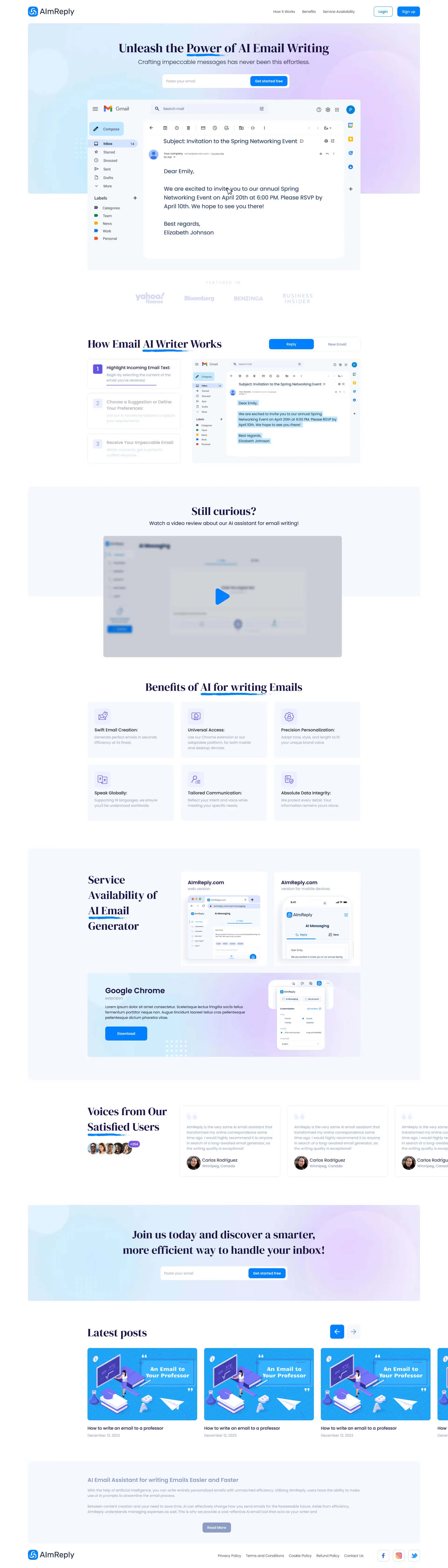
Even seasoned design engineers never guess which visual hierarchy will convert cold traffic best. When designing the acquisition landing page for the AI email writing service AImReply, we engineered 4 distinct hero section concepts testing different layout compositions, color accents, and typographic focal points.
In the visible top slice of the selected homepage (first 500px), the visitor immediately reads the clear value proposition (`Best AI Email Writer — Perfect Emails at the Speed of Thought`), sees the primary action button (`Try For Free`), and views a smartphone mockup demonstrating instant email reply generation (`New Email -> Reply`). This high-clarity hero viewport captures attention within 4 seconds and guides the user down the page into the 3-step interactive product walkthrough and cross-platform extension showcase across Chrome, Web, and Mobile:
Message Mismatch: When Your Ad Promises One Thing and Your Landing Page Shows Another
Flaws #6 and #7—the primary reasons why google ads traffic is not converting—stem from Message Mismatch (breaking the semantic and visual bridge between the ad creative and the hero screen).
1. How Semantic Disconnection Drives 75%+ Paid Bounce Rates
Consider a common scenario: a prospect searches Google for "auto equity loan keep driving your car 15 minute approval" and clicks a $4.50 search ad. Instead of a dedicated page validating those exact terms, they land on a generic corporate homepage listing mortgages, business leasing, and insurance. Because the promised condition ("keep driving your vehicle") is buried or absent, the user bounces within 4 seconds and converts on a competitor's page.
2. InvestFinans Case Study: 100% Message Match & Thumb-Zone Calculator on Mobile
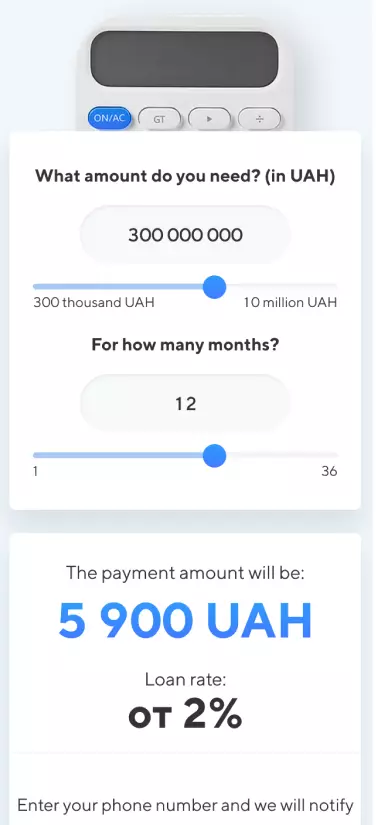
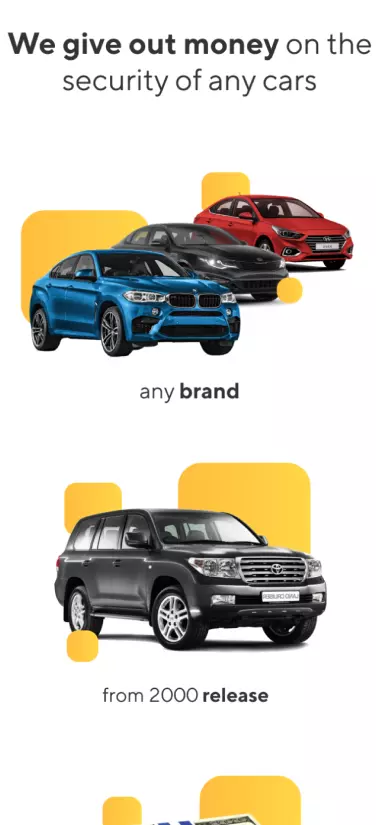
To eliminate expectation drop-off in the competitive consumer finance vertical, we engineered the InvestFinans auto-equity loan landing page and its mobile adaptation around strict message alignment and immediate interactive utility.
On the first mobile screen, the user sees the exact ad promises verified above the fold: payout in 2 hours, up to 90% of the vehicle's value, rates starting from 2%, loans up to 10M UAH, and full retention of the car. Screen 2 presents a one-handed mobile monthly payment calculator, Screen 3 outlines eligible vehicle requirements (any brand from model year 2000+), and Screen 4 displays a transparent checklist of only 3 required documents (passport, tax ID, and vehicle title):


3. StartUp Case Study: Editorial Social Proof for High-Trust B2B & Venture Funnels
In B2B, advisory, and investment verticals, Flaw #7 is the Social Proof Vacuum. Cold prospects will never submit confidential company details on a page populated by anonymous three-word reviews.
When designing the landing page for the technology business accelerator StartUp, we architected the page as an authoritative editorial media long-read. In the visible top slice of the page (first 500px), founders immediately see the bold selection thesis ("In the Baltic States and Belarus — we will find and take 5 most interesting and promising startups and go through 6 steps to success with each of them") paired with the structured 12-month program goals (`About the Project`, `Our Goals`, `How to Achieve This?`). Scrolling down, the long-read unfolds into the 6 accelerator stages, investor mentor cards, and an in-depth illustrated interview with the founder of AgTech unicorn OneSoil right before the application form:

Technical Barriers: Frozen Analytics Scripts, Chat Widgets Blocking CTAs & Interrogation Forms
Even when a prospect is sold on your offer and scrolls down to convert, Flaws #8, #9, and #10 sabotage the final step—Lead Capture & Checkout Friction.
1. Flaws #8–9: Widget Collisions in the Mobile Thumb Zone & 9-Field Forms
Inspect your landing page on a 375×812px iPhone viewport and look at the bottom 120 pixels. On most underperforming sites, three floating elements collide in the exact same thumb zone: a GDPR cookie banner, a pulsing third-party live-chat bubble, and a sticky callback button—completely obscuring the primary form submit button. Worse yet, demanding 7–9 mandatory fields (Full Name, Company, Role, Email, Phone, City, Notes) without automatic phone input masking triggers a 75% form abandonment rate.
2. Flaw #10: Main-Thread Blocking from Unmanaged GTM Third-Party Scripts
Stacking 12 unoptimized marketing tags inside Google Tag Manager (multiple pixels, session recorders, heatmap scripts, and chat widgets) pushes Total Blocking Time (TBT) past 1,200ms. When a user taps your CTA button on a mid-range smartphone, the main thread is frozen executing third-party trackers, causing a 1.5-second input freeze. Offloading third-party scripts to Web Workers or Server-Side GTM restores instant tap responsiveness.
3. Live Mobile UI Preview & QR Conversion Gateways in GOLD FISH
For mobile apps, global SaaS, and AI tools, forcing users into a traditional "leave your phone number and wait for a sales rep" form kills momentum. High-intent users want instant visual proof of the interface and direct product access.
In our promotional landing page design for the GOLD FISH mobile AI poker assistant targeting the Asian market, we eliminated lead-form waiting rooms entirely. In the visible top slice of the page (first 500px), the visitor is greeted by a high-contrast hero section featuring 3D poker visuals and a smartphone mockup displaying the live app interface—complete with the active point balance (`50 325`), instant top-up CTA (`購買積分`), and supported poker room toggles (`Poker`, `UPoker`). This immediate visual proof builds trust in the first second and guides users down the page to supported platform cards with instant QR download codes, coupon packages, and 1-tap messenger support:

Pre-Launch Readiness Checklist: 20 Parameters to Verify Before Funding Your Ad Account
Before reviewing the 20-point pre-launch checklist, examine the unit-economics math below: how fixing these 10 technical and UX flaws transforms the exact same $3,000/month ad spend from a cash drain into a high-margin profit engine.
How Engineering a High-Speed, Message-Matched Lander Cuts CPL by 81% on the Exact Same $3,000/mo Ad Budget
- Pre-Render Click Loss (4.5s LCP in WebView): −42% clicks lost (840 visitors bounce pre-load)
- Visitor-to-Lead Conversion Rate: 0.9% (only 18 leads from 2,000 paid clicks)
- Effective Cost Per Lead (CPL): $166.67 (destroys unit economics)
- Closed Deals (20% Close Rate): 3.6 deals/mo ($1,440 gross margin)
- Monthly Campaign Net P&L: −$1,560 net cash loss every month
- Click-to-Session Retention (0.8s LCP): 96%+ (1,920+ engaged sessions inside WebView)
- Visitor-to-Lead Conversion Rate: 4.8% (96 qualified leads from the same 2,000 clicks)
- Effective Cost Per Lead (CPL): $31.25 (5.33x reduction in acquisition cost)
- Closed Deals (20% Close Rate): 19.2 deals/mo ($7,680 gross margin)
- Monthly Campaign Net P&L: +$4,680 net profit (+$6,240/mo cash swing)
You do not need to increase your ad spend or fire your media buyer: fixing WebView render speed, hero message alignment, and mobile form ergonomics slashes CPL from $166.67 to $31.25 and turns a −$1,560 loss into +$4,680/mo net profit.
Part A. Technical Speed & WebView Compatibility (Checks 1–5)
Mobile 4G LCP under 1.8s: Hero WebP/AVIF visual preloaded with `fetchpriority="high"` and zero render-blocking CSS/JS.
Zero Layout Shift (CLS = 0.00): Locked aspect-ratio containers prevent buttons from jumping under the user's thumb.
Instagram / TikTok In-App WebView Test: Page renders cleanly at 60 FPS inside sandboxed social browsers.
Main-Thread Protection (TBT < 150ms): Third-party analytics and heatmap scripts deferred or offloaded via Server-Side GTM.
Zero Horizontal Overflow on 375px: No stray elements break mobile viewport width on iPhone screens.
Part B. Hero Message Match & 5-Second Clarity (Checks 6–10)
100% H1 Headline Message Match: The primary search keyword or ad hook is mirrored verbatim in the hero headline.
Quantified Sub-Headline: Specific numbers (rates, timelines, ROI, or price anchors) replace generic adjectives.
Above-the-Fold Primary CTA: The main action button is immediately visible on mobile without scrolling.
Anxiety-Reducing Micro-Copy: Clear expectation beneath the button ("Get instant estimate in 40 seconds—no sales call required").
Authentic Product/Outcome Visual: Real UI previews, calculators, or 3D product artifacts replace generic stock photography.
Part C. Form Ergonomics, Thumb Zone & Attribution (Checks 11–20)
Maximum 2–3 Fields for Initial Lead Capture: Name and Phone/Messenger handle only.
Native Mobile Keypad & Autofill: Phone inputs trigger `inputmode="tel"` and 1-tap iOS/Android autofill.
Uncluttered Thumb Zone: Live chat bubbles and cookie banners never overlap sticky mobile CTA buttons.
Interactive Self-Qualification (Calculator / Quiz): Give high-intent visitors an interactive estimator before asking for contact details.
Verified Case Studies & Named Social Proof: Real client metrics, founder interviews, and verifiable proof replace anonymous quotes.
1-Tap Messenger Fallbacks (Telegram / WhatsApp): Capture prospects who prefer async text over phone calls.
Inline Input Masking & Validation: Auto-format phone numbers without wiping form state on error.
High-Utility Thank-You State: Confirm exact response time in minutes and offer an immediate downloadable asset.
Server-Side Attribution (Meta CAPI + GA4 Enhanced Conversions): Capture 100% of conversions despite iOS privacy blocks.
Automated Pre-Launch Audit: Run your URL or readiness parameters through our interactive Ad Spend Readiness Landing Page Scanner before funding your next campaign.
Key Takeaways
Paying for Google Ads and Meta clicks that never turn into sales inquiries?
Up to 45% of paid social and search clicks are lost in the first 3 seconds due to sluggish LCP (>2.5s) and heavy page builders choking inside Instagram/TikTok WebViews.
Breaking the semantic bridge between ad copy and the hero viewport (Message Mismatch) causes 75%+ bounce rates on high-CPC traffic.
Replacing multi-field interrogation forms with thumb-friendly calculators, 1-tap phone autofill, and direct QR/messenger gateways recovers up to 70% of mobile drop-offs.
Lifting landing page conversion from 0.9% to 4.8% on a $3,000/mo ad budget slashes CPL from $166.67 to $31.25 and pays back a $2,200 engineering redesign in 10.6 days.