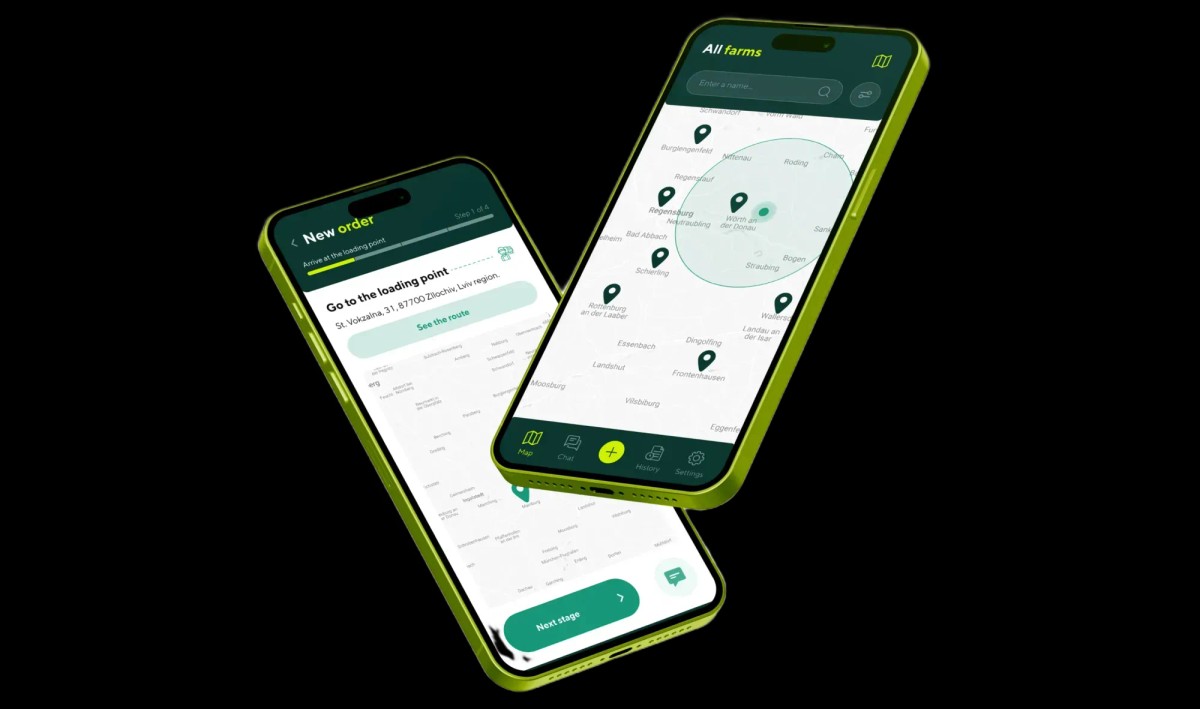
iOS / Android Mobile Apps
Why 75% of Mobile Apps Are Uninstalled on Day 1: Designing Onboarding for Habit-Forming Retention & Ad Spend ROI
Why a $3.00 install becomes a $240 acquisition loss when 85% of users churn in 60 seconds
Mobile startup founders and growth teams frequently fall into the "cheap CPI" illusion: your user acquisition dashboard reports $2.50–$4.00 Cost Per Install across Apple Search Ads and Meta campaigns, yet unit economics bleed cash because the actual Customer Acquisition Cost (CAC) per paying subscriber exceeds $180–$240. According to 2025–2026 mobile attribution benchmarks from AppsFlyer and Adjust, median cross-industry Day-1 Retention hovers around 25%–26%, plunging to just 8%–12% by Day 7. When an app suffers from structural onboarding friction, Day-1 retention drops below 14%—meaning out of every $15,000 spent on paid user acquisition, $12,900 is immediately incinerated on users who uninstall or abandon the app within their first session.
The root cause of this Day-1 exodus is rarely missing core features; it is the cognitive and privacy tax imposed during the first 60 seconds of cold launch. Greeting a newly acquired user with a barrage of native OS permission dialogs (iOS ATT tracking, precise GPS location, push notifications) followed by a mandatory email-and-password registration wall triggers instant abandonment. In this engineering guide, we break down mobile app onboarding ux best practices, show how to improve mobile app day 1 retention from 14% to 38%+, and demonstrate mobile app activation rate optimization that helps reduce app uninstall rate through habit forming mobile app design.
The Permission Prompt Ambush: Why Demanding Location and Push Access Before Value Destroys Trust
The costliest mistake in mobile product engineering is firing native iOS and Android system permission dialogs inside `applicationDidFinishLaunching` during the very first second of a cold start. Before the user has seen a single screen of value, the operating system interrupts them asking for App Tracking Transparency (ATT), push notification access, and GPS coordinates—triggering an automatic "Deny" reflex.
1. The One-Shot Trap of Native iOS & Android Permission Dialogs
Under Apple Human Interface Guidelines (HIG), an application can trigger a native system permission prompt (such as `UNUserNotificationCenter` or `ATTrackingManager`) strictly once per app installation lifecycle. If an unprimed user taps "Don't Allow" or "Ask App Not to Track" at second three, you permanently lose the ability to invoke that system dialog again. Re-enabling notifications later requires routing the user manually into iOS System Settings → App List → Notification Toggles—a high-friction path where fewer than 0.8% of users convert. You permanently lose your free push-retargeting channel and are forced to pay Meta or Google again to re-acquire the exact same user.
2. Engineering the Double Opt-In Pre-Permission Bridge (Soft Prompts)
To lift permission opt-in rates from a dismal 18%–25% to 62%–74%, we engineer contextual pre-permission screens (Soft Prompts). Instead of firing the OS dialog on cold start, we wait until the user completes a high-intent action that naturally requires that permission. Once the user generates their first workout plan or logs a meal, we present a native in-app bottom sheet explaining the exact value exchange ("Enable reminders to get notified 15 minutes before your scheduled workout") with "Turn On Reminders" and "Maybe Later" buttons. We only invoke the irreversible iOS system prompt when the user taps "Turn On"—preserving our native prompt quota if they defer.
3. Permission Timing Benchmark: Cold-Launch Ambush vs. Contextual Value-First Prompts
Below is the measured impact of permission sequencing on opt-in rates and cohort retention. You can explore our full mobile engineering deliverables inside the Native Mobile App UI/UX hub.
| OS Permission Type (iOS / Android) | Scenario A: Cold-Launch Ambush (Second 1) | Scenario B: Contextual Pre-Prompt After First Action | Direct Impact on Unit Economics & Retention |
|---|---|---|---|
| Push Notifications | 21%–28% Opt-In (72%+ permanently unreachable via push) | 64%–72% Opt-In (triggered after saving first milestone) | +140% Day-7 Retention lift via automated habit reminders |
| iOS ATT Ad Tracking | 16%–22% Opt-In (breaks Meta/TikTok conversion attribution) | 48%–56% Opt-In (value-exchange pre-prompt screen) | −28% lower paid CAC through accurate ad pixel optimization |
| GPS Location Access | 19%–30% Opt-In + up to 24% immediate privacy uninstalls | 78%–85% Opt-In (requested on "Find Nearby Gym" tap) | −65% drop-off during local service or delivery discovery |
| Camera / Photo Library | 12%–15% Opt-In (perceived as invasive on launch) | 88%–94% Opt-In (triggered strictly on "Scan Meal" tap) | 3.4x higher core feature activation in Session 1 |
The Quick-Win Principle: Delivering Tangible Product Value Within the First 45 Seconds
In product architecture, the primary onboarding metric is TTV (Time-to-Value)—the exact number of seconds from tapping the app icon to experiencing the first personalized result (the "Aha! Moment"). If five static illustration slides and a 12-field form stand between launch and utility, 68% of paid traffic abandons the session within 30 seconds.
1. Replacing Static Intro Carousels with an Interactive Value Path
Users never read multi-slide marketing carousels on app launch; their eyes immediately scan the top-right corner for a "Skip" button. High-converting mobile app onboarding ux best practices replace passive reading with interactive micro-commitments. Every single tap during the first 45 seconds should dynamically compute and preview the user's personalized plan, calorie budget, or financial limit.
2. Sub-45-Second Metabolic Profiling & Instant Dashboard Value in Wrieat
A strong example of rapid Time-to-Value engineering is Wrieat, a mobile calorie counter and nutrition tracking app we designed. In the Health & Fitness vertical, the #1 driver of Day-1 uninstalls is forcing users to manually populate complex food tables before seeing their daily macro targets.
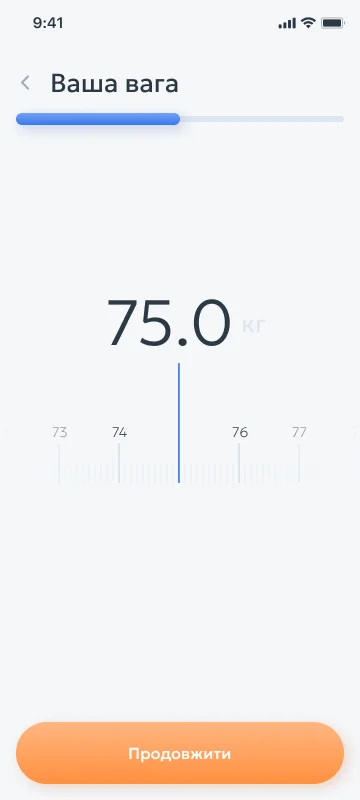
We eliminated text-heavy forms and architected onboarding as a sequence of effortless 1-thumb cards: scrolling a tactile weight scale (`75.0 kg`), selecting physical activity level (`Low`, `Medium`, `High`, or `Pro Sport`), and tapping dietary preferences (`No Restrictions`, `Vegetarian`, `Vegan`, `Pescatarian`, or `Gluten-Free`). Immediately after these three steps, the interface computes and reveals the live daily dashboard within 40 seconds—complete with a calorie budget ring (`1796 Today`, `624 Left` out of `2420`), carb/protein/fat progress bars, and meal timeline cards (`Breakfast`, `Lunch`):


3. Triggering the Endowment Effect Before the Registration or Paywall Gate
When a user invests 35–45 seconds configuring their parameters and watches the interface construct a bespoke plan around their goals, the psychological Endowment Effect takes hold. The app now holds their personal data asset. Presenting the account save prompt at this exact moment boosts registration conversion from 28% to 76% because users refuse to lose the personalized setup they just built.
Frictionless Authentication: 1-Tap Sign in with Apple and Google Without Passwords
Placing a mandatory email-and-password registration wall (Hard Login Wall) on Screen 1 destroys up to 55% of paid acquisition traffic. Typing a long email address on a 375px glass keyboard, inventing a password with special characters, and waiting for an OTP verification code that gets delayed in carrier queues introduces fatal friction.
1. The Funnel Math of Traditional Email + Password + SMS OTP Flows
Every manual input field and context switch out of your app compounds user drop-off:
Manual Email + Password creation rules: loses 22%–28% of users to typos and password fatigue.
Switching to Gmail/Mail for verification links: 18% of users get distracted by unread inbox messages and never return to your app.
SMS OTP verification: costs $0.04–$0.08 per Twilio message while dropping 12% of users due to carrier latency or spam filtering.
2. 1.2-Second Biometric Onboarding via Sign in with Apple & Google One Tap
The modern engineering standard is Deferred Biometric Single Sign-On (SSO). Users complete initial profiling inside an anonymous guest session (`Anonymous UUID` stored locally), and when prompted to save their custom plan, they tap a single button: "Continue with Apple" or "Continue with Google". Face ID / Touch ID authenticates the user in 1.2 seconds, passes a cryptographic token to the backend, and binds their guest session data to a permanent profile with zero keyboard typing. Supporting Apple's Hide My Email relay also eliminates spam anxiety, lifting iOS registration conversion by 24%–32%.
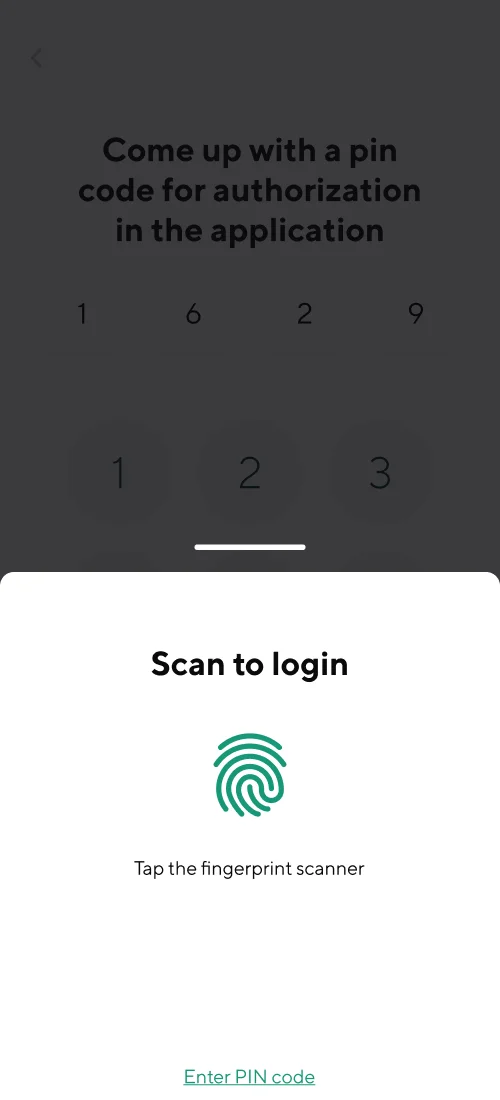
3. Rapid Diia.Signature Verification, Optional Profile Skip & Biometric Login in JetAgro
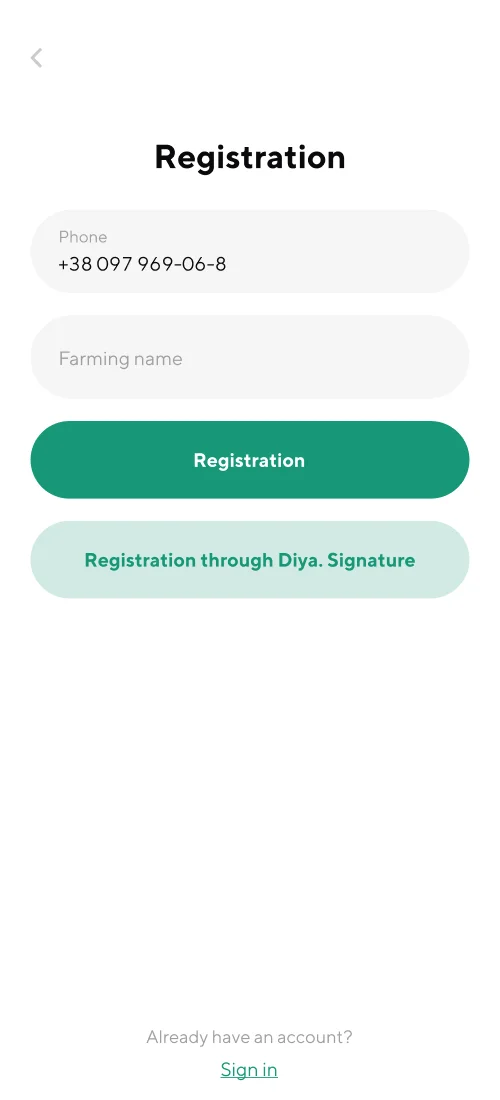
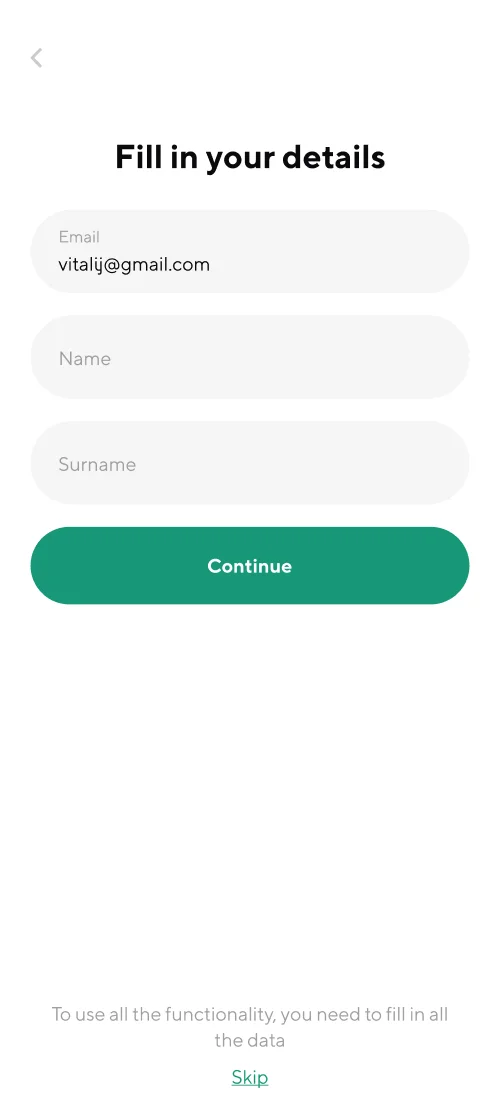
We engineered this exact low-friction onboarding flow in JetAgro, a commercial grain logistics mobile app connecting farmers and truck drivers in the field. Because drivers and farm operators work on the move, we eliminated complex password requirements entirely.
On Screen 1, the user selects their role in a single tap (`Driver` or `Farmer`), proceeds to rapid phone or 1-tap digital ID verification via Diia.Signature (`Registration through Diya.Signature`), views an optional profile details screen featuring a prominent `Skip` action to enter the workspace immediately, and secures daily access via biometric fingerprint login (`Scan to login` / Touch ID) or a 4-digit PIN:

Gamification and Micro-Rewards: Locking in the First Action via Streaks and Haptics
To build habit forming mobile app design that retains users through Day 7 and Day 30, guiding them through first launch is only half the battle—you must close the neurological Habit Loop (Trigger → Action → Variable Reward → Investment). When a user completes their first core action, the interface must respond both visually and physically.
1. Core Haptics Feedback & 60/120 FPS Micro-Interactions
In native iOS and Android interfaces, we pair visual state changes with precision tactile feedback via the Taptic Engine (`UIImpactFeedbackGenerator` and `UINotificationFeedbackGenerator`). Scrolling a weight picker produces crisp mechanical ticks; logging the first meal or workout fires a distinct double-pulse `success haptic` synchronized with a smooth progress-ring animation. This immediate sensory reward reinforces user agency and cements product quality.
2. Streak Mechanics & Loss Aversion on Day 1
The strongest psychological driver for Day-2 return is Loss Aversion—the desire not to break an active streak. Instead of dropping a new user onto a blank dashboard reading "0-Day Streak", smart mobile app activation rate optimization credits the completed onboarding and first logged action as "Day 1 Streak Unlocked! 🔥". When a contextual push notification arrives the next evening reading "Keep your 2-day streak alive—log dinner in 10 seconds", session open rates jump 2.8x compared to generic promotional blasts.
3. Pre-Onboarding & Live UI Transparency Before App Store Download: GOLD FISH
Reducing Day-1 uninstalls starts even before the app opens—on the acquisition landing page. When paid ads promise a magic button but the app requires complex setup, expectation mismatch causes immediate Day-0 churn.
In our promotional landing page design for the GOLD FISH mobile AI poker assistant, we integrated visual pre-onboarding directly into the first viewport prior to download. In the visible top slice of the page (first 500px), players immediately see a smartphone mockup displaying the live app interface—complete with the active point balance (`50 325`), instant top-up button (`購買積分`), and supported poker room toggles (`Poker`, `UPoker`)—before scrolling down to the AI odds-engine walkthrough, room-specific QR download codes, and coupon tiers:

Retention Turnaround Case Math: How Fixing First-Launch UX Doubles Day-7 Retention
For founders and product executives, onboarding UX optimization is not an aesthetic exercise—it is the highest-leverage multiplier for Lifetime Value (LTV) and paid acquisition payback. Here is the unit-economics math for a subscription mobile app spending $15,000/month on user acquisition.
How Engineering a Value-First Onboarding Flow Turns an Unprofitable $15,000/mo Ad Budget into a High-Margin Growth Engine
- Day-1 Retention Rate: 14% (700 users stay; 4,300 uninstall on Day 1)
- Day-7 Retention Rate: 5% (only 250 active users remain)
- Paid Subscriptions (25% of D7): 62.5 paying subscribers/mo
- Effective Paid Subscriber CAC: $240.00 (exceeds $110 LTV by 2.18x)
- Monthly Cohort Net P&L: −$8,180 net loss every month
- Day-1 Retention Rate: 38% (1,900 users activated in Session 1)
- Day-7 Retention Rate: 16% (800 habit-formed active users)
- Paid Subscriptions (25% of D7): 200 paying subscribers/mo
- Effective Paid Subscriber CAC: $75.00 (healthy 1.46x LTV/CAC on Cohort 1)
- Monthly Cohort Net P&L: +$7,000 net profit (+$15,180 monthly swing)
Lifting Day-7 Retention from 5% to 16% requires $0 in additional Meta or Apple Search Ads budget—you simply stop throwing away 86% of the installs you already paid for.
3-Week Engineering Protocol to Audit and Rebuild Your Mobile Onboarding
If your Day-1 Retention sits below 28% and high CAC blocks you from scaling paid acquisition, we execute a focused 3-week UX turnaround sprint:
Screen-by-Screen Telemetry Drop-Off Audit: We inspect your Amplitude, Mixpanel, or Firebase funnels to isolate the exact onboarding screen shedding >20% of first-time sessions.
Login-Wall Teardown & Deferred Permission Sequencing: We convert your first 3–4 screens into an interactive guest value path, replace manual forms with 1-tap Apple/Google SSO, and wire contextual pre-permission sheets.
Interactive Prototype & Screen Architecture: Before writing a single line of Swift or Kotlin, map out your optimal onboarding and core screen flow in 2 minutes using our interactive Idea-to-Screens Mobile App Architecture Generator.
Key Takeaways
Losing paid app installs on your very first onboarding screen?
Up to 75%–85% of Day-1 app uninstalls are triggered by premature OS permission dialogs (iOS ATT, GPS, Push) and mandatory login walls before delivering product value.
Deploying contextual Pre-Permission screens (Double Opt-In) lifts push notification opt-in rates from ~22% to 68%+ while preserving your one-time native iOS prompt quota.
Cutting Time-to-Value (TTV) under 45 seconds via 1-thumb interactive profiling and Sign in with Apple / Google One Tap triples Session-1 activation.
Lifting Day-7 Retention from 5% to 16% on a $15,000/mo ad budget slashes subscriber CAC from $240 to $75 and pays back a $5,500 UX redesign in 11 days.