B2B SaaS & Dashboards
Designing UX for AI Agents & Generative Software: Human-in-the-Loop Controls, Streaming & Trust Patterns — Architecture Cost & ROI
Why 80% of AI startups lose trial users in week one to 'Black Box' anxiety and runaway LLM token burn
According to research by Gartner and the RAND Corporation, roughly 80% to 85% of enterprise AI initiatives and autonomous agent deployments fail to reach scaled production or hit a retention wall—and the primary culprit is rarely the underlying frontier model (Claude 3.7 Sonnet, GPT-4o, or Gemini 2.5 Pro). It is the interface architecture. When founders wrap a sophisticated multi-agent backend inside a bare text-input chat box, they offload the entire cognitive burden of prompt engineering onto busy B2B users. Customers stare at a blinking cursor, panic during 18-second tool-calling latencies, fear that an autonomous agent will hallucinate an external client email or corrupt production database records, and churn after 3–4 frustrating re-prompting loops.
Worse still is the hidden unit-economics bleed: every blind "regenerate response" click inside a chat thread forces the LLM to re-ingest the entire conversation context window ($3.00 to $15.00 per million output tokens on reasoning models), devouring up to 45% of a SaaS startup's gross margin. In this engineering guide, we break down how to architect production-grade designing interfaces for ai agents ($7,000–$20,000 turnkey): replacing chat wrappers with structured generative ui ux design patterns and human in the loop interface design gates that boost Trial-to-Paid conversion by 2.6x while cutting API token costs by 70%.
The Death of the Standard Chatbot: Why Chat Windows Fail Complex AI Products
Usability studies from the Nielsen Norman Group (NN/g) confirm a fundamental UX paradox: an open-ended text box ("Ask me anything...") carries the highest cognitive interaction cost of any UI pattern. In B2B software, a financial controller, procurement officer, or sales manager does not want to write prose instructions to an AI—they want a deterministic business outcome in 3 clicks. Mature AI products replace conversational chat threads with Structured Canvases and Parametric Intent Controls.
1. Deconstructing Prompts into Parametric UI Controls: The AImReply Case Study
Instead of forcing users to manually type tone-of-voice constraints, recipient roles, target languages, and formatting rules into a chat box, an engineered AI interface exposes those variables as fast visual selectors (pills, segmented toggles, and sliders) that compile into a strict JSON system prompt on the backend.
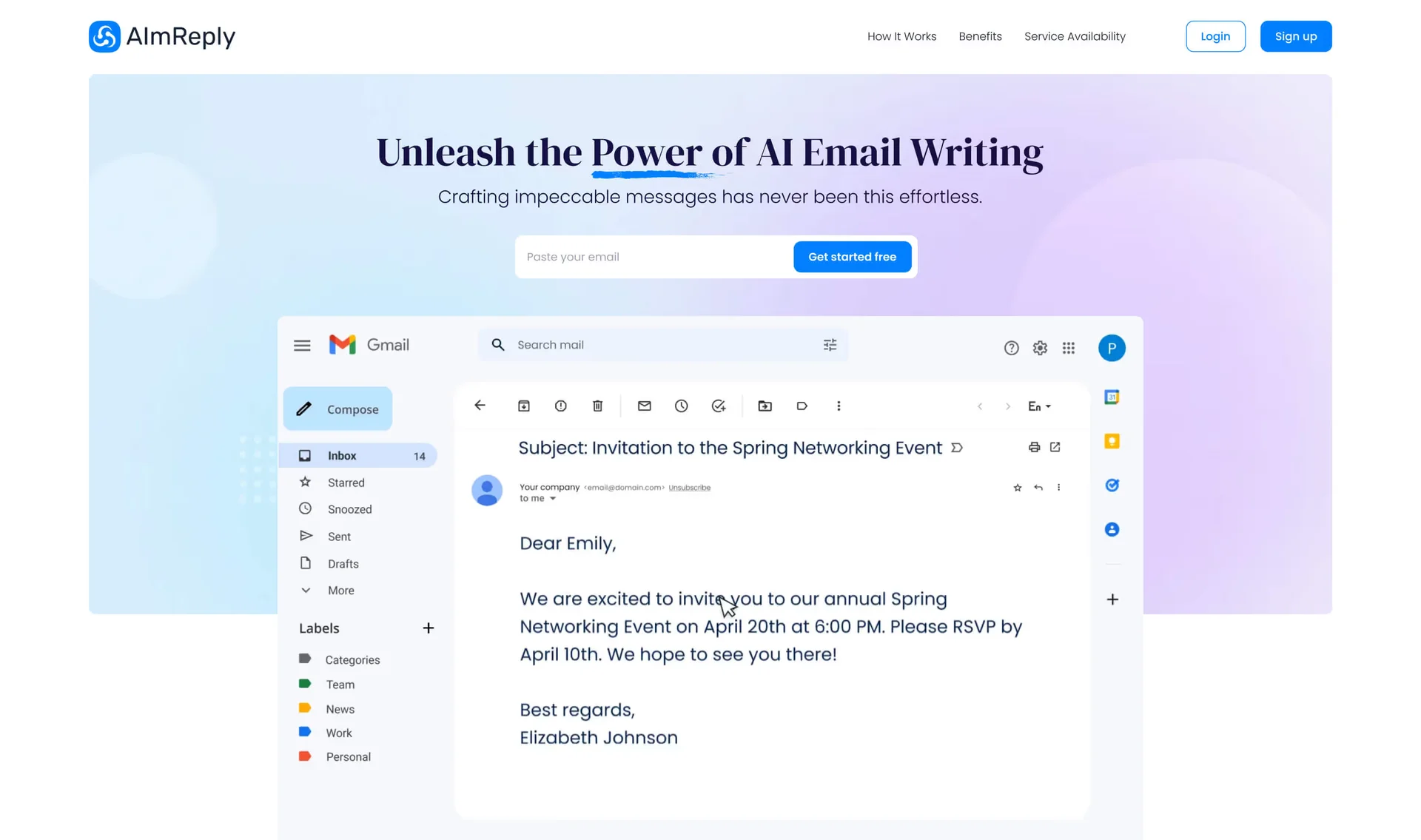
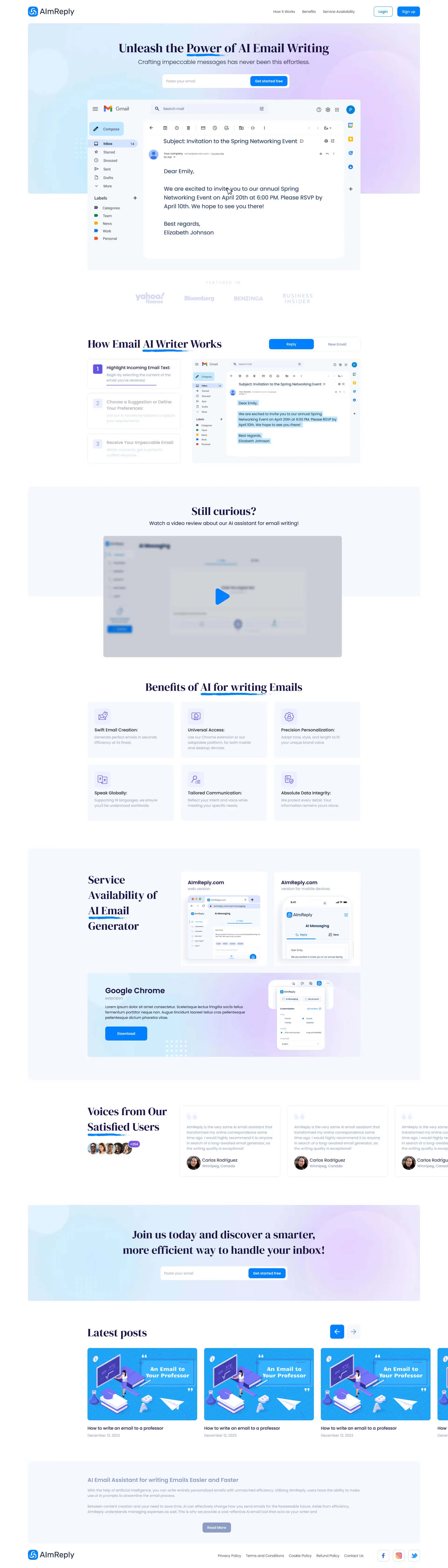
We applied this exact prompt-deconstruction architecture when designing the product showcase and workflow experience for the AI email assistant AImReply. To eliminate blank-page anxiety inside the user's inbox, the hero screen immediately demonstrates AI-assisted email composition right inside a live Gmail inbox thread, while the full product page breaks down the 3-step generation flow with instant tone and multilingual controls across web, mobile, and the Google Chrome extension:
2. Architectural Comparison: Raw Chat Wrapper vs. AI-Native Workspace with HITL
Below is a side-by-side comparison of how a standard chatbot wrapper performs against a structured AI-Native workspace across user retention and LLM infrastructure unit economics. Explore our full B2B product deliverables inside the B2B SaaS UI/UX & High-Density Dashboards hub.
| Architectural Factor / SaaS Metric | Option A: Standard Chat Wrapper (Text Box UI) | Option B: AI-Native Workspace (Generative UI + HITL) |
|---|---|---|
| Task Initiation Mechanics | Manual prompt typing into a blank text field | 1-click parametric selectors, presets & contextual actions |
| Time-to-First-Value (TTV) | 8–14 minutes (trial-and-error prompt tweaking) | 45–90 seconds (structured artifact on first run) |
| Average Re-Prompts per Task | 4.2–6.5 full-context regenerations | 1.1–1.4 iterations (surgical inline block editing) |
| Monthly LLM API Token Cost (COGS/User) | $14.50–$28.00/mo (unbounded context re-ingestion) | $3.80–$6.20/mo (prompt caching & scoped diff updates) |
| 10–25s Reasoning Latency Drop-Off | Blind loading spinner → 38% tab abandonment | Live Chain-of-Thought stepper (`Querying DB` → `Verifying`) → < 4% drop-off |
| Autonomous Execution Safety | High risk of silent hallucinations or data overwrite | Human-in-the-Loop Gate (`Approve` / `Diff Edit` / `Rollback`) |
| Free Trial-to-Paid Conversion Rate | 3.5%–6.0% (heavy 48-hour onboarding churn) | 14.5%–21.0% (enterprise buyer & CFO trust) |
Latency & Streaming UX Patterns: Thought Skeletons, Reasoning Steps & Execution Progress
When a traditional SaaS app runs a PostgreSQL query, the UI updates in 120 milliseconds. When an autonomous AI agent decomposes a goal, queries a vector database (RAG), executes three external API tool calls, and validates schema constraints, end-to-end latency stretches from 8 to 35 seconds. Mastering llm streaming and latency ux optimization means turning passive wait time into transparent proof of work.
1. Live Chain-of-Thought Steppers Instead of Blind Loading Spinners
According to Jakob Nielsen's response-time thresholds, any wait exceeding 10 seconds without granular progress feedback causes users to assume the system has crashed. Instead of a generic spinner, we engineer a three-stage Streaming Reasoning Accordion powered by Server-Sent Events (SSE):
Sub-300ms Structural Skeleton: Before the first LLM token arrives, the interface immediately renders the wireframe layout of the target table, report, or card grid so the user's eye anchors on the upcoming workspace.
Live Tool-Call Telemetry (`1.5s – 12.0s`): The UI streams real-time state badges as the agent works: `✓ Scanned 42 PDF contracts` → `⟳ Cross-checking supplier pricing API...` → `✓ Validated margin guardrails`.
Progressive Component Hydration: Users can inspect and edit the top summary card while the agent continues streaming rows into the data table below the fold, paired with a persistent `✕ Pause / Cancel Run` button.
2. Contextual In-App Copilot Overlays Without Context Switching: The simpl.cx Case Study
High-performing AI assistants do not force operators to copy-paste data between their core web app and a separate tab—they embed directly over the live workspace as a contextual orchestration layer.
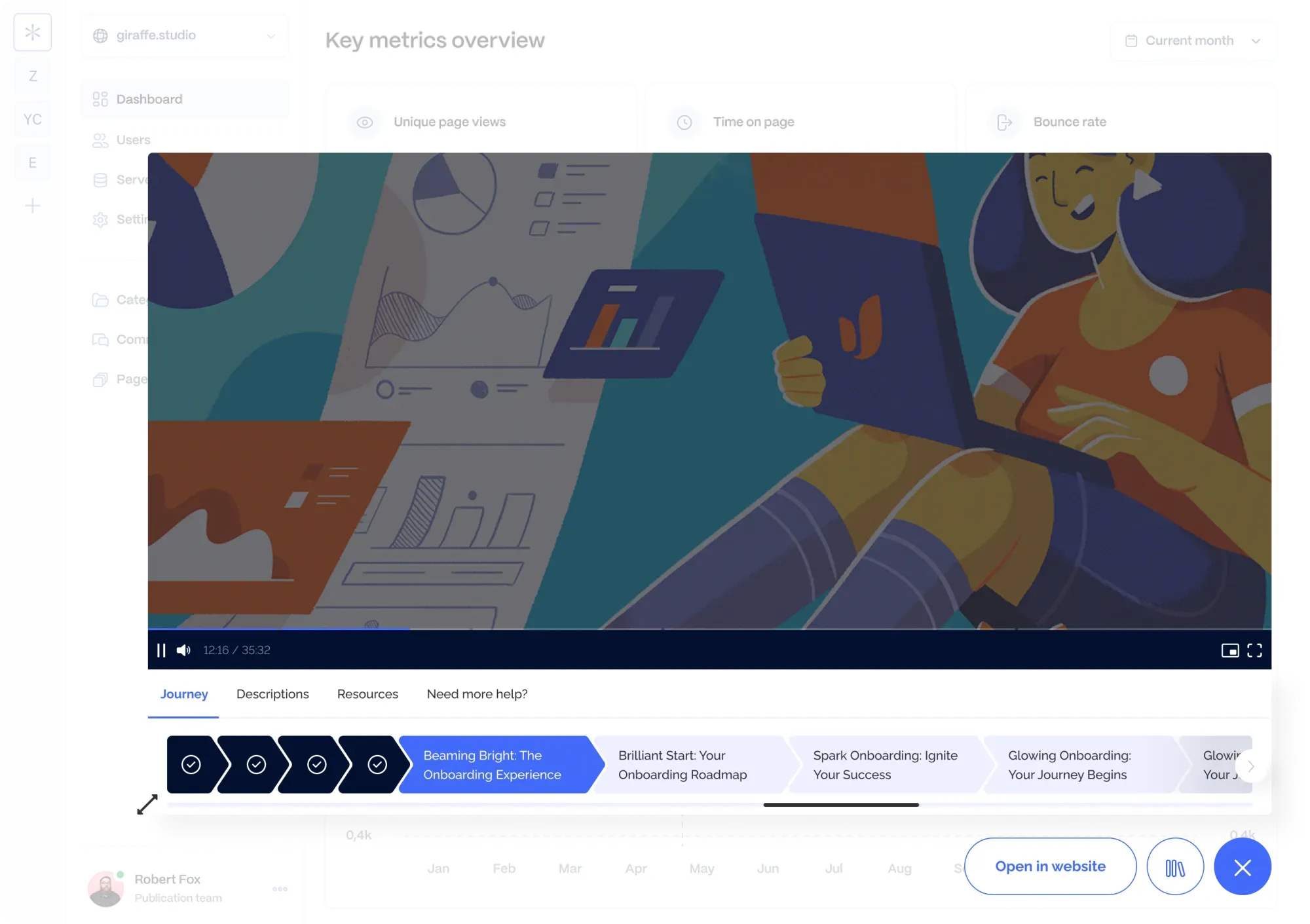
We engineered this exact lightweight contextual overlay architecture for the B2B SaaS platform simpl.cx. We designed an embeddable JS widget that launches directly over any client web application without page reloads: users see a clear stage progress bar, interactive step guidance, attached reference files (Resources), and verification checkpoints, with 1-click access to pause the flow or escalate to a human specialist:
Human-in-the-Loop Architecture: Approval Gates (Approve / Edit / Reject) & Graduated Autonomy
The single biggest blocker to enterprise AI adoption in fintech, legal, procurement, and healthcare is asymmetric error cost. An autonomous agent can execute 99 tasks flawlessly, but if its 100th action silently wires an incorrect invoice amount or emails a hallucinated discount to a VIP client, the business suffers immediate damage. As an ai product ux consultant, I architect autonomous workflows around a 3-tier Graduated Autonomy Matrix.
1. The 3-Tier Autonomy Stoplight & Side-by-Side Diff Viewers
Production-grade human in the loop interface design never treats automation as an all-or-nothing toggle. Every agent tool call is routed through a risk-weighted governance layer:
Green Tier (Autonomous Execution + 1-Click Undo): Low-risk read operations, lead tagging, data enrichment, and internal draft creation run automatically in the background, logged in an immutable activity feed with a 1-click `↺ Rollback State` button.
Amber Tier (Batch Staging & Inline Diff Review): When an agent updates 30 CRM records or reprices a catalog category, changes land in a `Staging Queue`. The operator views a clean side-by-side Diff Viewer (`Previous Value` in red strikethrough vs. `Proposed AI Value` in green), tweaks any cell inline, and clicks `Approve All 30 Changes`.
Red Tier (Hard Approval Gate): Any action that triggers external communications, financial transactions, or destructive database writes halts execution and renders a high-contrast decision card: `[ ✓ Approve & Execute ]`, `[ ✎ Modify Parameters ]`, or `[ ✕ Reject & Teach Rule ]`.
2. Visual Checkpoint & Action Gate Builders
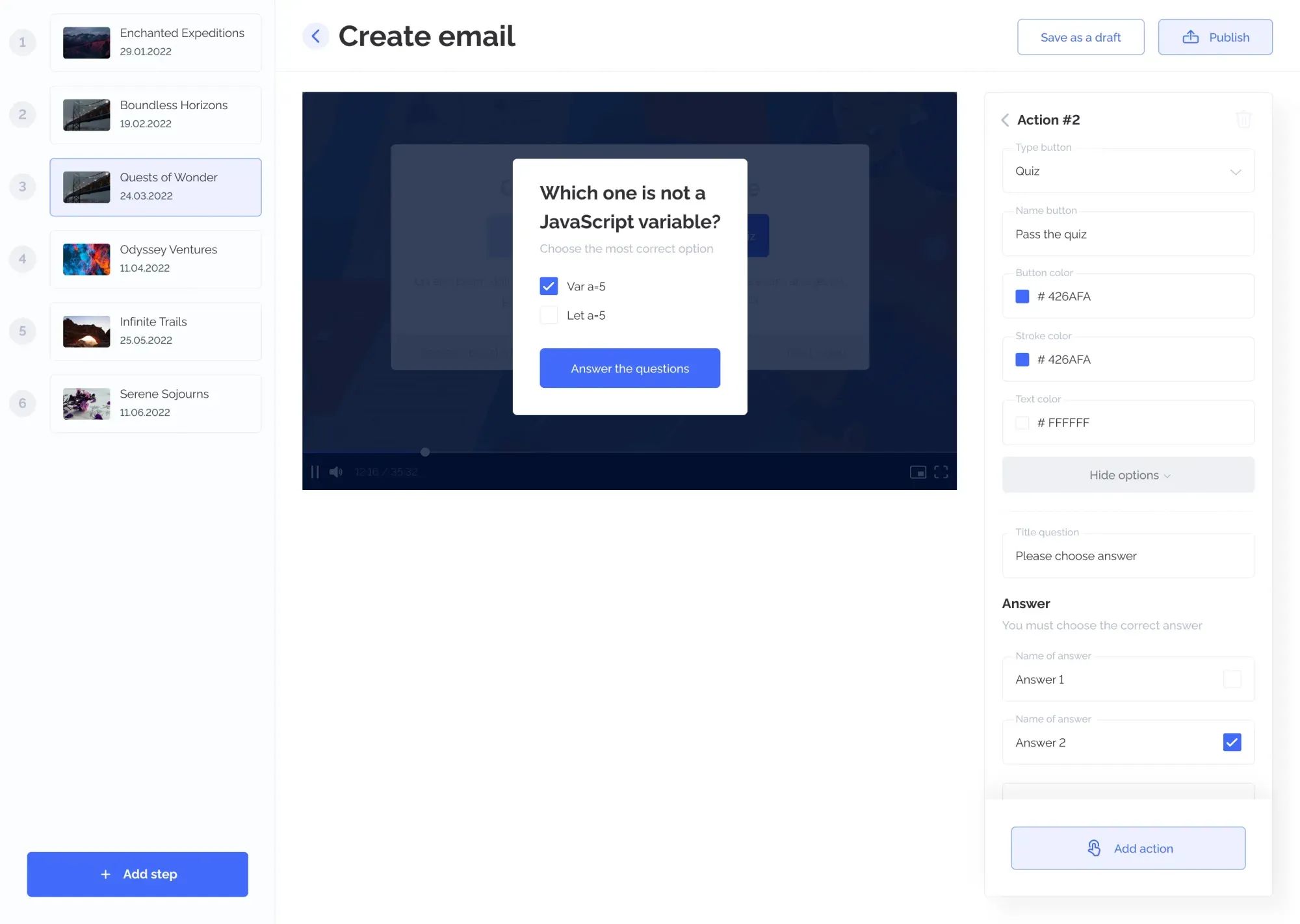
Enterprise team leads need the ability to configure exactly where an automated workflow must pause for human verification. Inside the simpl.cx admin platform, we designed a 3-column step-by-step Journey Builder where managers sequence 6+ workflow stages in the left rail (`+ Add step`), preview the live interactive verification modal in the center canvas, and configure checkpoint parameters in the right-hand inspector (`Action #2` — `Type button: Quiz`, question prompt, verified answer checkboxes, and `Save as a draft` / `Publish` controls):
Explainable AI (XAI): Visualizing Source Citations, Confidence Scores & Decision Logic
Domain experts will never trust an algorithm that outputs a naked number without an audit trail ("Order 450 units of SKU-9" or "Win probability: 74%"). Overcoming the enterprise "Trust Recession" requires baking Explainable AI (XAI) and Source Lineage directly into every generated UI component.
1. Inline Source Citations, Confidence Badges & Algorithmic Transparency: The GOLD FISH Case Study
Whenever an AI agent synthesizes documents, legal clauses, or probabilistic forecasts, we embed three verification patterns:
Hover-to-Verify Source Pills (`[Source: Contract #42, p.7]`): Clicking or hovering over any generated claim opens a split-screen document reader scrolled directly to the exact highlighted paragraph in the source PDF or database row.
Calibrated Confidence Badges: High-certainty database lookups render in standard typography, while low-confidence inferences automatically display an amber warning badge: `⚠ Low Confidence (68%) — Verify Manually`.
Visualizing Probabilistic Engine Logic: When a product relies on real-time odds calculation or mathematical modeling, the interface must demystify how the engine works.
We solved this exact algorithmic trust challenge when designing the promo platform for the mobile AI poker assistant GOLD FISH. Because users rely on the app for real-time mathematical odds calculation, establishing algorithmic credibility was paramount. On the hero screen, we showcased the live mobile assistant interface with active balance telemetry (`50 325`) and instant room toggles (`Poker / UPoker`), followed across the landing page by a visual breakdown of the AI probability engine, instant QR onboarding, and transparent usage tiers:

Case Study: Architecting an Autonomous Queue Workspace From Raw Prompt to Verified Output
The highest ROI in B2B AI comes from embedding generative agents inside a structured multi-stage fulfillment pipeline: intake specification → automated draft synthesis → quality & compliance check → human expert review → milestone invoicing. Here is how replacing a raw chat wrapper with a structured workspace transforms SaaS unit economics.
Raw Chat Wrapper vs. Structured AI-Native Workspace with HITL (per 2,500 Monthly Trials)
- First-Run Activation (Aha-Moment): Only 22% of users craft a working prompt
- LLM Token Burn (Re-Prompting Loops): 5.4 full regenerations/task ($16.40 COGS/user)
- Free Trial-to-Paid Conversion: 4.2% (105 paying subscribers from 2,500 trials)
- Month-1 Subscriber Churn: 28% due to black-box errors & lack of Undo gates
- Net New Monthly Recurring Revenue: $8,295 MRR on $45,000 ad spend
- Parametric Preset Activation: 74% of users reach verified output in 60 seconds
- LLM Token Cost (Scoped Inline Diffs): 1.2 runs/task ($4.90 COGS — 70.1% API savings)
- Free Trial-to-Paid Conversion: 14.8% (370 paying subscribers on identical traffic)
- Month-1 Subscriber Churn: 8.5% thanks to Approve / Edit / Rollback controls
- Net New Monthly Recurring Revenue: $29,230 MRR (+252% revenue on same ad budget)
Replacing an open-ended chat box with parametric controls and inline diff editing solves the two biggest threats to AI SaaS startups simultaneously: it triples trial activation while stopping users from burning expensive reasoning tokens on full-context regenerations.
1. Multi-Stage Order Queue, Revision History & Milestone Control: The Academic Papers Case Study
When a platform orchestrates complex research or document generation workflows, users need a structured lifecycle command center rather than an unstructured chat log.
We engineered this exact multi-stage workspace architecture for the Academic Papers platform. Instead of scattering communication and files across messy threads, we designed a unified order management dashboard and a 6-tab project workspace covering formal specification sheets (academic tier, citation style, deadline), direct author/reviewer messaging, versioned revision logs, file repositories, and milestone invoice ledgers. From the main queue table, users monitor live completion percentages and approve or pay for deliverables in one click:

2. 4-Point Readiness Checklist Before Scaling Paid Traffic to Your AI Product
Before pouring ad spend into your AI SaaS or rolling out an internal agentic tool, audit your interface against four engineering criteria:
The 60-Second Keyboard-Free Rule: Can a first-time trial user generate a high-value artifact using 1-click presets or sample data in under 60 seconds without typing a single prompt?
Transparent Latency Telemetry: Does every task taking longer than 3 seconds display a live Chain-of-Thought step indicator (`Analyzing` → `Querying DB` → `Formatting Table`) paired with an instant `Stop / Modify` button?
Scoped Block Regeneration: Can users highlight a single paragraph or table cell and instruct the AI to refine just that element without wiping out the other 95% of the approved output?
Hard HITL Action Gates: Are all external webhooks (sending emails, mutating CRM records, charging cards) protected by an explicit `Approve / Diff Edit / Reject` confirmation screen? To find out in 2 minutes whether your product needs a full architectural overhaul or a targeted UX sprint, run our interactive Redesign vs. Surgical Tweak Diagnostic Tool.
Key Takeaways
Building an AI SaaS or autonomous agent system and need to turn a 'black box' into a trusted workspace?
80–85% of AI products hit a retention wall because they hide powerful agentic backends behind a blank chat box, forcing users to act as prompt engineers.
Replacing open-ended text boxes with parametric UI selectors and inline diff editors cuts re-prompting loops from 5.4 to 1.2 runs, slashing LLM API token costs by 70%.
Live Chain-of-Thought streaming skeletons turn 10–30 second reasoning waits into transparent proof of work, cutting tab abandonment below 4%.
Human-in-the-Loop approval gates (Approve / Diff Edit / Rollback) eliminate black-box anxiety and lift Trial-to-Paid conversion from 4.2% to 14.8%.