Custom CRM & Automation
Migrating from Excel & Google Sheets to Custom CRM: Step-by-Step Transition Without Halting Sales or Losing Customer Data
Why 70% of spreadsheet-to-CRM transitions stumble in Week 1—and how to execute a zero-downtime cutover
Every growing company with 10 to 30 employees eventually hits the spreadsheet wall: a shared folder clogged with files named `Sales_Pipeline_FINAL_v14_Updated.xlsx` becomes the single biggest operational bottleneck. Yet founders often delay an excel to crm migration for months out of a legitimate operational fear: halting order fulfillment mid-quarter, losing historical customer discounts, or triggering a quiet revolt from sales reps attached to their color-coded grids. Industry research from Forrester and Gartner confirms that up to 70% of off-the-shelf CRM implementations fail or revert to 'shadow spreadsheets' due to chaotic data imports and bloated user interfaces.
At the same time, staying in spreadsheets is a ticking financial bomb: decades of corporate spreadsheet audits (most notably Professor Raymond Panko's research) reveal that 88% to 94% of operational spreadsheets contain material formula or data errors, while sales reps waste 17% to 20% of their workweek (6–8 hours weekly) on manual data entry and status reconciliation. In this engineering blueprint, we break down how to move from spreadsheets to crm in 14 days with zero sales downtime, how to automate spreadsheet data cleanup for crm import, and how to architect a bespoke interface your team adopts in 2 hours.
The Point of No Return: 5 Symptoms That Google Sheets Is Actively Destroying Your Unit Economics
Spreadsheets are a brilliant scratchpad for a solo financial analyst, but a disastrous database for a live commercial team. When 8 sales reps, 2 dispatchers, and an accountant edit the same sheet simultaneously, data integrity collapses. Here are the five engineering symptoms proving it is time to stop using excel for customer tracking and replace google sheets with custom crm architecture.
1. Symptoms #1–3: Browser Freezes Past 15,000 Rows, Silent Formula Corruption & Version Chaos
The first symptom is browser rendering paralysis. Once a Google Sheet accumulates 15,000 to 25,000 rows wired with `VLOOKUP`, `IMPORTRANGE`, and conditional formatting rules, recalculating a single cell edit takes 4 to 9 seconds. A sales rep takes an inbound call, tries to filter a buyer's order history, and the Chrome tab freezes.
The second symptom is silent formula death (1%–5% Cell Error Rate). All it takes is one rushed operator pasting a plain value over a dealer-margin formula or sorting a column without expanding the selection—and your company ships orders at a loss for weeks. Spreadsheets lack strict database schema validation: nothing stops a user from typing `"will pay next Tuesday"` into a numeric currency column, instantly breaking your monthly revenue rollup.
2. Symptoms #4–5: Forgotten Follow-Ups Killing LTV & Zero Protection Against Database Theft
The third and fourth symptoms strike directly at top-line revenue: zero automated follow-up triggers. A spreadsheet is passive—it will not push a notification 15 minutes before a promised callback or flag a B2B account that normally orders $2,500 monthly but has gone silent for 38 days. Finally, symptom five is total security exposure: any employee with edit permissions can click `File → Download → .xlsx` in 3 seconds and walk out the door with your entire customer database.
3. Operational Loss Comparison: Google Sheets / Excel vs. Bespoke Relational CRM
Below is a side-by-side engineering benchmark for a 15-person operational team. Explore our complete system deliverables in the Custom CRM & Financial Analytics hub.
| Operational Node / Metric | Legacy Excel + Google Sheets + Messengers | Bespoke Custom CRM on Relational DB (PostgreSQL) | Direct Financial Impact |
|---|---|---|---|
| Customer Lookup & History Speed | 12–45 seconds (laggy filters, searching across 6 yearly tabs) | 0.08 seconds (instant indexed search by phone or SKU) | 4.5x faster inbound call handling |
| Pricing & Formula Error Rate | 88%–94% of files contain broken formulas or stale price tiers | 0% (strict server-side schema validation & auto-pricing) | Eliminates underbilled shipments & margin leaks |
| Weekly Manual Data Entry per Rep | 6.5–8 hours/week (copy-pasting into invoices & shipping labels) | < 1.2 hours/week (1-click invoice & waybill generation) | Frees +22% of team capacity for active selling |
| Overdue Receivables Control | Manual Friday reconciliation by accounting | Real-time automated shipment hold on overdue accounts | Cuts cash-flow gaps & overdue AR by 40%–65% |
| Audit Trail & Exfiltration Defense | Shared links; full database downloadable in 5 seconds | Granular RBAC, phone masking & immutable activity logs | 100% protection of proprietary client equity |
Legacy Audit & Data Cleansing: Deduplication, E.164 Phone Normalization & Preserving History
The most destructive migration failures happen when a business exports raw CSV files from Excel and dumps them straight into a new database ('Garbage In, Garbage Out'). If you import 5 years of uncleaned spreadsheets as-is, your reps will log into the new CRM and see four separate profiles for the same buyer with conflicting balances.
1. E.164 Phone Standardization & Fuzzy Matching Deduplication
In a typical legacy spreadsheet, a single customer's phone number appears in eight different variations: `(555) 234-5678`, `555.234.5678`, `+15552345678`, `5552345678 (John Warehouse)`, or two numbers crammed into one cell separated by a slash. Before running any import, we execute an automated ETL (Extract, Transform, Load) cleansing pipeline.
In Pass 1, our parser strips non-numeric characters, extracts inline text notes into dedicated comment fields, and normalizes every phone number into the strict international E.164 standard (`+15552345678`). In Pass 2, a fuzzy-matching algorithm (using Levenshtein distance) identifies duplicate corporate entities like `Apex Logistics LLC`, `Apex Logistics, Inc.`, and `John Doe (Apex)`—merging them into a single master account while preserving all associated contacts.
2. Parsing 'Dumpster Cells' into a Live Visual Booking Grid in the SIESTA Case Study
A second spreadsheet plague is unstructured notes where dates, deposits, special requests, and reschedule history are jammed into a single text cell. Leaving that data unstructured makes automated capacity planning or dynamic pricing impossible.
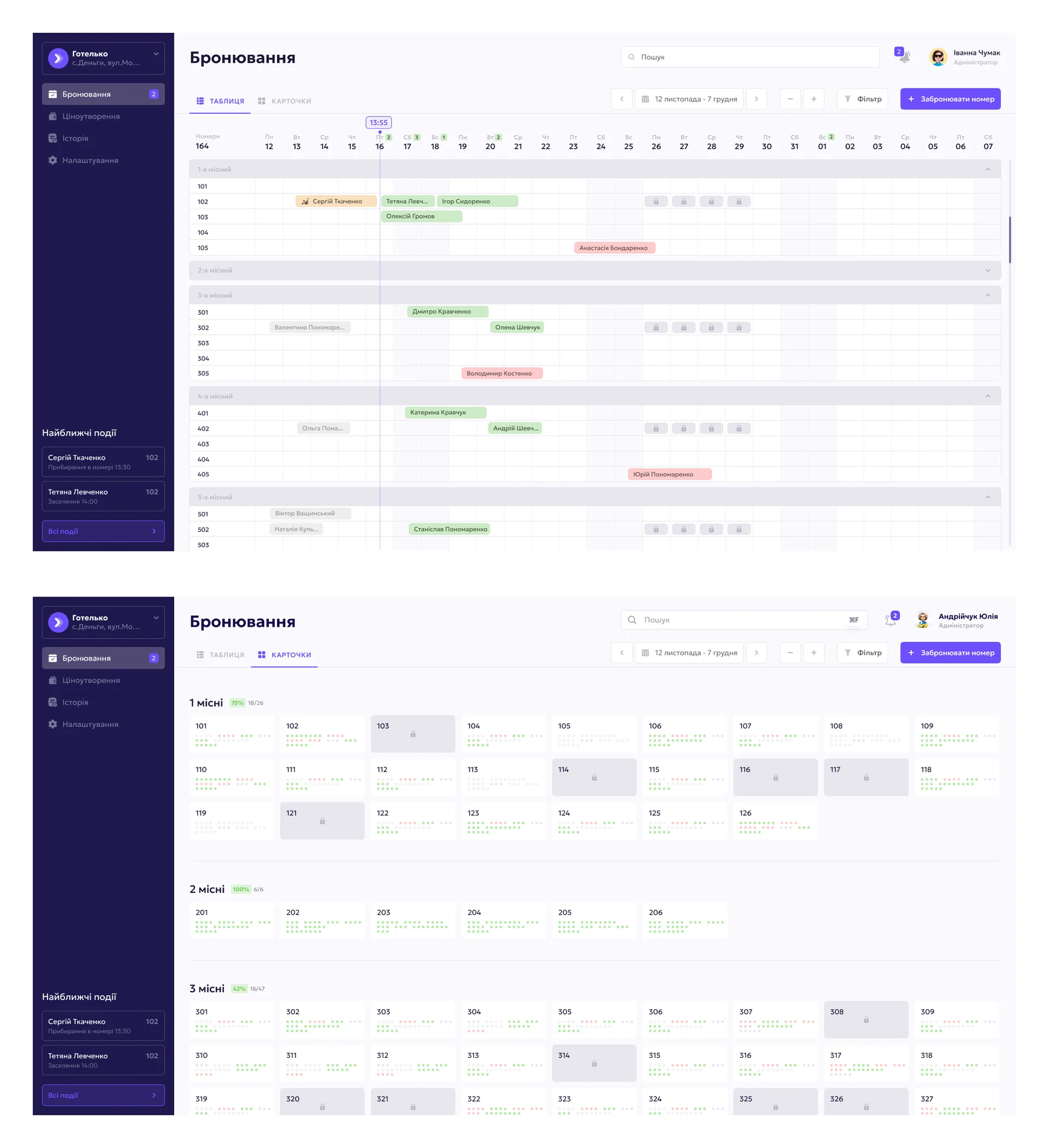
We solved this exact structural transformation challenge when designing the SIESTA hotel management MVP system. In hospitality operations, tracking room reservations in spreadsheets inevitably causes double-bookings (overbooking across overlapping dates) and rate calculation errors. Instead of flat rows, we engineered a booking module with a top mode switcher (`ТАБЛИЦЯ` / `КАРТОЧКИ`): on the primary screen, administrators view an interactive timeline calendar grid organized by room capacity (`1-х місний`..`5-х місний`), color-coded guest stay bars, locked maintenance dates (marked with padlock icons), and a live 'Upcoming Events' sidebar tracking scheduled housekeeping and check-ins:
3. Preserving Multi-Year Order History & Loyalty Tiers in the Teren Blade Case Study
Sales teams panic before a migration because they fear losing multi-year purchase histories and custom loyalty discounts for VIP buyers. During a relational migration, we decompose flat spreadsheet rows into linked database tables: `Customers` (unique profiles), `Orders` (historical transactions), and `Order_Items` (line-item SKUs).
A clear illustration of how clean relational customer data drives repeat purchases (LTV) is the personal account portal we designed for the handcrafted custom knife brand Teren Blade. At the top of the viewport, the buyer immediately sees their automatically calculated loyalty tier (`5880 UAH` spent unlocking a `4%` discount, plus the exact `4120 UAH` threshold to reach `5%`), a wholesale buyer verification status banner, and a structured contact profile (`First Name`, `Last Name`, normalized phone, `E-mail`, city, and delivery address) alongside navigation tabs for `My Orders` and `Wishlist`:

Sandbox & Parallel Run: Why You Must Never Cut Over Cold Turkey on a Monday Morning
The #1 management blunder during a CRM rollout is the 'Cold Turkey Cutover'—locking everyone out of Google Sheets at 9:00 AM on Monday and forcing the team onto an untested system. By 10:30 AM, an edge-case return or split payment halts order intake, and by noon the founder re-opens the old spreadsheets in frustration. To guarantee 0 minutes of operational downtime, we enforce a 3-Phase Parallel Shadow Run Protocol.
1. Days 1–5: Isolated Staging Sandbox Loaded with Real Production Data
During Week 1, your sales team continues working in their familiar spreadsheets without disruption. Behind the scenes, we deploy a staging sandbox populated with a full snapshot of your cleaned historical database. The Head of Sales and 1–2 senior reps ('product champions') run 20 real-world edge cases in the sandbox: creating orders, applying partial prepayments, handling returns, and generating invoices. Every UI friction point is eliminated before the broader team ever logs in.
2. Days 6–11: Dual-Write Shadow Run & Automated Checksum Reconciliation
In Week 2, we activate a real-time synchronization bridge (via Google Sheets API / webhooks). Every order entered or received from the website automatically mirrors into the new CRM. Reps begin processing live deals inside the new interface under engineer supervision, while the legacy sheet remains open in `Read-Only` mode as a safety net. On Day 10, we run automated financial reconciliation scripts to verify that revenue and receivables match down to the cent.
Overcoming Sales Team Resistance: Ergonomic Principles for 2-Hour User Adoption
Why do sales reps fiercely resist boxed CRMs like Salesforce or HubSpot and sneak back into Excel? The reason isn't laziness—it is Fitts's Law and cognitive friction. In a spreadsheet, a rep views 40 rows at a glance and updates a status in two keystrokes (`Enter` → `Down Arrow`). In a bloated off-the-shelf CRM, updating one deal requires opening a new tab, waiting 3 seconds for scripts to load, scrolling past 35 irrelevant fields, and clicking 'Save'.
How a zero-downtime transition from spreadsheets to a high-speed custom CRM reclaims 320+ sales hours monthly and stops lead leakage
- Time wasted on manual copy-pasting & reconciliation: 20% of workweek (392 team hours/month)
- Direct payroll burned on spreadsheet admin: $2,800/mo ($33,600/year paying reps to type rows)
- Warm deals lost due to missed callback reminders: ~50 lost orders/mo (−$4,250 net margin)
- Margin lost to broken formulas & wrong discount tiers: −$1,700/mo in underbilled invoices & errors
- Total monthly financial bleed: −$8,750/mo (−$105,000 annually)
- Order intake & shipping label generation time: 25 seconds vs. 4.5 minutes (10.8x faster)
- Reclaimed team capacity (without hiring): +$2,400/mo in productive selling time
- Incremental deals closed via automated follow-ups: +65 orders/mo (+$5,525 net margin)
- Sales department downtime during cutover: 0 hours (parallel shadow run + weekend switch)
- Net monthly financial gain: +$7,925/mo (+$95,100 annual bottom-line impact)
A custom CRM eliminates staff resistance because completing an order inside it is physically faster than typing into Excel: the system auto-fills buyer details, calculates tier discounts, and prints shipping labels in 1 click.
1. The '5-Field Rule' & High-Density Inline Editing with Keyboard Hotkeys
To achieve 100% team adoption on Day 1, we engineer the UI around a strict rule: completing a task in the new CRM must require 3x fewer clicks than the old spreadsheet. We preserve the compact, high-density table view operators love—complete with inline status editing and `Cmd+K` instant search by the last 4 digits of a phone number—while stripping away all visual clutter so reps see only the 5–6 fields required for their role.
2. Real-Time Admin Ergonomics & Poster POS Sync in the Golden Dragon Case Study
The fastest way to make employees forget spreadsheets is to automate the repetitive tasks they hated doing manually. A prime example is the custom CMS admin panel and order management dashboard we built for the Golden Dragon sushi delivery network.
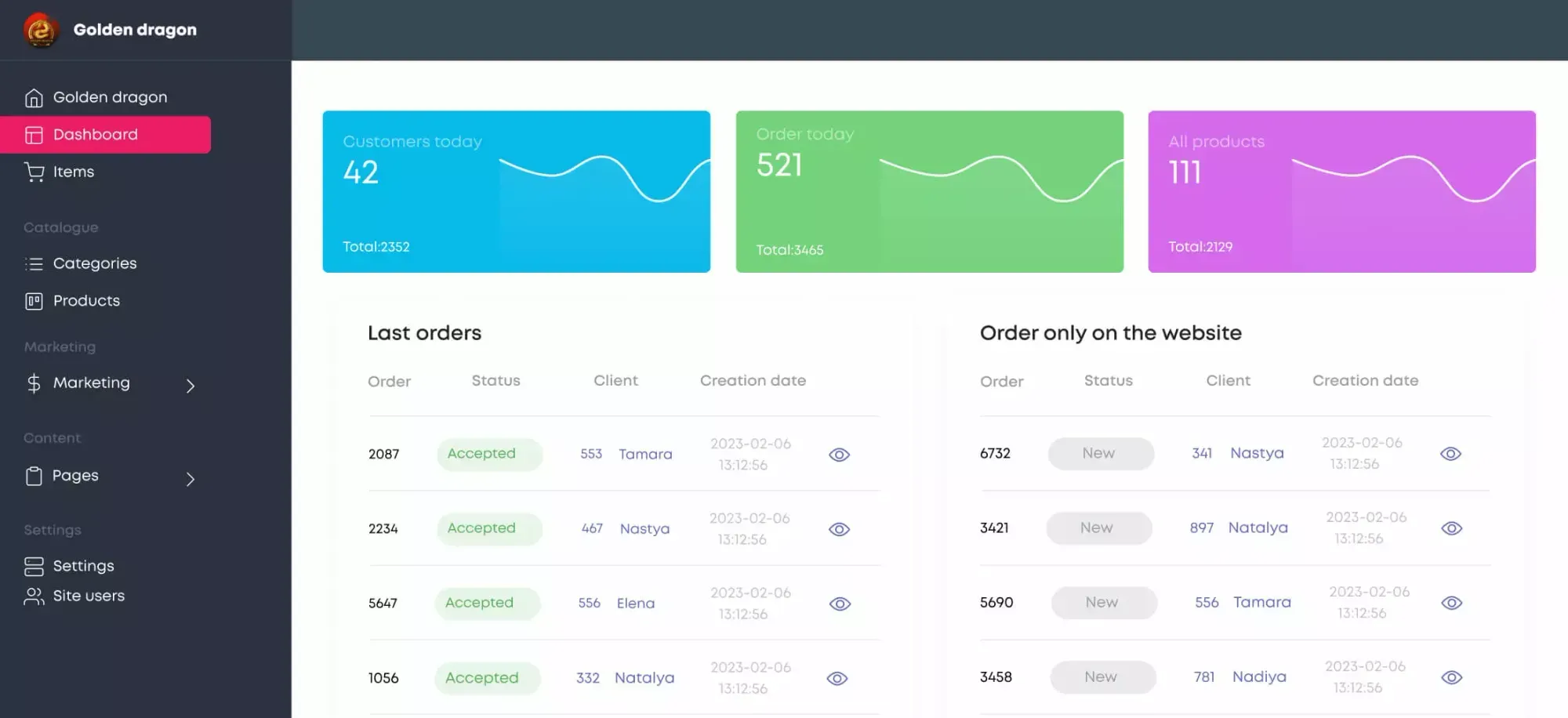
Previously, reconciling daily website orders against the POS terminal required manual cross-checking. We engineered a bespoke admin panel with direct two-way Poster POS synchronization in real time. At the top of the `Dashboard`, managers see three live KPI sparkline cards (`Customers today: 42`, `Order today: 521`, and `All products: 111`), while the lower workspace splits incoming traffic into two synchronized queues: `Last orders` (`Accepted` into Poster POS) and `Order only on the website` (`New` web orders awaiting 1-click inspection):
The Weekend Cutover Protocol: 10-Point Data Security & Integrity Checklist
The final switch from legacy spreadsheets to production CRM always happens during the lowest-traffic window—between Friday evening and Sunday night (Weekend Cutover Protocol). Below is our mandatory 10-point engineering checklist guaranteeing 100% data preservation.
Phase A. Friday Evening (19:00–22:00): Write Freeze & Cryptographic Snapshot
Switch all legacy Google Sheets to `View Only`: prevents accidental Friday-night edits after the shift closes.
Cold Archival Snapshot: export all raw `.xlsx` and `.csv` workbooks into encrypted cold storage with SHA-256 checksums.
Final Delta Sync: run the automated ETL script to ingest only the new transactions created during the final 48 hours of parallel testing.
Phase B. Saturday — Sunday: Checksum Reconciliation & Webhook Cutover
Automated Financial Reconciliation: verify that total accounts receivable, prepayments, and customer counts match between the legacy sheet and PostgreSQL (`$0.00` variance).
Relational Foreign-Key Validation: confirm zero orphaned orders or unlinked contact records.
Production Webhook Cutover: point website lead forms, VoIP telephony, Telegram/Instagram bots, and payment gateways directly to the live CRM.
Role-Based Access Activation: provision individual staff logins with bulk-export restrictions enabled.
Phase C. Monday Morning (08:30): Live Shift Launch with Hypercare Support
15-Minute Morning Kickoff Briefing: quick live walkthrough of the workspace with the sales team.
72-Hour Engineer Hypercare Window: direct Slack/Telegram channel where our engineer resolves any operator question within 2 minutes.
Automated Hourly Point-in-Time Backups: continuous PostgreSQL replication to an isolated off-site server. To audit your current spreadsheets and calculate your exact monthly time savings before migrating, run our interactive Excel-to-CRM Diagnostic Calculator.
Key Takeaways
Ready to migrate your customer database out of fragile spreadsheets into a fast custom CRM without halting sales?
Managing a 10+ person business in Excel and Google Sheets introduces material formula errors in 88%–94% of files and burns up to 20% of sales rep payroll on manual copy-pasting.
Dumping raw spreadsheets into a new CRM ('Garbage In, Garbage Out') creates duplicate chaos; automated E.164 phone normalization and fuzzy-matching deduplication are mandatory first steps.
A 14-day migration achieves zero sales downtime through a 3-phase rollout: staging sandbox on real data, parallel dual-write shadow run, and a verified weekend cutover.
User adoption is won through interface ergonomics: when logging an order and printing a waybill takes 25 seconds and 3 clicks instead of 4 minutes in Excel, reps embrace the system in 2 hours.