B2B SaaS & Dashboards
High-Density Data Dashboard Design: Architecting Complex Analytics Without Cognitive Overload
Why airy Dribbble mockups paralyze B2B operators and burn thousands of payroll hours
When a medical transport (NEMT) dispatcher, financial controller, or SEO analyst spends 6–8 hours a day inside an enterprise web application, their worst enemy is a 'spacious' marketing-style UI with 24–32px cell padding, oversized cards, and tables that fit only 6 rows on a 1920×1080 monitor. To reconcile 50 transactions or cross-reference 18 report columns, staff are forced into endless vertical and horizontal scrolling while holding numbers in working memory. According to Nielsen Norman Group usability benchmarks, losing horizontal row tracking across wide data grids increases operator input errors by 28–35% and stretches single-record processing from 12 seconds to 45 seconds.
Applying complex dashboard ui design best practices for B2B SaaS, ERP, and internal operations software requires strict engineering discipline. Quality is measured not by decorative gradients, but by viewport information density, monospaced numeric scanability, 60 FPS rendering across 50,000+ virtualized rows, and keystrokes per task. In this guide, we break down designing data dense software interfaces, examine high density data table ux design patterns, and demonstrate how a systematic dashboard overhaul ($6,000–$18,000) pays for itself in under 90 days through reclaimed staff productivity and higher enterprise retention.
The 'Excel BedSheet' Syndrome: Fatal Mistakes When Moving Large Tables to the Web
Most B2B web applications fall into one of two traps: either backend developers dump raw SQL tables into a 35-column horizontal scroll nightmare, or a graphic designer with zero enterprise experience turns a functional data grid into bloated cards with avatars and drop shadows—cutting usable screen real estate by 75%. Explore our full architectural methodology inside the B2B SaaS UI/UX & High-Density Dashboards hub.
1. Unpinned Horizontal Scrolling (Missing Sticky Primary & Action Columns)
As soon as a table exceeds viewport width without a `position: sticky` left identifier column (Client Name, Order ID, or SKU) and a pinned right action column, cognitive overload spikes. By the time an analyst scrolls right to inspect 'Net Margin' or click 'Approve', their eye loses the horizontal row track—leading to costly edits on the wrong record. In industrial b2b data grid ux design, primary keys on the left and batch actions on the right remain permanently locked while intermediate metrics scroll smoothly inside an isolated container.
2. Multi-Line Text Wrapping & Jagged Row Heights
When a long customer note or legal entity name stretches a single row from 32px to 96px, vertical scanning rhythm collapses. Instead of seeing 25 predictable records at a glance, the viewport drops to 8 rows of uneven height. High-density engineering enforces a strict single-line row height (28–36px in compact mode) with clean truncation (`text-overflow: ellipsis`) paired with a 150ms hover Popover or `Spacebar` quick-preview inspector to read full notes without breaking grid geometry.
3. Architecture Comparison: Raw SQL Dump vs. High-Density UI Engineering
Here is how three common table implementation approaches compare across operator ergonomics and browser performance on a standard 1920×1080 workstation:
| Ergonomic & Engineering Metric | Raw Admin Template Dump | Airy Promo UI (Dribbble Style) | Engineered High-Density UI (Our Standard) |
|---|---|---|---|
| Row Height | 44–52 px (uncontrolled text wrapping) | 64–80 px (oversized padding & avatars) | 28–36 px (fixed single-line + Density Toggle) |
| Visible Rows Above the Fold | 9–12 rows | 5–7 rows | 22–28 rows on a single screen |
| Numeric & Currency Alignment | Left or center-aligned (jagged decimals) | Mixed proportional fonts | Strict right alignment + `tabular-nums` |
| Search & Multi-Facet Filtering | Full page reload per dropdown (2–4s lag) | Hidden inside a 4-click drawer | `Cmd+K` Command Palette + instant chips (<150ms) |
| Rendering 10,000+ Rows | Browser tab freezes (150k+ DOM nodes) | Forced 10-row pagination (kills comparison) | DOM Virtualization (60 FPS, ~40 active nodes) |
| Average Time per Record Action | 42–55 seconds | 50–65 seconds | 11–16 seconds (up to 68% time saved) |
Typography & Contrast in High-Density UI: Micro-Grids, Tabular Numerals & Visual Scanning
In data-heavy software, 90% of the interface is typography. Using proportional marketing fonts for financial columns or applying loose 16px spacing where every 2 pixels count turns an analytical workspace into visual noise.
1. Monospaced Tabular Numerals (`font-variant-numeric: tabular-nums`) & Alignment Rules
In standard proportional fonts, the digit `1` occupies 4 pixels while `8` or `0` takes 9 pixels. In a financial column listing `$11,111.00` above `$88,880.00`, decimal points and thousands separators drift out of vertical alignment—forcing analysts to read every digit individually rather than scanning magnitude at a glance.
Our enterprise data visualization architecture mandates `font-variant-numeric: tabular-nums` across all numeric tokens (or dedicated monospaced families like JetBrains Mono / Geist Mono for IDs, timestamps, and currency). Alignment follows strict cognitive rules:
Text strings, entity names, categories: Left-aligned.
Currency, percentages, quantities, delta shifts (`+14.2%`): Right-aligned with fixed decimal precision.
Status badges, ISO codes, uniform dates: Center-aligned.
2. Semantic Color Encoding & Unified Chart-to-Table Hierarchy: The Xamsor Case Study
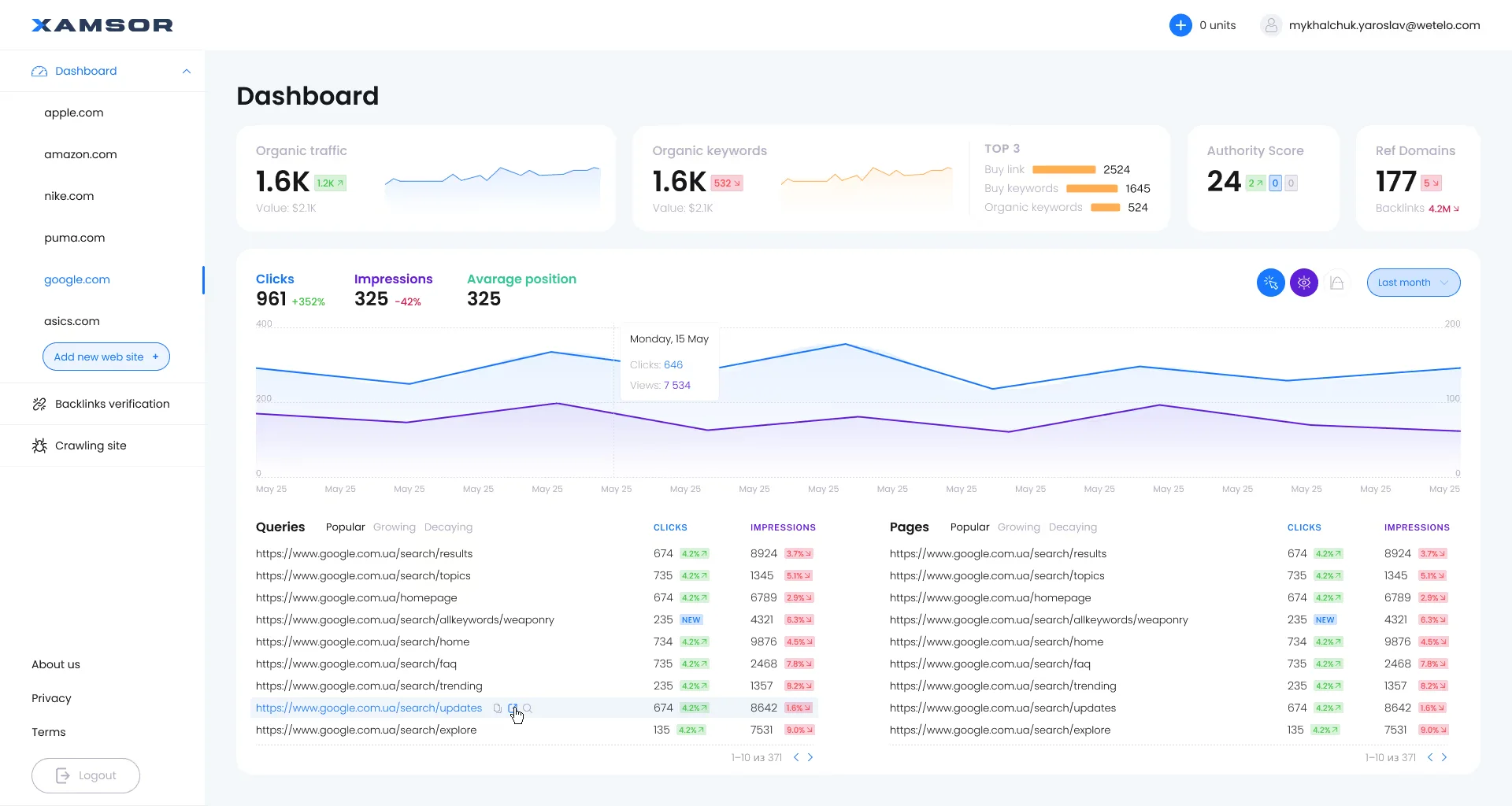
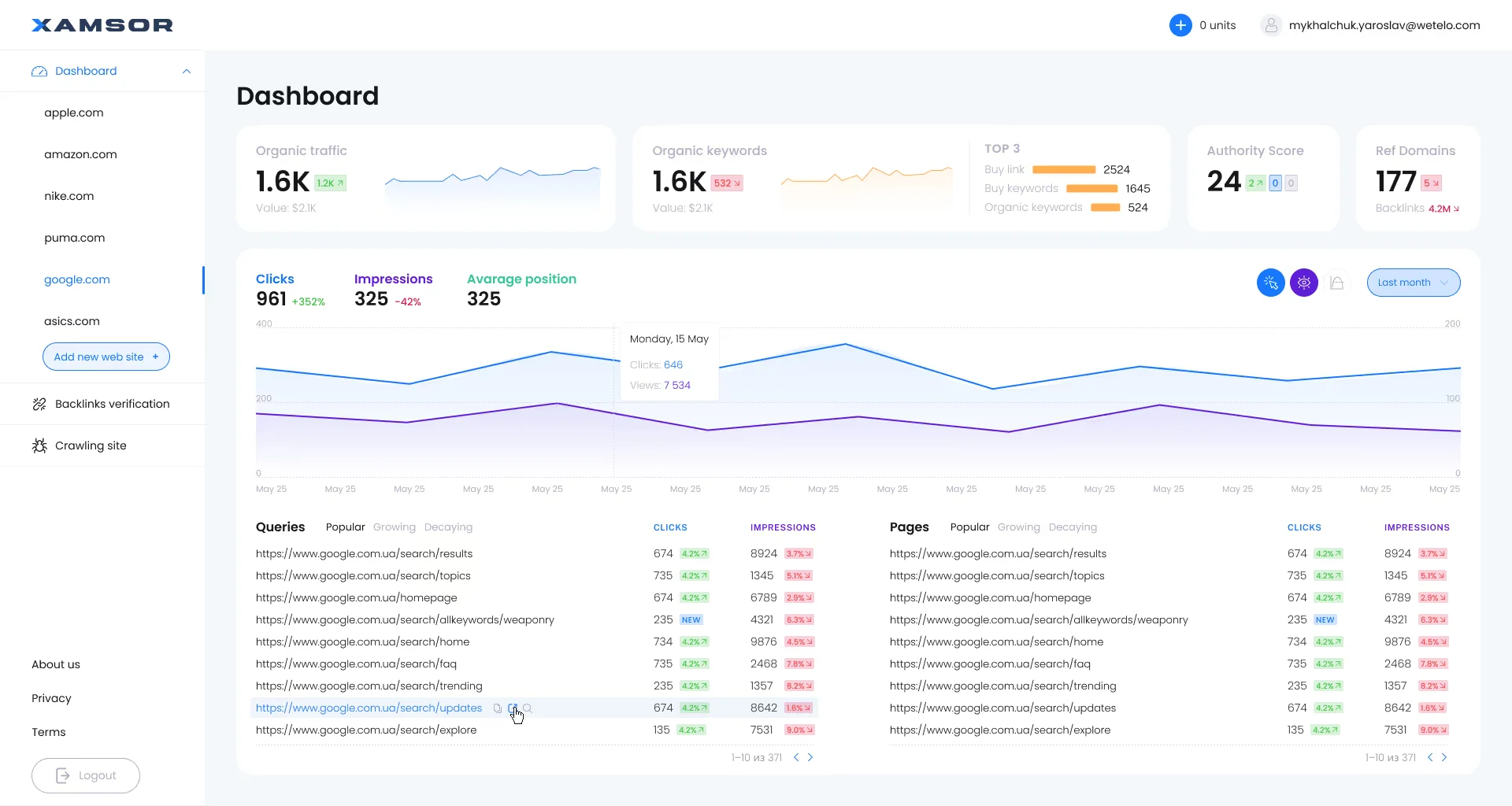
When dozens of metrics share a single screen, color must act as an exception alert system rather than decoration. If every chart and button screams in saturated brand colors, operators miss critical anomalies. A high-density canvas stays neutral monochrome (Slate/Zinc surfaces with subtle 4–6% border contrast), reserving semantic green, amber, and crimson strictly for positive/negative deltas and threshold breaches.
We engineered this exact hierarchy for Xamsor, an SEO analytics SaaS platform synchronized with Google Search Console. On a single viewport with zero wasted space, we combined four top-level KPI summary cards (Organic Traffic, Keywords with a color-coded TOP-3 / 4–10 / 11–50 distribution bar, Authority Score, and Ref Domains), an interactive multi-metric timeline chart, and dual high-density data tables (Queries and Pages) equipped with 1-click segmentation tabs (`Popular`, `Growing`, `Decaying`):
3. 4px/2px Micro-Grids, Inline Sparklines & Slide-Over Inspectors
To pack maximum analytical context into a 32px row without clutter, we embed 60×18px axis-free Sparklines and subtle background Micro-bars directly inside table cells—allowing users to see both the exact figure and its 30-day trajectory simultaneously. Clicking any row opens a 480px right-hand Slide-Over Inspector Drawer with full audit history and JSON payloads, preserving the user's exact scroll position in the master table.
Fast Filters & Command Palette (Cmd+K): Cutting Record Lookup Time Under 3 Seconds
Even a well-formatted table fails if isolating a target segment requires opening six separate dropdowns and waiting for server roundtrips. Modern enterprise workflows rely on keyboard-first navigation and instant faceted filtering.
1. Global Command Bar (`Cmd+K` / `Ctrl+K`) & Faceted Saved Views
Power users navigate via keyboard three times faster than with a mouse. Implementing a Linear- or Bloomberg-style command palette lets an operator press `Cmd+K`, type `status:overdue rep:miller >5000`, and filter 50,000 records in under 3 seconds without touching the trackpad.
We structure filtering across three speed layers:
1-Click Saved View Tabs: Pinned preset chips above the grid ('Overdue Today', 'Decaying Pages', 'Rate Conflicts') displaying live record counters.
Instant Multi-Select Facet Chips: Tokenized filter pills that can be toggled, negated, or saved as shared team views.
Floating Batch Actions Bar: Selecting multiple rows via `Shift + Click` summons a bottom action bar for bulk status updates, assignment, or CSV export.
2. Instant View-Mode Switching & Matrix Timelines: The SIESTA Case Study
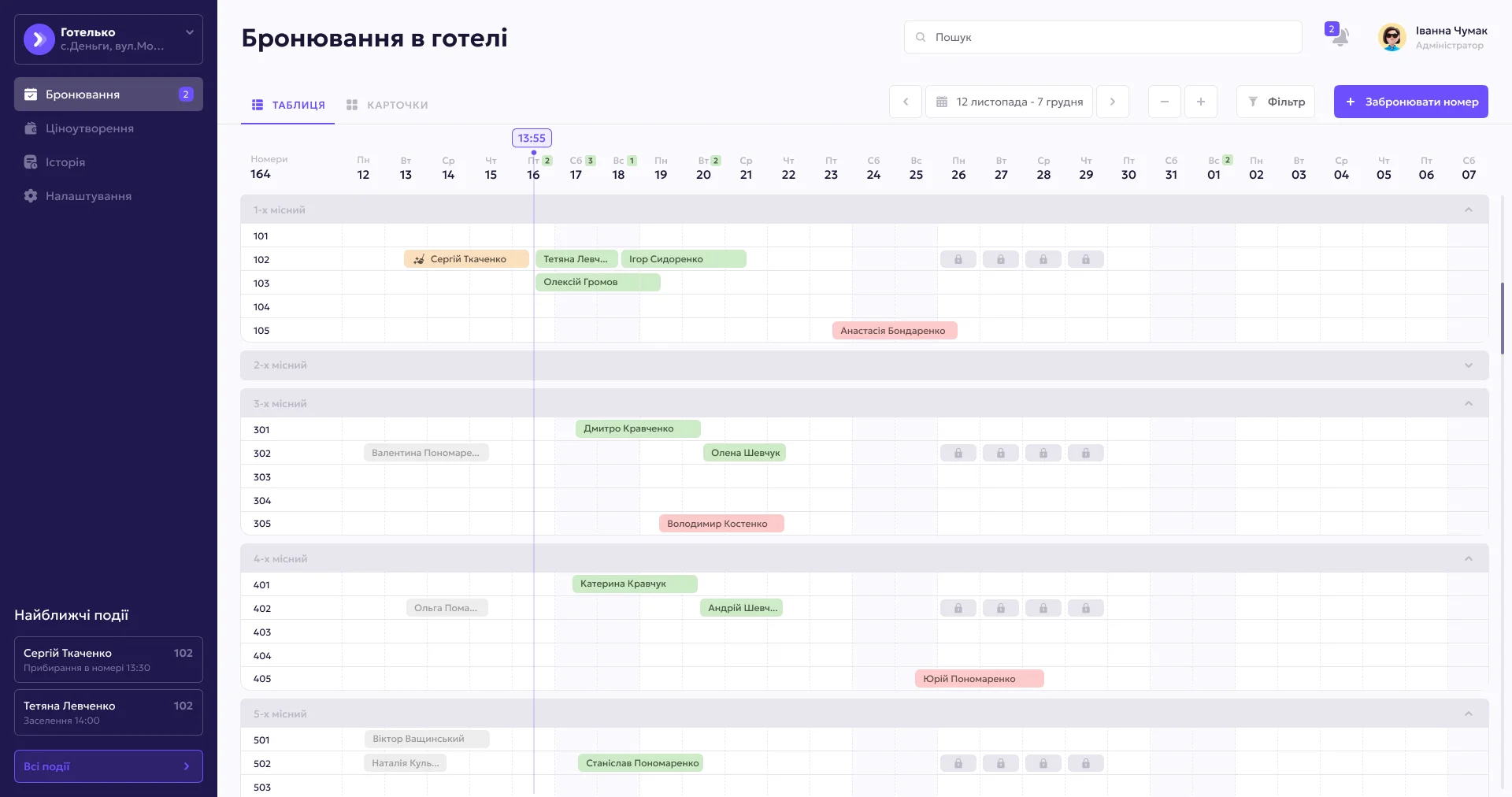
In resource-scheduling and hospitality operations, a flat list cannot expose timeline bottlenecks. Operators need 1-click switching between a high-density matrix grid and visual capacity cards while retaining active filters.
We built this dual-mode architecture for SIESTA, a hotel management MVP system (PMS). At the top of the bookings workspace (`Бронювання`), staff have an instant view-mode switcher (`ТАБЛИЦЯ` / `КАРТОЧКИ`) next to date-range filters and search. On the primary viewport, front-desk operators work inside a dense timeline calendar grid where horizontal columns represent dates, vertical groups organize room capacities (`1-х місний`..`5-х місний`), color-coded bars display guest names and stay durations, padlock icons mark maintenance holds, and the left sidebar lists upcoming housekeeping and check-in events:
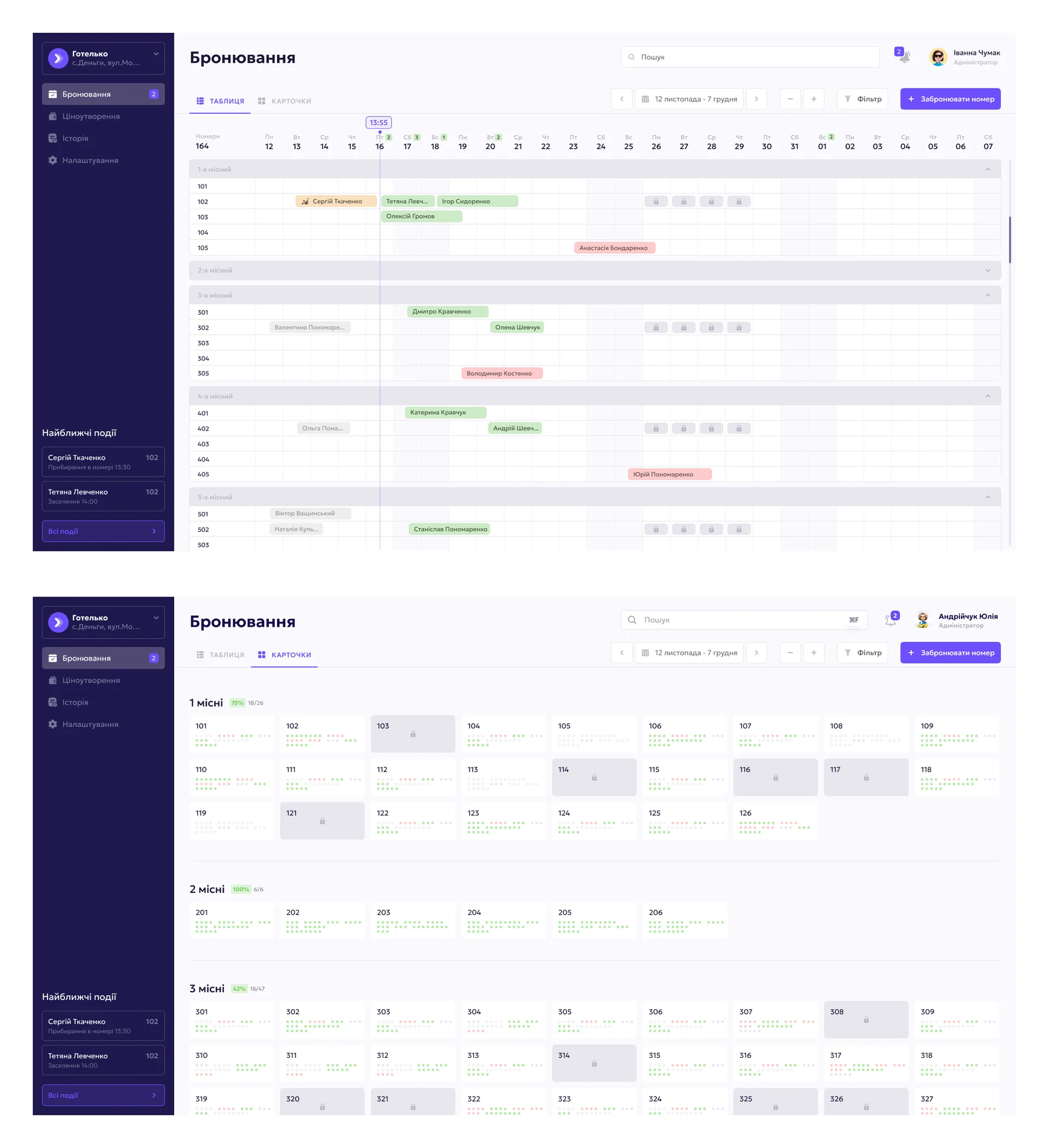
Table Virtualization & Browser Load: What Designers Must Align on With Frontend Engineers
A static Figma mockup means nothing if rendering 15,000 rows in production blocks the JavaScript main thread for 4 seconds on every sort. As a Design Engineer, I architect high-density UI hand-in-hand with React 19 / Next.js rendering constraints.
How High-Density UI Saves $46,800/Year for a 15-Analyst Operations Team & Cuts SaaS Churn
- Lookup & Verification per Record: 42 seconds (horizontal scroll + 5 clicks)
- Browser Rendering Performance: 2.5–4.0s freeze on sort/filter (8–12 FPS)
- Row-Tracking Input Error Rate: 8.2% of records require manual correction
- Daily Staff Time Lost to UI Friction: 1.8 hrs/day per analyst (27 hrs/day total)
- Enterprise SaaS Churn Impact: High trial drop-off due to sluggish tables
- Lookup & Verification per Record: 12 seconds (tabular grid + slide-over drawer)
- Browser Rendering Performance: < 50ms instant response on 50k rows (60 FPS)
- Operator Input Error Rate: < 0.8% via sticky columns & zebra contrast
- Reclaimed Team Capacity: +325 productive staff hours every month
- Full Redesign Payback Period: 100% break-even on $8,500 in 65 days (2.1 mos)
For commercial B2B SaaS platforms, re-engineering your data grid delivers a double ROI: internal ops teams handle 3x the volume without new hires, while enterprise clients upgrade to annual plans because their analysts can work all day without eye strain.
1. Dual-Axis DOM Virtualization: TanStack Table vs. AG Grid
Rendering a 10,000-row by 20-column table directly into the DOM creates 200,000+ HTML nodes, triggering severe layout thrashing and dropping scroll frame rates under 8 FPS.
The engineering solution is mandatory DOM Virtualization (Windowing): only the 25–30 rows currently visible in the viewport (plus a 5-row overscan buffer) exist in memory at any millisecond. During design handoff, we align with developers on the right grid engine:
TanStack Table + `@tanstack/react-virtual` (Headless): Best when you need 100% control over custom Tailwind/CSS tokens, a tiny ~15 KB bundle, and bespoke cell interactions.
AG Grid (Enterprise): Ideal for heavy financial and logistics terminals requiring out-of-the-box multi-axis virtualization, Excel-like range selection, tree grouping, and live pivoting.
2. Optimistic UI Updates & Fixed-Geometry Skeletons
When an operator edits a cell inline or toggles a status, blocking the screen with a loading spinner for 800ms destroys keyboard flow. We specify Optimistic UI: the cell updates instantaneously so the user can press `Tab` / `Enter` to edit the next row while the API mutation resolves in the background. During initial data fetches, fixed-32px-height skeleton rows match column widths to the pixel, guaranteeing zero layout shift (`CLS = 0.00`).
Before & After: Transforming a Chaotic Interface Into a High-Precision Operator Instrument
How do you know whether your platform requires a full architectural overhaul or a targeted data-grid sprint? Below is a real-world example of taming extreme data density, followed by a 5-point diagnostic checklist.
1. Taming Extreme Multi-Tab Data Density: The CheckLive Case Study
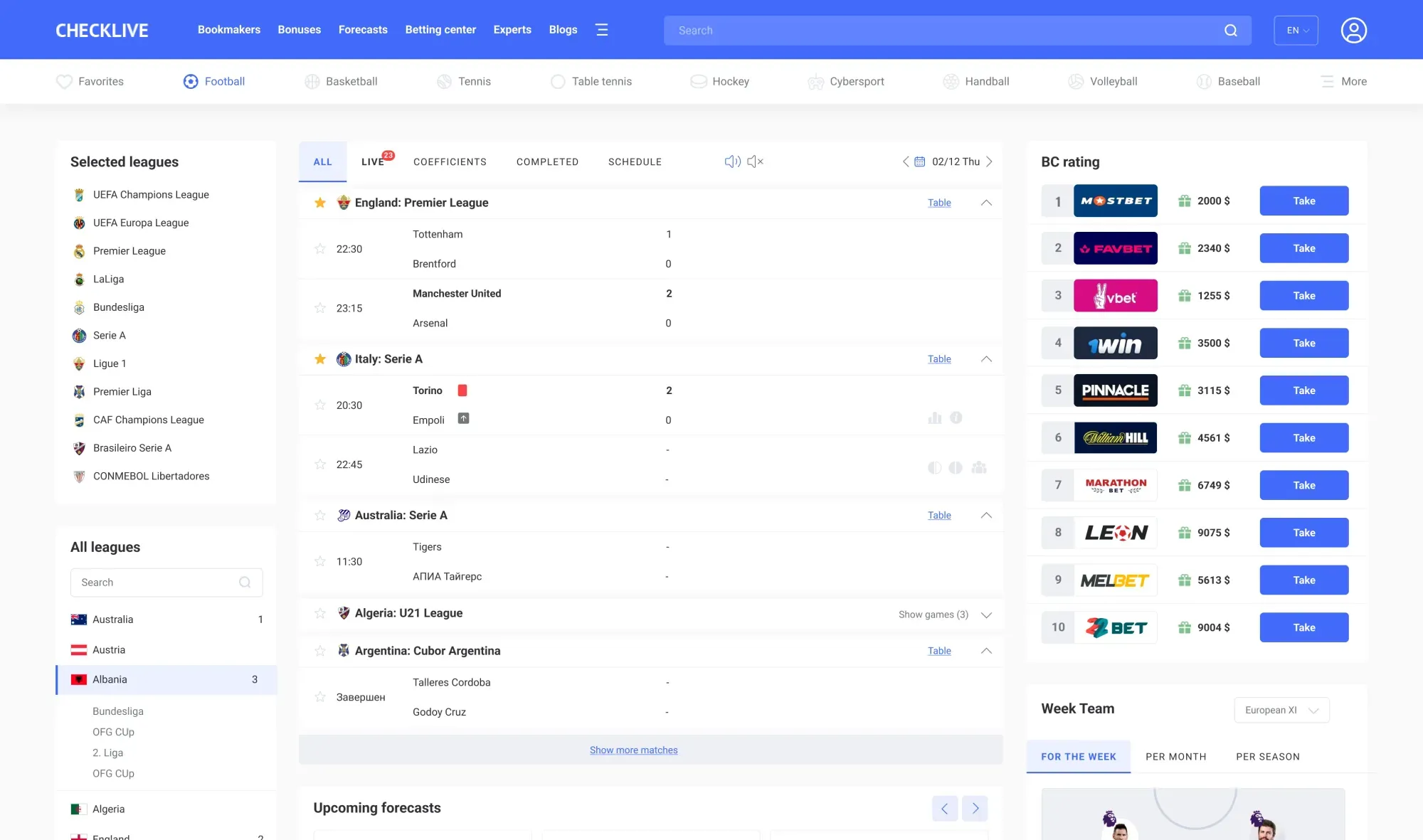
Sports analytics, live betting terminals, and capital markets represent the highest dynamic data density on the web—where match results, player ratings, and multi-dimensional statistical grids share a single screen.
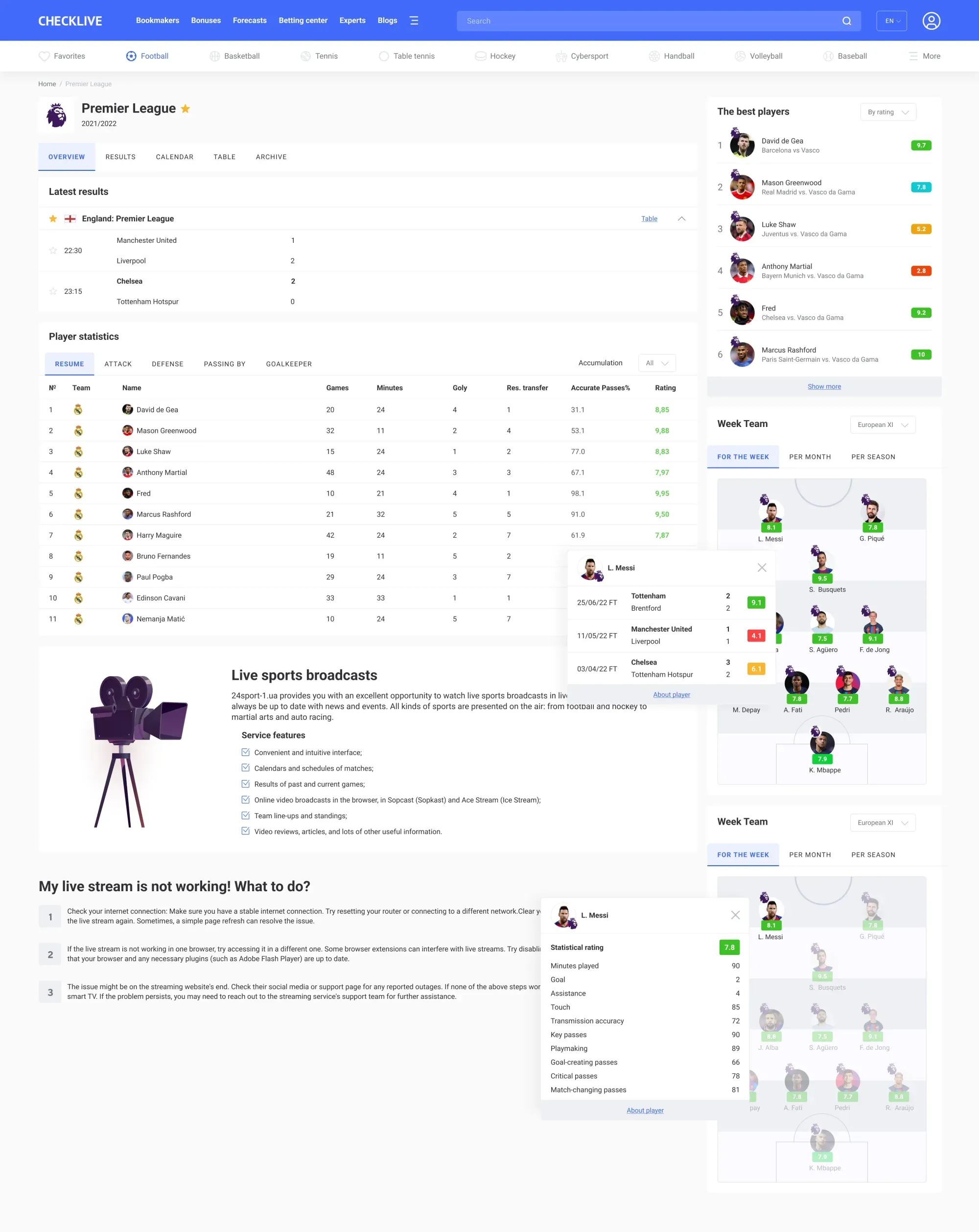
When designing the sports statistics and predictions platform CheckLive, we structured the championship view (`Premier League`) so analysts can scan dense telemetry without cognitive overload. In the top visible viewport, the left column presents tournament navigation tabs (`OVERVIEW`, `RESULTS`, `CALENDAR`, `TABLE`, `ARCHIVE`) and `Latest results`, while the right sidebar pins `The best players` leaderboard featuring semantic color-coded rating badges (`9.7`, `7.8`, `5.2`, `2.8`, `9.2`, `10`). Immediately below, the `Player statistics` grid segments metrics across 5 instant tabs (`RESUME`, `ATTACK`, `DEFENSE`, `PASSING BY`, `GOALKEEPER`) with aligned numeric columns (`Games`, `Minutes`, `Goly`, `Res. transfer`, `Accurate Passes%`, `Rating`), paired with an interactive `Week Team` pitch diagram and player form popovers:
2. 5-Point Diagnostic Checklist: When Your Dashboard Needs Immediate Re-Engineering
Watch an operator or customer use your software for 10 minutes. You are leaking money every day if you spot two or more of these red flags:
The 'Export to CSV' Escape Hatch: Users immediately export tables to Excel because filtering or comparing numbers inside your web UI is too slow.
Browser Zoom Set to `75%` or `80%`: Staff manually zoom out their browser (`Cmd + -`) just to see all table columns without horizontal scrolling.
40 Open Browser Tabs: Clicking a record loses the table scroll position, forcing operators to middle-click every row into a new tab.
UI Freezes Above 500 Rows: Sorting a column or applying a multi-filter locks the mouse cursor for more than 300ms.
Broken Mobile Views for Executives: Opening the dashboard on a 375px smartphone overflows the layout instead of collapsing into priority cards or sticky-column views.
To find out in 3 minutes whether your product needs a full UX overhaul or a surgical table-ergonomics sprint, run your interface through our interactive Redesign vs. Surgical Tweak Diagnostic Tool.
Key Takeaways
Are your operators or B2B subscribers drowning in sluggish tables and exporting data to Excel?
Moving complex tables to the web without sticky columns, fixed 28–36px row heights, and monospaced numerals (`tabular-nums`) increases operator input errors by 28–35%.
Combining a `Cmd+K` command palette, 1-click Saved Views, and a slide-over inspector drawer cuts single-record processing time from 42 seconds down to 12 seconds.
Mandatory DOM virtualization (via TanStack Virtual or AG Grid) and Optimistic UI maintain 60 FPS scroll performance even across 50,000+ rows.
A systematic high-density dashboard redesign ($6,000–$15,000) reaches full break-even in 2–3 months by saving $46,000+/year in staff time and reducing B2B SaaS churn.