B2B SaaS & Dashboards
SaaS Pricing Page Redesign: Tier Architecture, Annual Switch Psychology & Boosting ARPU by 35%
Why your pricing page is the highest-leverage financial bottleneck in your SaaS funnel
According to benchmark studies from ProfitWell, Paddle, and OpenView, a SaaS pricing page captures 2x to 5x the conversion rate of any other page on a commercial website—yet the average product team spends less than six hours designing it. Founders pour tens of thousands of dollars into paid acquisition and core engineering, only for high-intent buyers to abandon the funnel on the final yard: prospects get lost in cryptic usage units, fear unpredictable overage charges, or default to the cheapest $19/mo starter plan where they churn within 60 days. A systematic b2b saas pricing page redesign is the fastest lever to expand revenue without acquiring a single extra visitor.
When SaaS executives ask us how to increase saas arpu through design and extend customer lifetime value (LTV), the root problem is almost never the raw price point itself. It lies in value presentation architecture: bloated 45-row feature checklists, weak visual anchoring on the target tier, and poorly framed billing toggles. In this engineering breakdown, we examine saas pricing table conversion optimization, analyze annual vs monthly toggle ux psychology, and inspect some of the best b2b saas pricing page examples from our portfolio that boost upfront cash collection by 35%–60% in a single sprint.
Choice Paralysis: Why 5 Pricing Tiers with 40 Checkmarks Kill 50% of Paid Conversions
The most common architectural flaw in B2B software products older than two years is dumping the entire internal product specification directly inside the pricing cards. Every time engineers ship a new module, marketing appends another row to the pricing grid—turning the checkout entry point into an unreadable 6-column spreadsheet of 45 technical parameters.
1. Hick's Law Cognitive Tax Above the Fold
Hick's Law operates ruthlessly on monetization screens: every column beyond 3–4 tiers and every unfamiliar technical acronym exponentially increases decision latency. Across analyses of 500+ SaaS companies by OpenView and SaaS Research Lab, 72% of top-performing products restrict their primary viewport to exactly 3 or 4 cards (typically Starter, Pro/Growth, and Enterprise). When you force a buyer on a 14-inch laptop to horizontally scroll across 5 columns, up to 50% of qualified traffic abandons the page due to acute Choice Paralysis.
2. The '3 Value Differentiators' Rule vs. 40-Row Checkmark Walls
Inside the primary tier cards above the fold, never repeat baseline features shared across every plan (such as listing '256-bit SSL Encryption', 'CSV Export', or 'Mobile Access' in all four columns). Each primary card should display only:
Clear Buyer Persona Tag: who this tier is built for ('For early teams up to 5 users', 'For scaling sales floors of 10–50 reps').
Primary Value Metric: the exact unit that scales price (active projects, video storage, API calls, or seats).
3–5 Core Upgrade Triggers framed as 'Everything in Starter, plus:...'. Move the exhaustive 35-row technical matrix below the fold inside a collapsible 'Compare all features' accordion with a sticky header (`position: sticky`).
3. Pricing Page Architecture Comparison: Cluttered Feature Matrix vs. CRO System
Below is the engineering comparison between legacy pricing tables and the conversion architecture we deliver in our B2B SaaS UI/UX & High-Density Dashboards practice.
| Architectural Node | Legacy Pricing Page (High Drop-Off) | Engineered CRO Pricing Architecture | Direct Monetization Impact |
|---|---|---|---|
| Visible Columns Above the Fold | 5–6 narrow cards with cramped text and horizontal scrolling | 3 core self-serve cards + anchored Enterprise block | Eliminates cognitive overload, +28%–42% lift in plan selection |
| Feature List Inside Primary Card | 25–40 rows repeating identical baseline features in every column | 3–5 high-impact growth triggers + expandable matrix below | Cuts offer scanning time from 90 seconds down to 12 seconds |
| Annual Billing Toggle UX | Subtle gray checkbox reading 'Save 15% billed annually' | High-contrast switch with '2 Months Free' badge & live $ savings | Lifts annual cohort share from 14% to 38%+, cutting churn by 3x |
| Variable Volume / Usage Handling | Fine-print footnote charging $0.04 per overage unit | Interactive usage slider calculating exact monthly/annual cost live | Removes CFO fear of surprise overage bills, +35% ARPU lift |
| In-App Subscription Screen | Plain text 'Current Plan: Basic' buried in settings | Visual usage quota dashboard with 1-click tier upgrade cards | Increases Expansion MRR across existing users by 22%–30% |
Anchoring Psychology & the 'Most Popular' Badge: Guiding Buyers to Your Target Tier
When all three or four pricing cards share identical white backgrounds, border weights, and button styles, a buyer's eye naturally drifts to the far left—selecting the cheapest starter plan. Steering prospects toward your highest-LTV tier requires deliberate Price Anchoring and Decoy Effect engineering.
1. Visual Dominance of the Hero Tier & CTA Button Contrast
Your target growth tier (usually the middle Pro or Business package) must stand out geometrically and chromatically:
Elevated Header Badge: a high-contrast pill badge above the card reading 'Most Popular' or 'Recommended for Teams'.
Asymmetric CTA Hierarchy: only the recommended tier gets a solid primary accent button (`Primary Solid CTA`), while Starter and Enterprise cards use understated outline or tonal buttons (`Secondary Outline CTA`).
Right-Hand Price Anchor: placing a $299–$499/mo Enterprise tier on the right makes the $79/mo Pro plan feel like a pragmatic, low-risk financial decision.
2. In-App Subscription Matrix & Seamless Tier Upgrades in simpl.cx
A costly mistake many SaaS teams make is designing pricing cards only for the public marketing site while neglecting the internal billing workspace (In-App Subscription Management), where 100% of Expansion MRR happens.
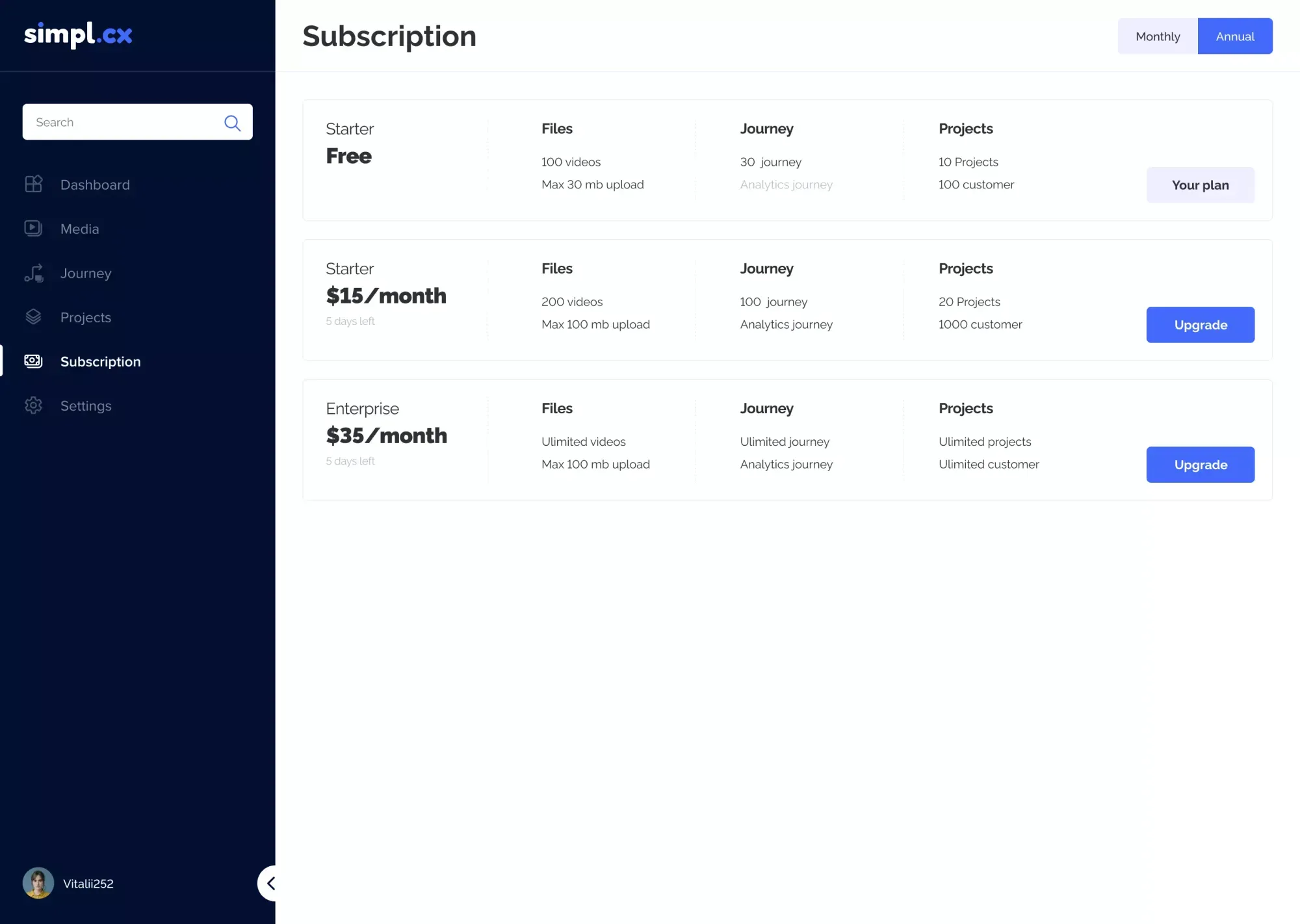
When designing the interactive video onboarding SaaS platform simpl.cx, we embedded a structured `Subscription` workspace directly inside the administrator portal. A top-right billing toggle (`Monthly / Annual` with `Annual` active) sits above three horizontal tier rows (`Free`, `$15/month`, and `Enterprise $35/month`) that compare quotas across three core value metrics—`Files` (100 to unlimited videos and 30–100 MB upload caps), `Journey` (30 to unlimited journeys plus `Analytics journey`), and `Projects` (100 to unlimited customers)—marking the active plan with a muted `Your plan` pill while highlighting solid blue `Upgrade` CTAs on higher tiers:
Anatomy of the Monthly/Annual Toggle: Visualizing Savings ('2 Months Free' vs. '% Discount')
Paddle and ProfitWell data prove that annual subscribers churn at one-third the rate of monthly users while delivering 10–12 months of upfront cash to fund customer acquisition. Mastering annual vs monthly toggle ux is all about framing numerical value.
1. Why '2 Months Free' Outperforms '16.7% Off'
Buyers rarely get excited about fractional percentages like '15% off' or '16.7% discount' when asked to lock up capital for a full year. Translating that exact same discount into concrete time or dollar units—displaying a vibrant pill badge reading '2 Months Free' or 'Save $240/year' directly beside the toggle—boosts annual plan selection by 28%–45%.
2. Avoiding Sticker Shock When Toggling Annual Prices
Never replace a `$79/mo` headline with a massive `$948/yr` number when the user flips the annual switch—that creates instant Sticker Shock. Instead:
Display the effective monthly rate in large display type ($79/mo) next to the crossed-out monthly rate (~~$99~~).
Show the billing cadence transparently in calm caption text directly underneath: 'Billed annually at $948/yr'.
Inside the product's billing tab for monthly users, render a contextual banner calculating their exact personal savings: 'Switch to annual billing today and save $240 instantly on your current Pro workspace'.
Usage-Based Pricing Calculators: Making Complex Volume Math Transparent
In modern SaaS, EdTech, and marketplace platforms where pricing scales across multiple axes—order volume, turnaround speed, active contacts, or platform credits—a static 3-column table breaks down. If a buyer has to open a spreadsheet to estimate their monthly bill, conversion plummets.
How Architectural Pricing Page Redesign Lifts ARPU by 37.5% & Multiplies Upfront Cash Flow by 4.4x on Identical Traffic
- Pricing Page-to-Paid Conversion: 1.8% (50% of buyers bounce due to choice paralysis)
- Tier Selection Distribution: 68% default to the lowest $29/mo Starter plan
- Average Revenue Per User (ARPU): $48.00/mo (low cohort margin)
- Annual Billing Adoption: Only 12% (8.6 out of 72 buyers commit annually)
- Month-1 Upfront Cash Collected: $9,561 (slow CAC payback cycle)
- Pricing Page-to-Paid Conversion: 3.1% (+72% more paying customers from the same traffic)
- Tier Selection Distribution: 64% select the highlighted $79/mo Pro Hero tier
- Average Revenue Per User (ARPU): $66.00/mo (+37.5% higher average check)
- Annual Billing Adoption: 38% (47 customers pay full annual contracts upfront)
- Month-1 Upfront Cash Collected: $42,350 (4.4x more immediate cash in the bank)
Without altering core product code or increasing ad spend by a single dollar, restructuring into a 3-tier anchored layout with a '2 Months Free' annual toggle pays back the entire $3,800 engineering redesign in 3.5 days.
1. Multi-Variable Pricing Grid & Interactive Calculator in Academic Papers
When final transaction pricing depends simultaneously on complexity tier, turnaround deadline, and service type, static tables create massive checkout friction.
A clear demonstration among our best b2b saas pricing page examples and service portals is the full redesign of Academic Papers. On the legacy site, a confusing rate table suppressed order conversion. We engineered an interactive `Prices` page: in the top visible viewport, users switch academic levels (`High School`, `Undergraduate`, `Graduate`, `Professional`) and select their exact turnaround on the `DEADLINE` bar (`12 / 18 / 24 Hours` or `2–20 Days`), dynamically updating per-page rates across 5 service cards (`Writing from scratch $9/page`, `Rewriting $5/page`, `Editing/Proofreading $4/page`, `Problem solving $20/page`, `Admission services $10/page` with package tooltips), followed below by `Writer's level` tiers and transparent `Free` vs. paid `Additional services`:

2. Credit-Based Monetization & Micro-Transaction UX in Best-Bride
A second widespread monetization model across AI tools, communication platforms, and B2C/B2B marketplaces is Credit-Based Pricing (Pay-As-You-Go), where users purchase platform credits and spend them on high-value actions. The primary conversion killer here is ambiguity around credit balances and deductions.
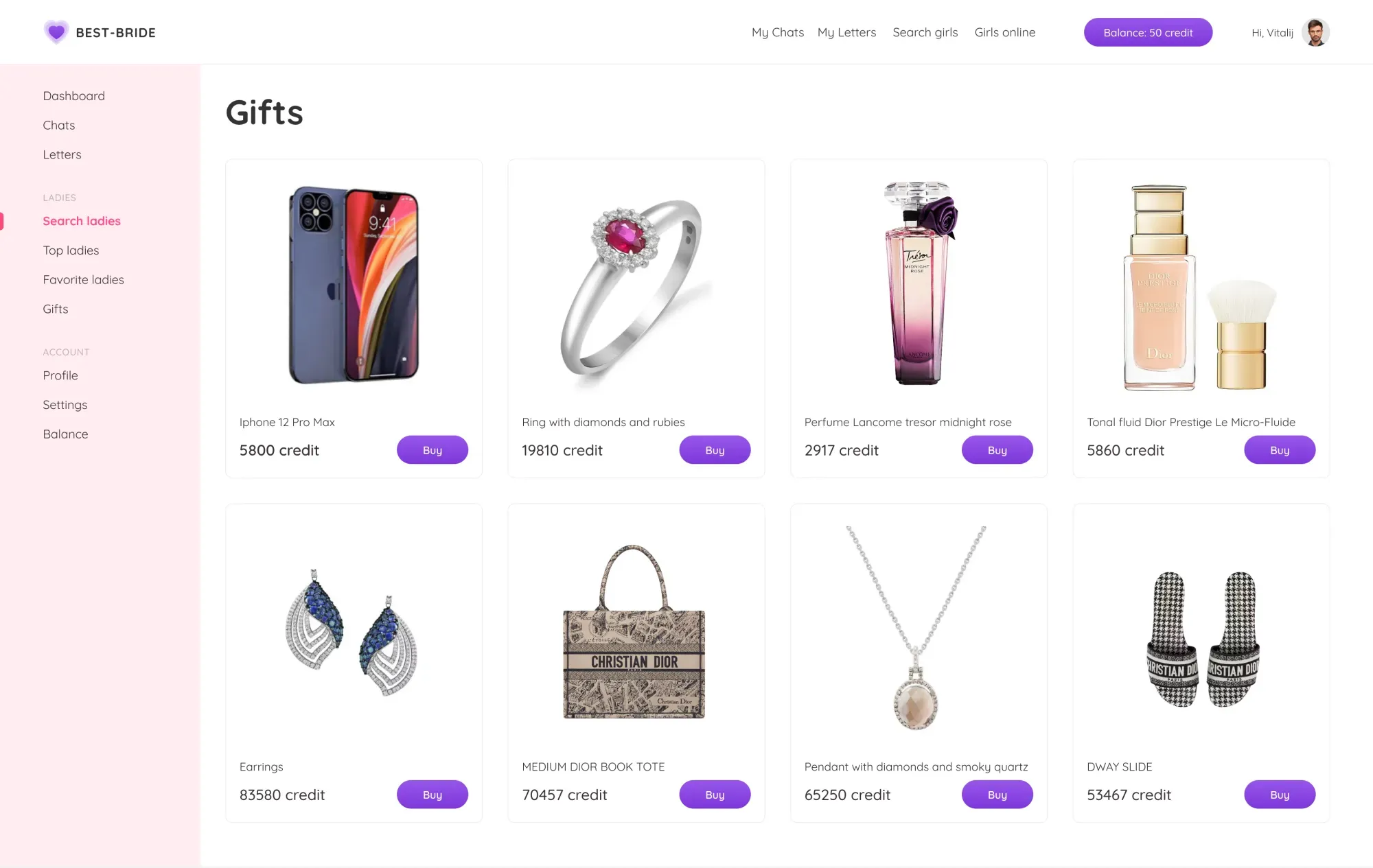
We solved this exact micro-transaction friction when designing the international platform Best-Bride. A persistent `Balance: 50 credit` pill remains anchored in the top header bar, while every card in the 4-column `Gifts` catalog displays its exact price in platform credits (`2917 credit`, `5800 credit`, `5860 credit`) paired with a 1-click purple `Buy` button that triggers recipient selection and deduction confirmation modals without page reloads:
Guarantee Micro-Copy & CFO FAQ: Eliminating Final Objections Before Checkout
Even after a prospect selects your $79/mo Pro plan and switches to annual billing, a final psychological barrier triggers right as they hover over the checkout button: 'What if our team doesn't adopt the tool? Will canceling require calling a pushy sales rep? Can our finance department download a compliant VAT/tax invoice?'
1. Risk-Reversal Micro-Copy Directly Under the CTA Button
Directly beneath the primary CTA button inside every pricing card, place two lines of 12–13px risk-reversal micro-copy:
For PLG Free Trials: 'Full 14-day Pro access · No credit card required · 2-minute setup'.
For Direct Paid Checkout: '30-day money-back guarantee · 1-click cancellation in dashboard · Instant tax-compliant B2B invoice'. Pair this with recognizable payment trust badges (Stripe Verified, Apple Pay, Google Pay, SOC2 / PCI DSS compliance).
2. Structuring the Financial & Billing FAQ Block
The FAQ section at the bottom of your pricing page should never repeat generic marketing claims. Dedicate it strictly to 6–8 financial and procurement questions that block CFO approval:
How does proration work if we upgrade or downgrade mid-billing cycle?
What happens if our team hits our usage limit during peak business hours (soft cap vs. hard lock)?
Do we pay for read-only guest or viewer seats?
Can we pay via ACH/wire transfer and download automated W-9 / VAT invoices?
To find out whether your SaaS pricing flow needs a full architectural overhaul or a focused 2-week CRO sprint, run your product through our interactive Redesign vs. Surgical Tweak Diagnostic Tool.
Key Takeaways
Is your pricing page losing high-intent buyers or trapping revenue in low-tier monthly plans?
Consolidating 5–6 cluttered pricing columns into 3–4 focused tiers and stripping duplicate checkmarks eliminates choice paralysis, lifting pricing page conversion by 28%–42%.
Visual anchoring on the target Pro tier with asymmetric CTA contrast shifts 60%+ of buyers away from entry-level plans, boosting ARPU by 35%+.
Replacing abstract percentage discounts with a '2 Months Free (Save $240)' badge on the annual toggle increases annual billing adoption to 38% and cuts churn by two-thirds.
Interactive usage calculators and transparent credit-based pricing eliminate fear of hidden overages and accelerate CFO sign-off.