E-Commerce & Conversion
Faceted Filtering & Fast Search for 10k+ Item Catalogs: Sub-50ms Performance Without Page Reloads or Ad Spend Waste
Why sluggish catalog filters torch up to 60% of Google Shopping budgets—and how to engineer sub-50ms faceted navigation
Once an e-commerce store scales past 3,000–10,000+ SKUs, the primary conversion bottleneck shifts from the homepage hero banner to catalog discovery speed. Picture the journey of a high-intent shopper you just paid $0.80–$1.50 to acquire via Google Performance Max or Meta Advantage+ Catalog Ads: they land on a category page, tap a checkbox for their size, dosage, or brand—and the viewport freezes for 3.2 seconds, triggers a full browser reload, and resets their scroll position back to the top. By the third filter interaction, 54% to 68% of mobile shoppers abandon the store, leaving your ad budget with zero return.
According to large-scale usability benchmarks by the Baymard Institute, 78% of mobile and 58% of desktop e-commerce sites deliver poor-to-mediocre product list and filtering experiences, even though shoppers who engage with search and faceted filters convert 2.4x to 3.2x higher than casual browsers. In this engineering breakdown, we examine faceted navigation ecommerce ux, demonstrate how sub second catalog filter speed (under 50ms) works under the hood, and calculate how implementing ecommerce product filtering best practices pays for itself within 35–45 days.
Why Shoppers Bounce to Competitors: The Pain of 3-Second Full-Page Reloads
Most mid-market online stores still rely on legacy synchronous architectures built on monolithic OpenCart, WooCommerce, or Magento templates weighed down by third-party filter plugins. Whenever a shopper narrows down 12,000 items across four attributes, the relational database executes cascading `JOIN` and `COUNT(*)` SQL queries across unindexed EAV tables.
1. Anatomy of a 3-Second Freeze: Scroll Resets & Zero-Result Dead Ends
When a buyer wants to select three brands and two sizes in a sidebar, a synchronous engine locks the UI after every single tap. Instead of checking five boxes in four seconds, the user is forced to wait through five full DOM reloads and scroll back down to the filter panel each time (Scroll Position Reset).
Even worse is the Zero-Result Dead End. Without pre-calculated facet counts, a shopper selects 'Brand A + Size XL + Black', waits three seconds, and hits a blank '0 products found' screen. Baymard Institute research proves that encountering two consecutive zero-result states causes over 47% of shoppers to exit the store permanently.
2. Category-Specific Attributes: Why Generic Checkboxes Fail
The second major leak is applying a one-size-fits-all filter sidebar across every category. Over 51% of e-commerce stores fail to expose domain-specific facets. Water filtration buyers need to filter by contaminant type and reverse-osmosis stages; pharmacy shoppers need active ingredient, milligram dosage, and form factor; children's apparel buyers filter by exact height in centimeters and season. Forcing mobile users to paginate through 18 screens manually because only 'Price' and 'Brand' facets exist pushes Add-to-Cart rates below 1.1%.
3. Architectural Comparison: Monolithic Template vs. Reactive Faceted Engine
Below is a technical and financial comparison between a standard template filter plugin and the reactive large catalog navigation architecture we build inside our High-Yield E-Commerce Design practice.
| Technical & UX Metric | Legacy Monolithic Template (WooCommerce / OpenCart Plugin) | Reactive Faceted Architecture (Next.js + Elastic / Meilisearch) | Direct Impact on Conversion & Revenue |
|---|---|---|---|
| Filter Interaction Latency (INP) | 1,800–3,400 ms (full page reload or blocking SQL query) | 35–50 ms (Optimistic UI + in-memory inverted search index) | Shoppers combine 4–6 facets effortlessly without visual stutter |
| Scroll Position & Sidebar State | Resets to top of page after every checkbox click | 100% focus preservation (only the product grid updates) | Cuts catalog bounce rate from 64% down to 28% |
| Zero-Result Prevention | None (user lands on empty page after waiting) | Live facet counters `(+14)` & automatic disabling of empty combinations | Eliminates dead-end frustration across deep inventory |
| Predictive Search Autocomplete | 2.5+ sec (slow SQL `LIKE %query%` without typo tolerance) | < 40 ms (rich product cards, prices, typo & layout correction) | Lifts search-session conversion rate from 1.8% to 5.4%+ |
| SEO Long-Tail Indexation | Messy `?filter_id=12&attr=45` URLs blocked via `noindex` | Clean SSR canonical URLs (`/catalog/reverse-osmosis-filters/`) | Captures thousands of high-intent organic long-tail queries for free |
AJAX Filtering & Optimistic UI: Updating 10,000+ SKUs in 50 Milliseconds
Human perception registers any interface response under 100 milliseconds as instantaneous physical feedback. Achieving sub second catalog filter speed across 10,000 to 50,000 SKUs requires decoupling catalog read queries from the primary transactional database using an in-memory search index.
1. How Optimistic UI + Inverted Search Indexes Deliver 50ms Responses
Instead of querying normalized SQL tables on every click, product attributes are indexed as flat JSON documents with pre-computed bitmasks inside Elasticsearch, Meilisearch, or Algolia.
When a shopper checks a filter box, the React / Next.js frontend triggers an Optimistic UI update: the checkbox state and applied-filter pill render within 16ms (a single 60Hz frame), the browser URL updates cleanly via the `History API (pushState)` without reloading, and an asynchronous fetch returns updated product cards plus recalculated facet counts in 30–50ms. On slower 4G connections, a subtle skeleton shimmer overlays the existing grid with zero layout shift (`CLS = 0.00`).
2. Dual-Layer Faceted Navigation & Quick Presets in the Persha Voda Case Study
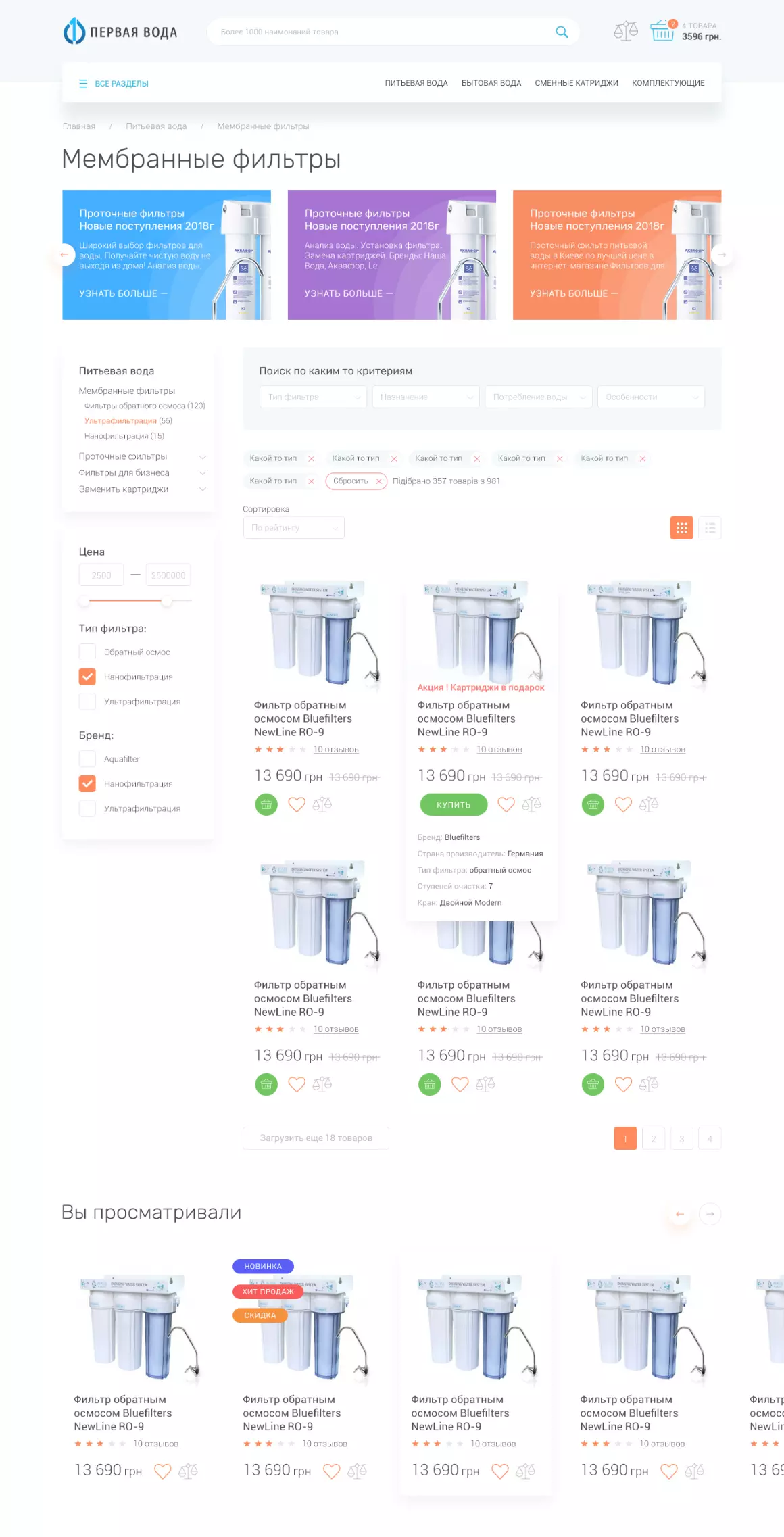
In technical retail verticals, buyers combine category trees with multi-criteria parameter bars. During our full e-commerce redesign for the water filtration store Persha Voda, we structured a catalog spanning hundreds of membrane and reverse-osmosis stations, whole-house softeners, and replacement cartridges.
To let buyers pinpoint compatible equipment in seconds, on the category page (`Мембранные фильтры`) we engineered a dual-layer filtering interface: the left sidebar displays a category hierarchy with live item counts (`Фильтры обратного осмоса (120)`, `Ультрафильтрация (55)`, `Нанофильтрация (15)`), a price range slider, and filter type / brand checkboxes, while the top bar above the grid houses a 4-parameter quick selector (`Тип фильтра`, `Назначение`, `Потребление воды`, `Особенности`), active filter tags with a one-click `Сбросить` reset, and a live `Підібрано 357 товарів з 981` counter. Hovering over any product card expands key technical specs—brand, country of origin, 7 filtration stages, and faucet type—without leaving the catalog grid:
Predictive Search Autocomplete: Brand Suggestions, Typo Tolerance & Inline Product Previews
Across e-commerce analytics, only 15%–25% of visitors interact with the search bar, yet those shoppers generate 45%–50% of total store revenue because they arrive with specific purchase intent. If your search bar requires exact spelling and forces users to hit `Enter` to load a results page, you are losing one in three ready-to-buy customers.
1. Five Engineering Pillars of High-Converting Predictive Search
A modern fast catalog search interface design acts as an instant merchandising modal that opens after the first 2–3 keystrokes:
Typo Tolerance & Keyboard Layout Recovery: If a shopper mistypes a brand name or types in the wrong keyboard layout, Levenshtein distance and N-gram indexing resolve the intended query in under 20ms.
Synonym & Symptom Mapping: Searching for a symptom or use case maps directly to the matching product category or active ingredient.
Rich Product Previews in Dropdown: Rendering product thumbnails, live prices, stock badges, and an inline 'Add to Cart' button inside the autocomplete popover reduces purchase friction to a single click.
Instant Category & Brand Facets: Alongside top SKU matches, the autocomplete modal suggests parent categories and brand collections.
2. Multi-Criteria Search & 29,000+ SKU Faceted Catalog in Good Day Pharmacy
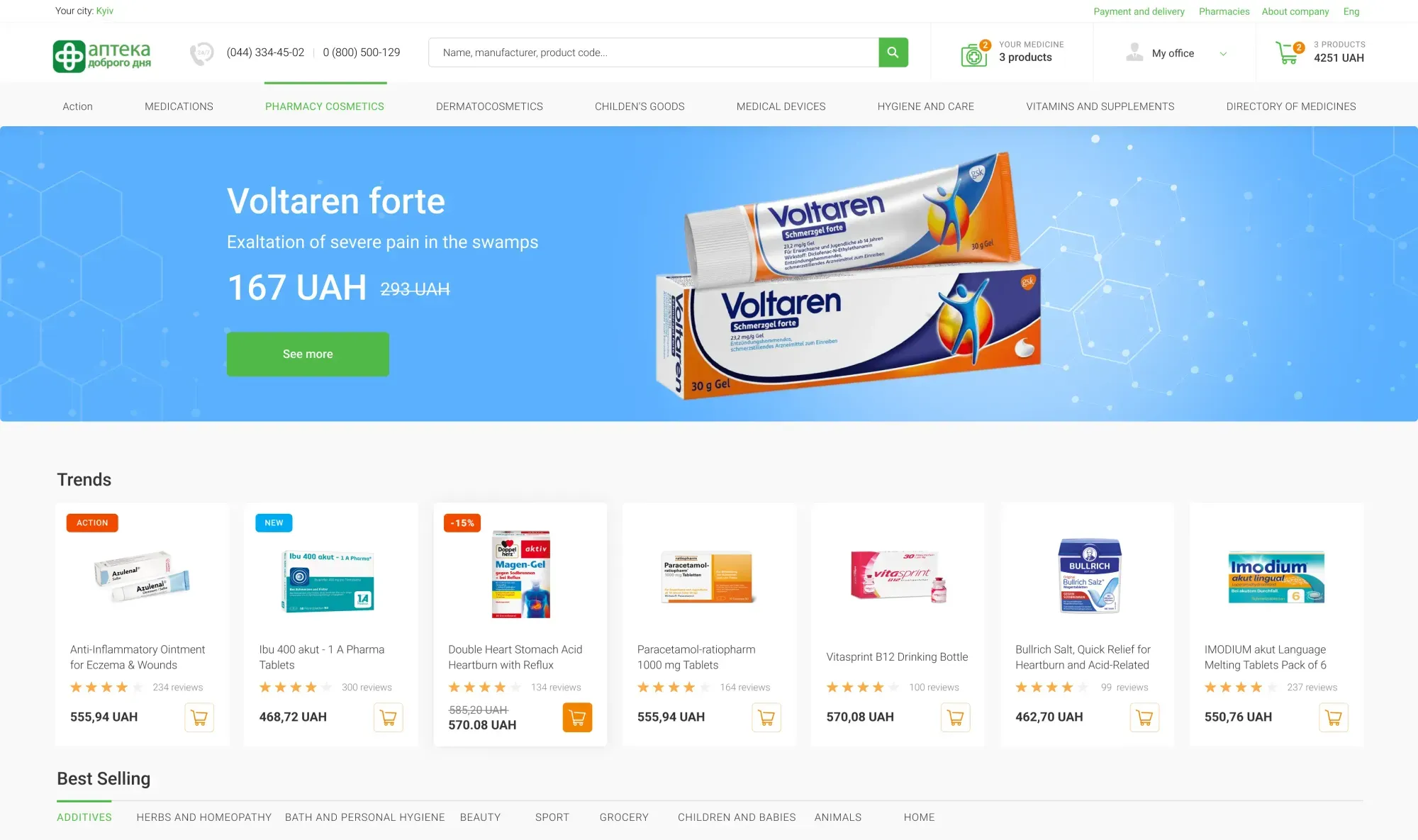
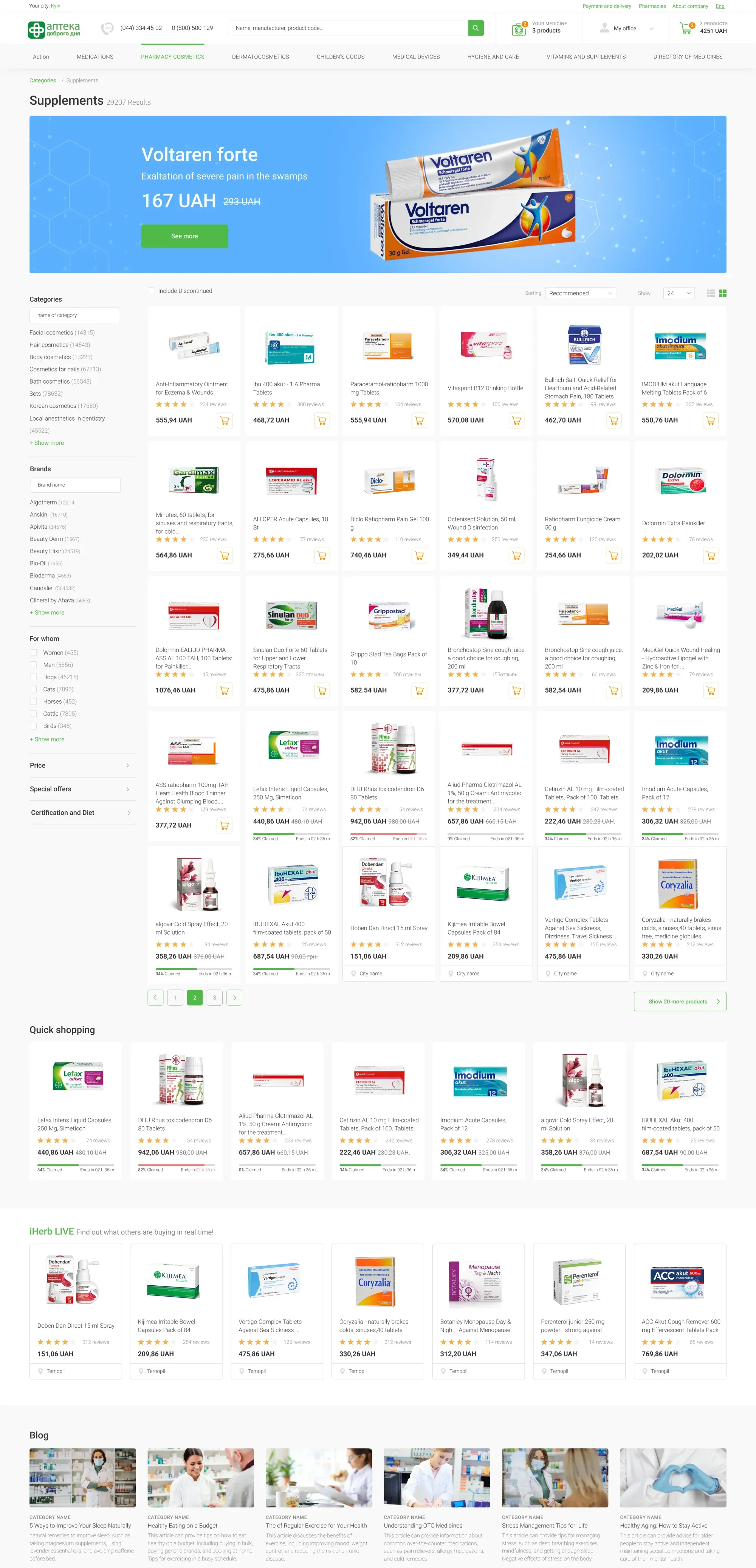
Pharmaceutical e-commerce places the highest demands on search precision and faceted filtering across tens of thousands of SKUs. When executing the comprehensive UX/UI redesign for the nationwide chain Good Day Pharmacy, we anchored a universal predictive search bar (`Name, manufacturer, product code...`) across the global header so shoppers can query by brand name, producer, or SKU code from any screen.
On the high-density catalog page (shown below for the `Supplements` vertical with `29,207 Results`), we engineered a left faceted sidebar featuring dedicated inline search inputs inside individual filter groups (`Categories` with a `name of category` input and live counters `(14315)`, `(14543)`, `(67813)`, plus `Brands` with a `Brand name` input and counters `(12214)`, `(34576)`), complemented by `For whom`, `Price`, `Special offers`, and `Certification and Diet` accordions. This lets shoppers narrow down 29,000+ items across a 6-column product grid in seconds, while the product page complements discovery with therapeutic analogue comparisons:
Mobile Filter Drawers: Thumb-Zone Ergonomics, Live Result Counters & One-Tap Reset
With 78% to 86% of retail traffic originating on smartphones, stacking a desktop filter sidebar above the mobile product grid is a fatal UX flaw—forcing users to scroll past four screens of checkboxes before seeing a single product photo. Before examining mobile drawer mechanics, review the unit-economics impact of upgrading catalog speed.
How replacing a 3.2-second reloading filter with sub-50ms AJAX navigation and predictive search doubles paid traffic profitability
- Filter interaction response time: 3.2 seconds with full page reload and scroll reset
- Mobile drop-off by 2nd filter click: 58% of mobile shoppers abandon the catalog
- Store-wide conversion rate (CVR): 1.1% (495 completed orders from 45,000 sessions)
- Customer Acquisition Cost (CAC): $18.18 against $19.50 net margin per order
- Monthly net profit after ad spend: +$652/mo (ad networks consume 93% of margin)
- Filter & search response latency: 45–50 ms with zero page reloads or layout shifts
- Product discovery completion rate: +118% deeper browsing with zero '0 results' dead ends
- Store-wide conversion rate (CVR): 2.4% (1,080 completed orders on identical traffic)
- Customer Acquisition Cost (CAC): $8.33 (slashing acquisition cost by 54.2%)
- Monthly net profit after ad spend: +$12,060/mo (+$11,408 net monthly profit delta)
For a 10,000+ SKU store, investing $6,500 once into sub-50ms faceted navigation and predictive search generates +$11,408/mo in net margin—outperforming a 2x ad budget increase on a slow site.
1. Anatomy of a High-Converting Mobile Filter Drawer (375px Viewport)
On a 375×812px smartphone screen, catalog filtering must respect one-handed Thumb Zone ergonomics:
Sticky Filter & Sort Trigger Bar: As the user scrolls down the 2-column product grid, a compact 'Filter (3) | Sort' bar stays pinned within thumb reach.
Horizontal Quick-Filter Pills: Directly above the product grid, a swipeable row of popular preset chips (e.g., 'Sale', 'Height 110–116 cm', 'Winter Jackets') lets users narrow items in a single tap without opening the full drawer.
Pinned Drawer Footer with Live Item Counter: Inside the slide-over filter drawer, the bottom action bar remains fixed with two clear buttons: a secondary 'Reset All' action and a primary 'Show 48 Items' CTA that updates its count dynamically with every checkbox tap.
2. Two-Tap Age & Size Mobile Filtering in the Dobramama Case Study
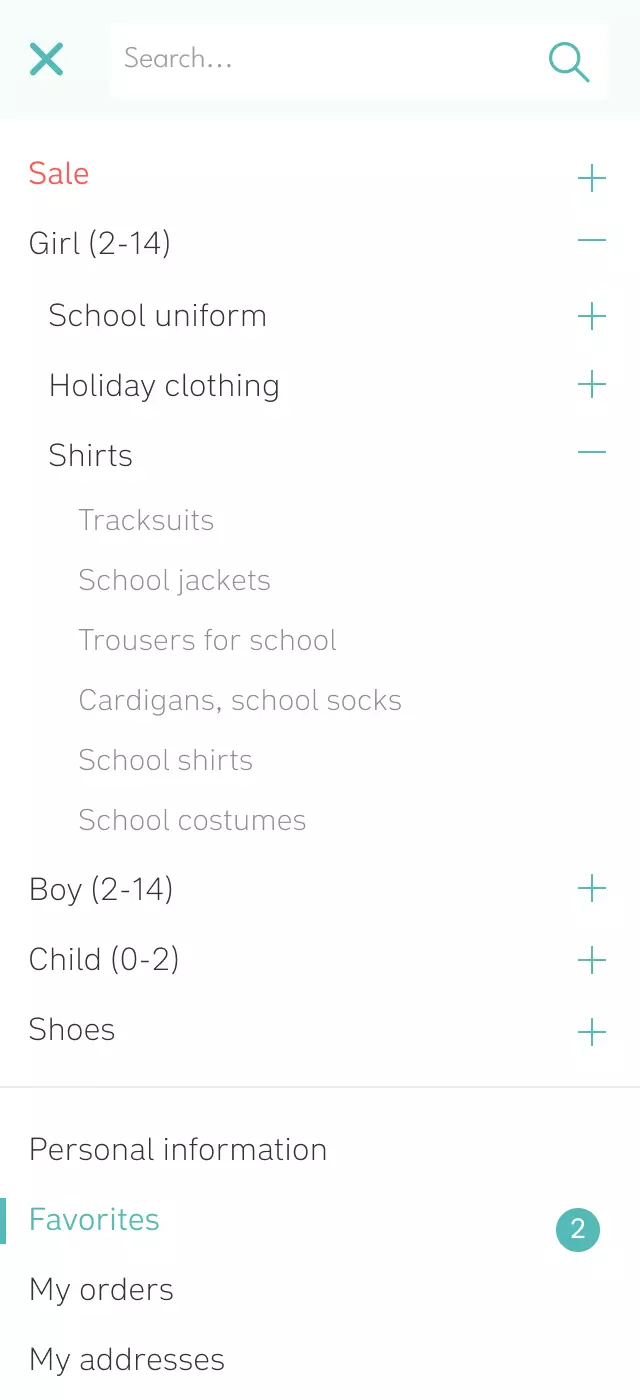
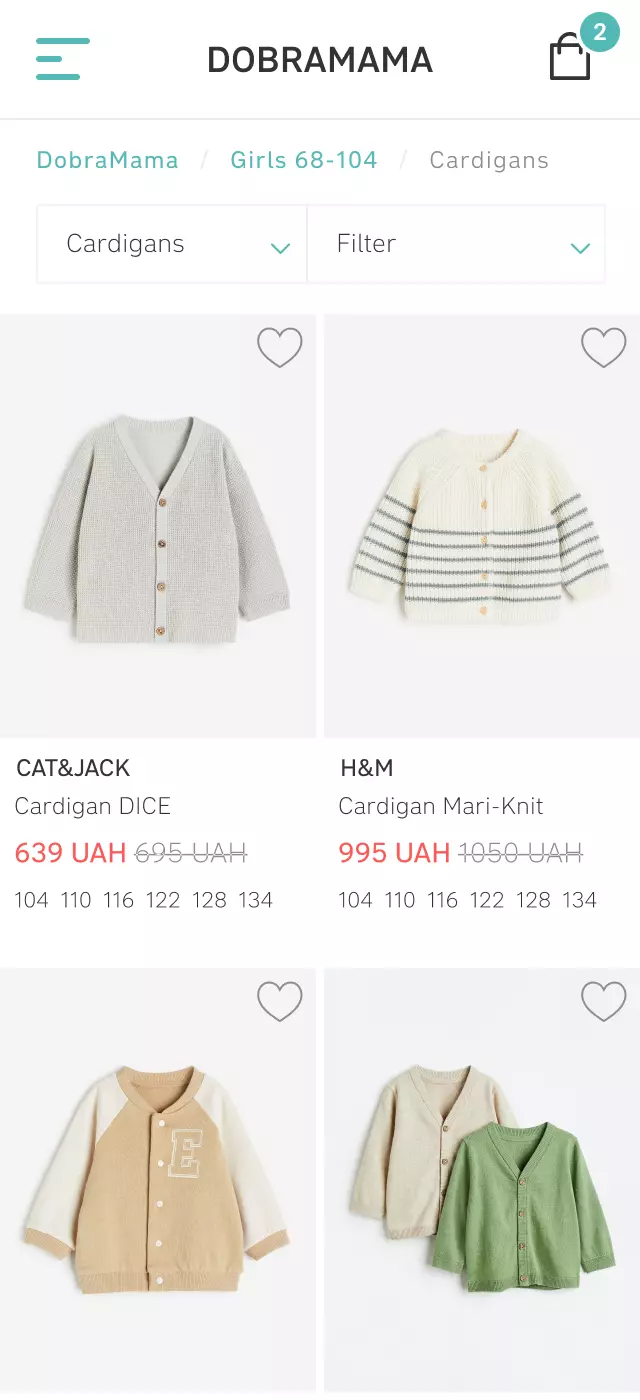
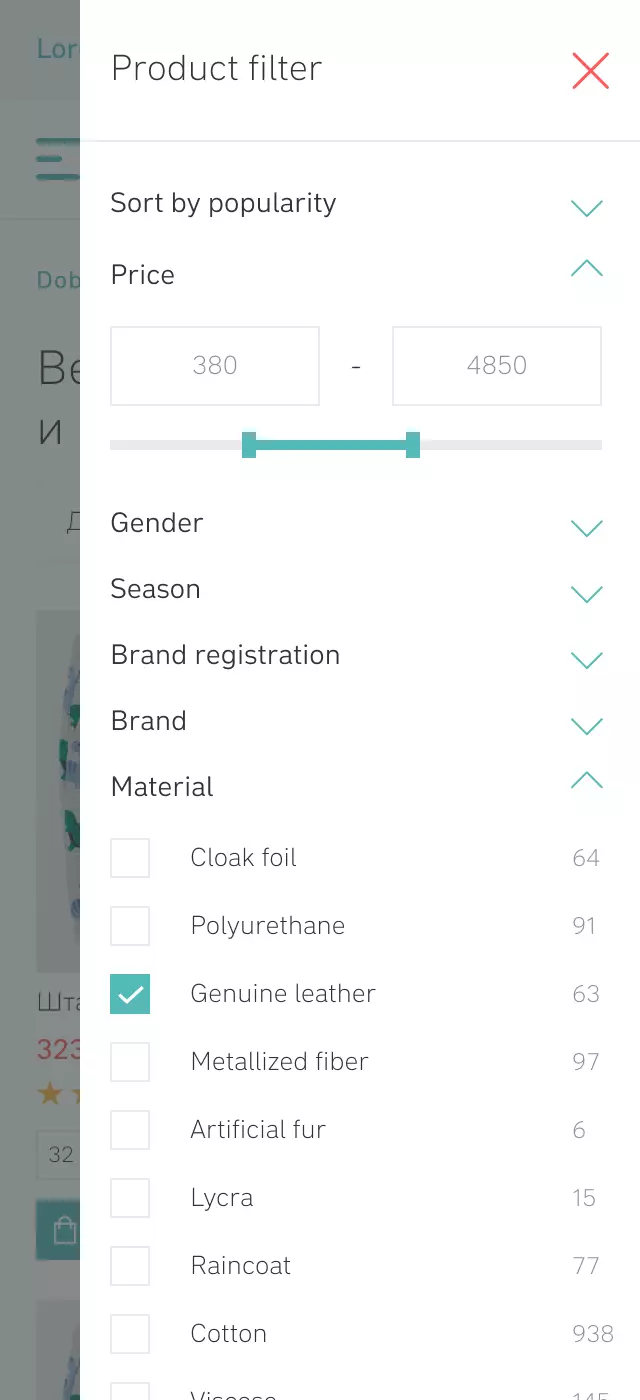
In children's apparel and footwear retail, busy parents shop predominantly on smartphones, filtering simultaneously by gender, age group, exact child height, and material. When designing the e-commerce platform for Dobramama, we crafted 15 dedicated mobile templates focused on rapid product discovery.
The four mobile screens below demonstrate the complete one-handed filtering flow: the mobile navigation menu with a top `Search...` input and expandable age/gender hierarchy (`Girl (2-14)`, `Boy (2-14)`, `Child (0-2)`, `Shoes`), the mobile category view (`Girls 68-104 / Cardigans`) featuring pinned `Cardigans | Filter` triggers and available height sizes (`104 110 116 122 128 134`) displayed directly on product cards, the slide-over `Product filter` drawer with a `380 – 4850` price slider, `Gender / Season / Brand / Material` accordions, and live item counters on the right (`64`, `91`, `63`, `938`), and the mobile product card with a thumb-friendly `Choose a size` dropdown and `Add to cart` CTA:

SEO Facets: Generating Thousands of Indexable Landing Pages for Long-Tail Queries
Well-architected faceted navigation does more than convert paid clicks—it becomes your primary engine for free organic search traffic. The key is a hybrid rendering strategy: shoppers experience instant client-side AJAX transitions, while Googlebot crawls pre-rendered Server-Side Rendered (SSR) landing pages for high-intent attribute intersections.
1. Turning 'Category + Brand + Attribute' Intersections into Organic Traffic Without Crawl Bloat
Exposing every possible checkbox permutation to search engines creates billions of duplicate URLs (a classic Spider Trap) that drain crawl budget. Our engineering ruleset enforces strict indexation governance:
Tier 1 & 2 Intersections (`Category + Brand` or `Category + 1 Primary Attribute`): Generate clean semantic URLs, templated `Title`, `Description`, and `H1` tags with live inventory counts, and remain open to indexation (`index, follow`).
Multi-Select Permutations (2+ values of the same facet, price sliders, or sort orders): Update instantly via AJAX for the user but carry `<meta name="robots" content="noindex, nofollow">` and a canonical tag pointing back to the parent category.
2. Combining Top SEO Subcategory Pills with Sidebar Facets in True Cloud
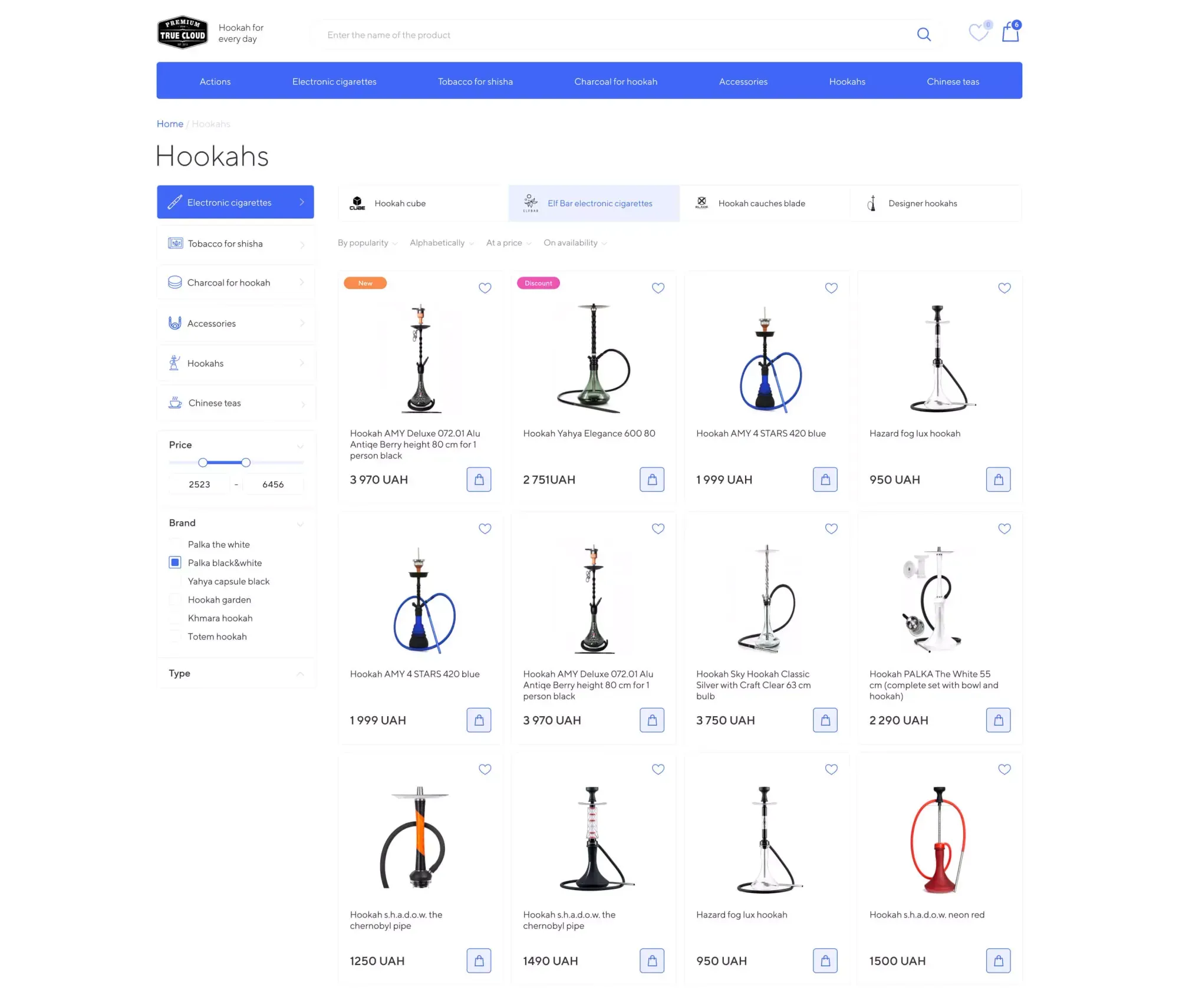
A clear illustration of pairing fast client filtering with SEO subcategory architecture is our e-commerce design for the hookah and accessories store True Cloud. In a vertical with hundreds of tobacco flavors, brands, and hardware specs (shaft height, bowl material, diffuser type), buyers search using highly specific long-tail phrases.
We structured the catalog page with a left sidebar housing category trees, price sliders, and brand checkboxes, while placing clickable SEO subcategory pills directly above the product grid. Shoppers jump into narrow product segments in one click, while the store captures organic search traffic and converts it through clean product cards and a two-step checkout:
3. 4-Point Catalog Readiness Checklist Before Scaling Google Shopping
Before increasing your Google Shopping or Meta Catalog ad budgets, verify your store against four engineering benchmarks—or run an automated check in our Ad Spend Readiness Scanner:
Sub-100ms Filter Response: Clicking any checkbox updates the grid via AJAX without reloading the page or resetting scroll position.
Zero Dead-End Combinations: Every facet option displays live item counts in parentheses and disables zero-result combinations prior to clicking.
One-Tap Applied Filter Pills: Active filters appear directly above the product grid with individual removal crosses and a master 'Clear All' action.
Back-Button State Persistence: Navigating from a filtered catalog to a product page and tapping the browser 'Back' button restores the exact filtered state and scroll offset.
Key Takeaways
Is your slow catalog filtering burning paid ad clicks?
Synchronous 3-second page reloads on filter clicks drive away up to 58% of mobile shoppers acquired through Google Shopping and Meta Catalog Ads.
Migrating to a reactive AJAX frontend backed by an in-memory search index (Meilisearch / Elasticsearch) cuts filter latency across 10,000+ SKUs to 35–50 milliseconds.
Predictive autocomplete with typo tolerance, keyboard layout correction, and inline product previews lifts search-driven conversion rates by 2.5x–3x.
Hybrid SSR SEO facets for two-level intersections (Category + Brand/Attribute) capture thousands of high-intent organic long-tail visits without crawl bloat.